
iWatermark+ Watermark Manager v5.3.4
Plum Amazing







About this app
Developer Description
Watermark Video & Photo (1080 & 4k) Batch With Visible & Invisible Watermarks
Text, Logo, QR-Code, Signature on photo or video and more. Adding a watermark displays that it was created and is owned by you. Watermarking your Android (or Canon, Nikon, Sony, Olympus, Samsung) photos & videos is easy with a watermark or watermarks using your name, logo, copyright, trademark, QR code, signature, etc. Sign your photos with 5 visible and 2 invisible = 7 watermark types. Use one or multiple watermarks simultaneously on one or a batch of photos. Then share to Facebook, WhatsApp, Instagram, Twitter, etc...
Why? Often when a photo or video goes viral the owner/creator becomes unknown, is lost or forgotten. Adding a watermark subtly displays, no matter where your photo goes, that it is owned by you. Watermark with your logo, email, website url, signature, QR or other info to maintain a connection to your photos.
iWatermark+, is the only watermarking tool available for all 4 platforms Android, iOS, Mac and Windows. iWatermark+ is the most popular and advanced utility for creating watermarks and watermarking photos
Only iWatermark+ has 7 Watermark Types-
5 Visible Watermarks:
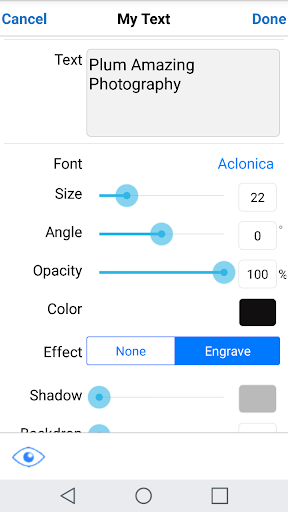
- Text - and change the font, color, angle, opacity, etc
- Arc Text
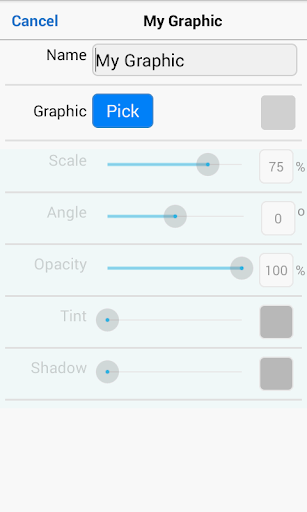
- Bitmap Graphics - import your logo or use our library
- Signature Scan - creates a watermark of your signature
- QRCode - creates a watermark that is like a barcode, readable by any smartphone camera and can contain up to 4000 characters of info
2 Invisible Watermarks:
- Metadata - for making watermarks that include IPTC/EXIF tags (like camera info, GPS, copyright, etc.) info
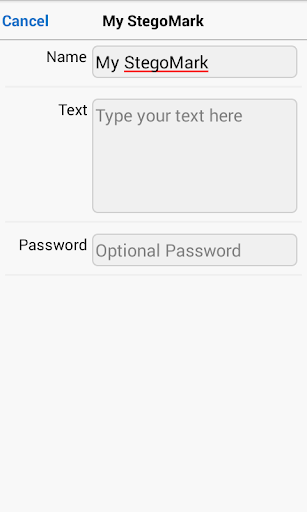
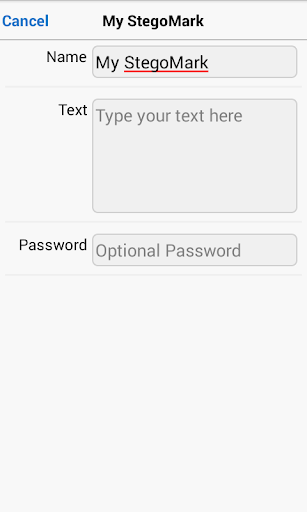
- Steganographic - for hiding a watermark in the color data of a photo
Only iWatermark+ has these features:
* watermark photos/videos (1080 & 4k)
* creates 7 watermark types, text, text on an arc, bitmap, signature, QR, metadata, and steganographic
* steganographic watermark that embeds info invisibly in the photo
* keeps a database of all your watermarks
* apply multiple watermarks to one photo
* watermark one or multiple photos in batch mode
* 292 excellent fonts for your text watermarks
* engrave and emboss text
* signature scanner to instantly import your signature or graphic as a watermark
* live preview and editing of font, color, scale, opacity, size, position and angle
* view metadata & exif in photos
* create metadata tags in text watermarks
* share to Facebook, WhatsApp, Twitter, Instagram, etc.
Watermarking displays your ownership of a photo. Like signing your name to a document, watermarking subtly displays, no matter where your photo goes, that it’s your property.
Touch is what iWatermark+ on Android is all about:
♦ With your finger drag the watermark to any position on the page
♦ Create your own text or graphic watermarks or select from the included example watermarks (both text and graphics)
♦ Single or batch process many photos at a time
♦ Choose from the many fonts
♦ By touch easily adjust the watermarks scale, opacity, font, color and angle and more
Why Watermark?
Digitally sign your photos/artwork with iWatermark+ to claim, secure and maintain your intellectual property and reputation.
✔ Photos go viral then they fly off globally. Watermark with name, email or url so your photo has a visible and legal connection to you
✔ Build your company brand, by having your company watermark on all it's photos
✔ Promote your company, name and website by using QR codes as watermarks
✔ Avoid the surprise of seeing your photos and/or artwork elsewhere on the web or in an ad
✔ Avoid the conflicts, costly litigation and headaches from plagiarists who claim they didn't know that you created it
✔ Avoid intellectual property (IP) squabbles
Localizations: ✔ English ✔ French, ✔ German, ✔ Japanese, ✔ Chinese, ✔ Vietnamese, ✔ Hindi, ✔ Spanish ✔ Urdu ✔ Indonesian
Contact us for help
What's New
Version Information
- Version
- 5.3.4
- Downloads
- 10K+
- Updated on
- Oct 31, 2025
- Released
- Jun 8, 2015
- Requires
- Android 5.0
Statistics
Google Play Rating History
Rating Distribution
Downloads Over Time
iWatermark+ Watermark Manager has been downloaded times. Over the past 30 days, it averaged downloads per day.
Shaded area shows 30-day prediction based on historical trends
Historical data collection started recently. More data points will be available over time.
iWatermark+ Watermark Manager - Google Play Rankings
Top Rankings
| Rank | Country | Category | List | Change |
|---|---|---|---|---|
| — |
Ranking History in
No ranking data available yet. Rankings are updated daily.
#88 in Top Paid Photography in Vietnam



#88 in Top Paid Photography in India


#89 in Top Paid Photography in Mexico
#89 in Top Paid Photography in Netherlands

iWatermark+ Watermark Manager users say on Google Play
 M
M
Thank you for fixing bugs everything works great! Awesome app!
 Anastasia Douglas
I run a sm busn making designs for cut/transfer to cups, shirts, signs etc. &this app is (for me) the Best free watermark app. This is not a paid review; I normally only review the apps I keep as I download 15 apps of the same type, create a "project" on each to see which ones work for me. The ability to create my own watermark and save it in the app is great. The types of watermarks is impressive. My issue is the sizing of my watermark, it limits you & won't cover an entire unaltered pic
 Luke Robert Parker
was working without any issue, now app keeps closing. why. get this sorted now.
 Charlie Fernandez
This used to be a dependable app! I had issues before, logo not appearing on the images correctly, yet that seems to be Ok now, but New the issue is that I don't see the new pictures in my camera roll. Wassup with that?
 A Google user
LOL. My last review (and use) of this app was in early 2019. I dropped it and moved on. Thank the heavens that a "developer" finally responded on 5 Oct 2022 ... some 30+ months later ... to let me know I'm using a really old version. Wow. Y'think? Nah. I'm not using any version at all! Good luck gang.
ApkTrusted Ratings & Reviews
More from Plum Amazing
See more apps


Similar Apps



Scan this QR code to download

Forwarding you to the page at Google Play market in seconds...
Open Google Play market now