
SpeechMaker vVARY
Plum Amazing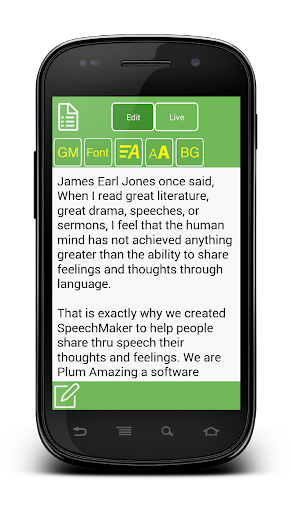


About this app
Developer Description
Use your Android device as a mobile podium to create, practice and give speeches
In addition to speeches use it to hold, edit, practice and read poems, lyrics, scripts, comedy, lectures, sermons, startup pitches and plays.
SpeechMaker is very popular with students, teachers, politicians, directors, poets, lecturers, ministers, authors, playwrights, speechwriters, scriptwriters, toastmasters, comedians, singers and actors.
Now practice and hear how you sound before delivering that important speech. Get a feeling for the cadence and the flow of your speech, poem, lecture, etc.
It can archive thousands of speeches with additional info like title, author, date and audio recordings. SpeechMaker comes with a number of famous speeches built in.
Using SpeechMaker:
- Speechmaker works on Android phones and tablets. Speechmaker is also popular on iPhone and iPads.
- Archive the best speeches in history. Learn from the masters.
- Create your speech or import it as text, RTF or PDF using Dropbox or Google Docs.
- Convert the text to be spoken out loud in different languages. Get a quick taste of how your speech sounds.
- Rehearse your speech and record the audio. Listen to the recording as feedback to improve your speech, timing and performance.
- Practice delivering your lines flawlessly, use a mirror and SpeechMaker.
- Give your speech using the easily adjustable autoscroll. Clearly see the speech scrolling in your choice of font, size and background color. See the time, elapsed time and time to go for the speech all at a glance.
- Archive your speech as text and audio to help you continue improving. Archive for historical purposes.
- Share you speech with friends, colleagues and Facebook.
More info:
http://plumamazing.com/iphone/speechmaker
SpeechMaker is more powerful then expensive teleprompters.
SpeechMaker Features
- Buy once to run on both smartphones or tablets.
- Beautiful UI and flat graphics for the latest version of Android.
- Import text, rtf, and pdf via DropBox, Google Drive, and Copy and Paste.
- Export speech text via Email
- Import and export audio via Dropbox
- Audio recording allows you to get feedback as you practice your speech
- Like a teleprompter autoscroll your speech at the just the right speed
- Hear the speach out loud as it scrolls and highlights each line
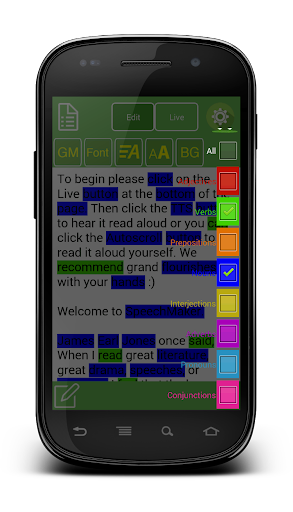
- With the flip of a button see verbs, nouns, adjectives and other parts of speech highlighted in different colors
- Control the look of a document by changing, background color, fonts, scroll speed, font size
- Buttons and gestures to start, stop and control scroll speed
- Touch gestures:
+ pinch or zoom to change font size
+ grab and move instantly to any part of a speech
+ tap the right side to speed scrolling. tap the left side to slow scrolling
- At a glance timing for a speech shows, elapsed, remaining, estimated time
- Display on connected HD monitors for TV stations, studios, auditoriums, podcasters, lecture halls and plays.
Read, correct, give, play and record speeches anytime and anywhere. No need to rely on notes on napkins or index cards.
Keep your speeches with you at all time, secure and available to use at any moment. Easily change and give speeches at the last minute.
Version Information
- Version
- -
- Downloads
- 100+
- Updated on
- -
- Released
- Aug 17, 2014
- Requires
- Android Varies with device
Statistics
Google Play Rating History
Rating Distribution
Downloads Over Time
SpeechMaker has been downloaded times. Over the past 30 days, it averaged downloads per day.
Shaded area shows 30-day prediction based on historical trends
Historical data collection started recently. More data points will be available over time.
SpeechMaker users say on Google Play
 A Google user
It took a bit to get the license to work and to get the feel of how it all works. It is not immediately intuitive. Once I had spent some time practicing with the controls, it works great.
A Google user
But there are a few bugs in the operation. Fix those and you get my 5 stars
A Google user
For about an hour I loved the app....but the timer never worked (there was no timer on the android version I have (or I couldn't find it). But then TTS stopped working. There is no volume. I can uninstall the app and reinstall it, and it will work a couple of times but then it'll stop. It also crashes during the live portion. Very good idea (and design), but you'd be foolish to actually use this app to give a speech. It is not reliable. I can live without the TTS (although this is one reason I bought the app), and I could live without the timer (although it is needed). but there is no way I can take a chance of using the app in "real life" because it crashes. I'm plum amazed that I wasted the money, but I will say that if the app gets fixed it would be a great tool.
 Elkin Jaramillo
Ir does not open PDF nor doc documents as stated on descripción. Only rtf and txt. The app is far from friendly. I had to uninstall it. No use.
ApkTrusted Ratings & Reviews
More from Plum Amazing
See more apps
Similar Apps

Pawline
Paid

AI Grammar Check: AI Writer
Paid

TicNote: AI Recorder & Agent
Free

Voice Memos: Braindump
Free

Geulgram - Text on Photo
Free

Translate: Screen Translator
Paid

AR Drawing: Learn & Sketch Art
Paid

Ava: Transcribe Voice to Text
Free

Listening: Text to Speech
Free

The Accent
Free

Letterly: Write by Voice & AI
Free

3D Photo: Imager
Paid

Dolphin EasyReader
Free

Text & Image to Video AI Gen
Paid

OtterAI Transcribe Voice Notes
Free
RecCloud - AI Speech to Text
Free
Scan this QR code to download

Forwarding you to the page at Google Play market in seconds...
Open Google Play market now