Separated Apps v3.2.11.5
Samsung Electronics Co., Ltd.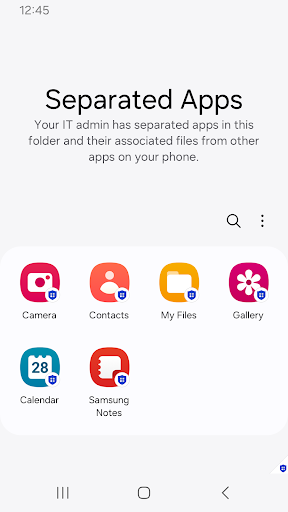
About this app
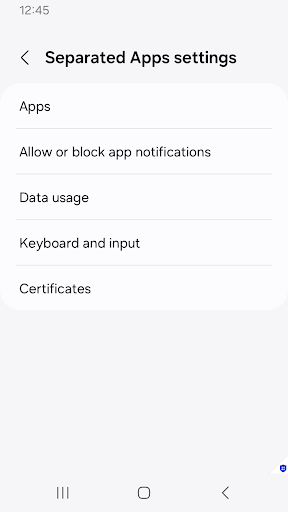
Separated Apps, developed by Samsung Electronics Co., Ltd., is designed to help enterprises protect sensitive work data by separating it from personal data on Android devices. This app is particularly beneficial for businesses and organizations that require a high level of data security and compliance. Compared to other productivity apps, Separated Apps stands out due to its focus on enterprise data protection, but its below-average user rating suggests some users may find it challenging to use or limited in its features. The lack of permissions requested by the app is a notable aspect, indicating a potentially more secure and private experience for users.
Pros
- With over 1 billion downloads, Separated Apps has a significant user base, which can be an indicator of its effectiveness and reliability in separating work and personal data.
- The app's developer, Samsung Electronics Co., Ltd., is a well-established and reputable company, which adds to the app's credibility and trustworthiness.
- The absence of in-app purchases and ads means that users can utilize the app without interruptions or additional costs, enhancing their overall experience.
- The app's focus on enterprise data protection makes it a valuable tool for businesses looking to secure sensitive information on employee devices.
- Regular updates, as indicated by the version history, suggest that the developer is committed to maintaining and improving the app's functionality and security.
Cons
- The below-average user rating of 2.5 out of 5 suggests that some users may encounter issues with the app's performance, usability, or feature set, which could be a concern for potential users.
- The lack of detailed information about the app's functionality and benefits on the developer's website or in the app's description might make it difficult for users to understand its full potential and limitations.
- Some users may find the app's purpose too narrow or specialized, limiting its appeal to a broader audience beyond enterprise users.
- The 'Varies with device' Android requirement might lead to inconsistencies in the app's performance across different devices, which could be frustrating for some users.
Best for: The ideal user for Separated Apps is an enterprise employee or an individual who handles sensitive work data on their personal Android device, requiring a secure and reliable method to separate this data from their personal information, and is likely tech-savvy enough to navigate the app's setup and customization options.
Developer Description
Designed for enterprises that need to protect sensitive work data.
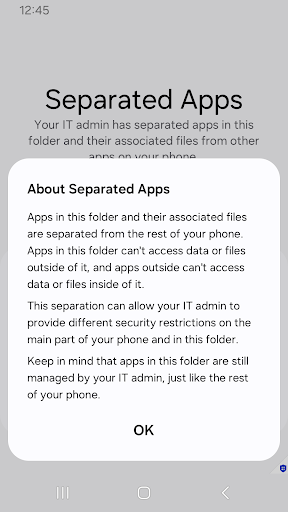
Designed for enterprises that need to protect sensitive work data, Knox Separated Apps allows IT admins to separate third-party apps from corporate apps on fully managed devices.
“"IT admins use Separated Apps to isolate apps on managed devices. This app isn’t intended for personal use."
How it works
- After an enterprise IT admin installs work apps on fully managed devices through a UEM, they can enable Separated Apps and select certain apps to install in the secure, separate area.
- By default, the following apps are available in the Separated Apps area.
.Google Chrome
.Microsoft Office (depending on the device model)
.Samsung Calendar
.Samsung Camera
.Samsung Gallery
.Samsung MyFiles
.Samsung Video
For more details, see the Knox SDK documentation.
The following permissions are required for the app service. For optional
permissions, the default functionality of the service is turned on, but not allowed.
[Optional permissions]
- Notifications : Used to provide you
Privacy
Given that Separated Apps requests no permissions, it appears to be a secure and private option for users. However, it's essential to note that the app's primary function is to separate and protect work data, which implies that it may still collect and store some information about how the separation is set up and used. Users should be cautious about the data they store within the app and ensure they follow best practices for securing their work data.
Tips
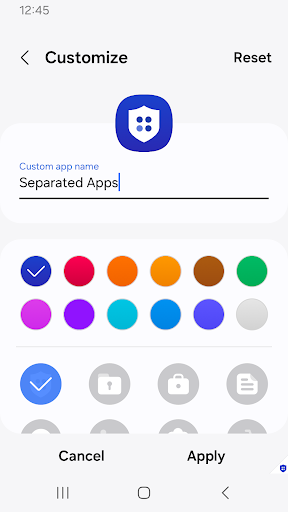
To get the most out of Separated Apps, users should carefully follow the initial setup instructions to ensure that their work and personal data are properly separated. Additionally, exploring the app's settings and features can help users understand its full capabilities and how it can be customized to meet their specific needs. Regularly reviewing and updating the app can also help ensure that users have the latest security patches and features.
Version Information
- Version
- 3.2.11.5
- Downloads
- 1.0B+
- Updated on
- Nov 28, 2025
- Released
- Oct 30, 2023
- Requires
- Android Varies with device
Statistics
Google Play Rating History
Rating Distribution
Downloads Over Time
Separated Apps has been downloaded times. Over the past 30 days, it averaged downloads per day.
Shaded area shows 30-day prediction based on historical trends
Historical data collection started recently. More data points will be available over time.
Separated Apps users say on Google Play
 Terri “Nan Nan Winks” Winkle
I did NOT put this on my phone! Why can't I uninstall these apps that are "suddenly" being installed with updates? SMH
 Margo Tovar
I haven't tried this yet. I love to save apps separately from others. I need to read up on this more. I just might end up loving it, sorry for the 1 star I didn't know what this is for. I will soon, I have another phone with the same phone number for now. A71 was older one & New is A16. I typed most on my A16 & this part on my A71. I can't understand why they don't last more than 5yrs. Shame I never used this on my older device. I can on my newer one ; )
 gholamnabi azizi
عالی
 Jason Smith
horrible app
 Sir Theodore Bear
This app has no business to be installed on my phone. Samsung shouldn't have the authority or ability to install apps on my device without my consent or explicit knowledge. Pre-installed apps and forcing such apps should allow device owners the choice to force stop or uninstall WITHOUT the excuse that device won't function properly. Samsung consistently doesn't respond when support tickets are submitted for app issues and inquiries. Class action lawsuit.
ApkTrusted Ratings & Reviews
More from Samsung Electronics Co., Ltd.
See more apps
Smart Tutor for SAMSUNG Mobile
Free

One Hand Operation +
Free
POWERbot-S
Free

Samsung WE VoIP
Free

Galaxy Buds Core Manager
Free
Samsung Accessory Service
Free

Galaxy Buds FE Manager
Free
Galaxy Buds FE Manager
Free

Galaxy Buds Pro Manager
Free

Samsung Plus 2
Free

Galaxy Buds3 Manager
Free

Galaxy Buds2 Manager
Free

Galaxy Buds Manager
Free

Galaxy Buds3 FE Manager
Free
POWERbot-E
Free

Galaxy Buds3 Pro Manager
Free
Similar Apps

Enpass Password Manager
Free

Bitwarden Password Manager
Free
Spark Mail: AI Email, Calendar
Free

F-Secure Mobile Security
Free
GlassWire Data Usage Monitor
Free
Duo Mobile
Free
Mi Browser
Free
SafeInCloud 1
Paid

Avira Security Antivirus & VPN
Free
Adblock Browser: Fast & Secure
Free
Startpage
Free

Pushbullet: SMS on PC and more
Free

Nuki Smart Lock
Free
AdGuard: Content Blocker
Free

NetGuard - no-root firewall
Free
AppLock - Fingerprint
Free
Scan this QR code to download

Forwarding you to the page at Google Play market in seconds...
Open Google Play market now