
SyncMyTracks v3.14.8
SyncMyTracks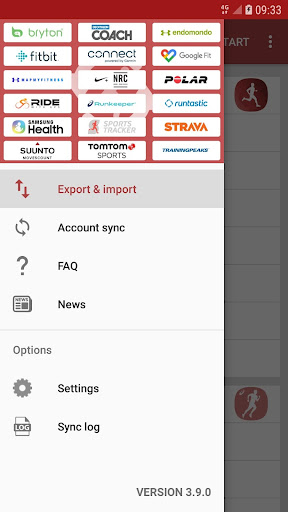



About this app
Developer Description
Sync your activities of the most popular sports tracking services
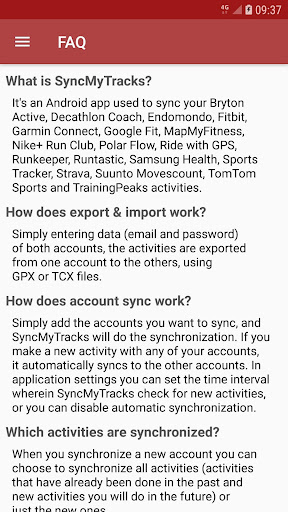
- What is SyncMyTracks?
It's an Android app used to sync your activities of the most popular sports tracking services. You can see the list of supported services by SyncMyTracks here: http://syncmytracks.com/#compatibility
- How does export & import work?
Simply entering data (email and password) of both accounts, the activities are exported from one account to the others, using GPX or TCX files.
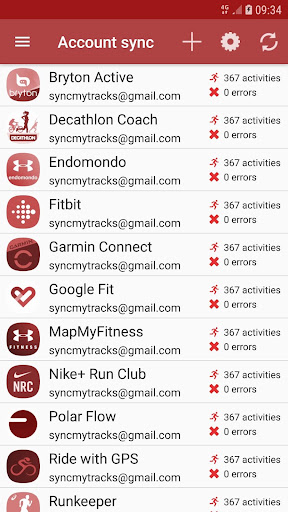
- How does account sync work?
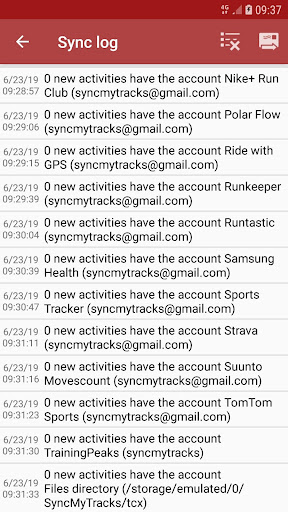
Simply add the accounts you want to sync, and SyncMyTracks will do the synchronization. If you make a new activity with any of your accounts, it automatically syncs to the others accounts. In application settings you can set the time interval wherein SyncMyTracks check for new activities, or you can disable automatic synchronization.
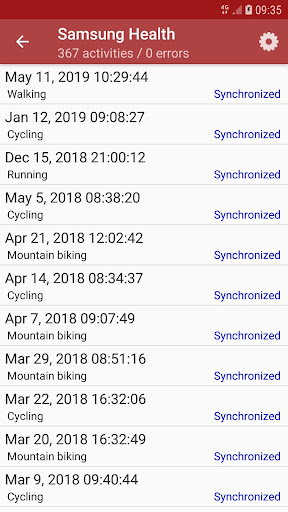
- Which activities are synchronized?
When you synchronize a new account you can choose to synchronize all activities (activities that have already been done in the past and new activities you will do in the future) or just the new ones.
- What data is synchronized?
SyncMyTracks synchronizes activity path information, such as time, duration, distance, pace and map. Also the heart rate, cadence, power and temperature are synchronized, when they are supported by different services.
- Can SyncMyTracks delete or modify my activities in synchronization?
Never! SyncMyTracks just adds activities to your accounts, it doesn't delete or modify the activities that you already have.
- Can SyncMyTracks duplicate my activities in synchronization?
SyncMyTracks prevents duplication of activities considering the start time of the activity.
- Where are emails and passwords of my accounts saved?
SyncMyTracks stores this data on your mobile. Passwords are stored using encryption. This data is only used to connect the accounts.
- What are the differences between the free version and the paid version?
In the free version, account sync is unavailable. Only you can export and import your activities. In addition, in the free version you can only export the last 40 activities at most. The paid version contains no ads.
- Can you use the export and import and synchronization with the same accounts?
Not recommended, it could create duplicate activities already synchronized.
- Can you use Facebook or Google+ to login and sync my accounts?
No. You must use your email and password. If password is not set, you must generate it in your account settings.
- Is SyncMyTracks sponsored, maintained or supported it by tracking services supported?
No, SyncMyTracks is independent of them. Therefore, be sure to use the application on the terms and conditions detailed on their respective web sites.
- How do I contact the developer of the application?
Via e-mail (syncmytracks@gmail.com) or via Twitter (http://twitter.com/SyncMyTracks).
What's New
- Fixes for Sports Tracker / Suunto.
3.14.7:
- Fixed connection issues with Garmin Connect.
3.14.5 - 3.14.6:
- Fixed connection issues with Polar Flow.
- Improved help text for using Samsung Health.
3.14.4:
- Fixes and improvements.
3.14.3:
- Fixes for Strava.
3.14.2:
- Fixes for Fitbit and MapMyFitness.
Version Information
- Version
- 3.14.8
- Downloads
- 50K+
- Updated on
- Dec 21, 2025
- Released
- Feb 18, 2014
- Requires
- Android 8.1
Statistics
Google Play Rating History
Rating Distribution
Downloads Over Time
SyncMyTracks has been downloaded times. Over the past 30 days, it averaged downloads per day.
Shaded area shows 30-day prediction based on historical trends
Historical data collection started recently. More data points will be available over time.
SyncMyTracks - Google Play Rankings
Top Rankings
| Rank | Country | Category | List | Change |
|---|---|---|---|---|
| — |
Ranking History in
No ranking data available yet. Rankings are updated daily.
#32 in Top Paid Health And Fitness in United States

#1 in Top Paid Health And Fitness in France


#3 in Top Paid Health And Fitness in Spain


#5 in Top Paid Health And Fitness in Italy
SyncMyTracks users say on Google Play
 Mickael Dijoux
Really good apps. But subject to changes in sport trackers apps. I use it to synchronize Strava, Garmin connect, Adidas Running, Decathlon Coach. And it works as wanted.
 Tim Tomkinson
Works well. Initial setup is a little confusing, but you only need to do it once. Author is quick to release updates when websites change their APIs. Update 01/06/23: The app is no longer automatically synchronizing according to its schedule. I have to manually sync every day, which is a pain. Update 05/08/24: MapMyRun files are no longer synchronizing with Garmin Connect. Update 05/16/24: Working again!
 Shawn P
was a great app but I think it's abandoned. can't log into Strava anymore
 Suphakit Boonsang
I can't import to Nike running club (NRC)
 Greg M
Things were working fine until about 2 weeks ago. Now, auto-sync will not run on any time setting and when manually started, all connections fail as well. No support requests are being replied to. Buyer be aware of a lack of support after you buy. Emails go unanswered and social media posts are blocked or deleted, sad but true... this situation continues now for over 3 years since I bought the app. what a mistake
ApkTrusted Ratings & Reviews
More from SyncMyTracks
See more apps
Similar Apps











Scan this QR code to download

Forwarding you to the page at Google Play market in seconds...
Open Google Play market now