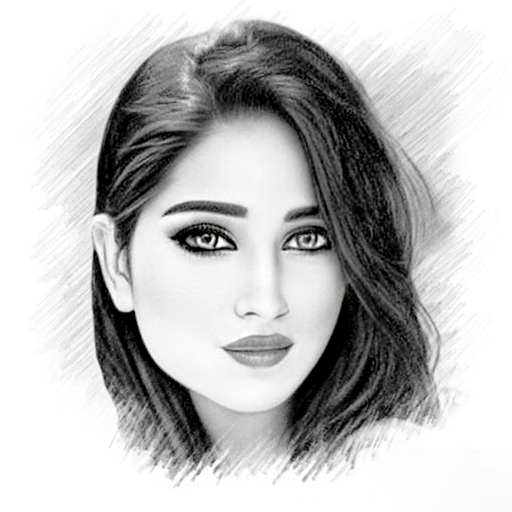
Pencil Sketch Photo Editor v2.1.3
Maxlabs Photo Editor



About this app
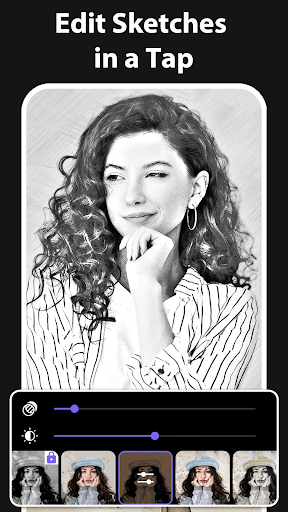
Pencil Sketch Photo Editor solves the problem of transforming ordinary photos into stunning pencil sketches, benefiting photography enthusiasts and social media users who want to add a creative touch to their posts. Compared to alternatives in the Photography category, this app stands out with its intuitive interface and impressive download numbers, indicating a well-received product. However, its lack of unique features beyond pencil sketch effects might make it fall short for advanced users seeking more comprehensive editing tools. The app's simplicity and ease of use make it an excellent choice for casual users.
Pros
- With over 5 million downloads and a 4.3-star rating, Pencil Sketch Photo Editor boasts significant social proof, indicating a reliable and enjoyable user experience.
- The app's developer, Maxlabs Photo Editor, has a professional website and provides a clear email address for support, demonstrating a commitment to customer service and transparency.
- The absence of permission requests is a significant advantage, as it alleviates concerns about data privacy and security, making it an attractive option for users who value their personal information.
- The app's free version with optional in-app purchases offers a flexible pricing model, allowing users to try out the basic features before deciding whether to upgrade, which can be a cost-effective solution for casual users.
Cons
- The app's monetization model, which includes ads and in-app purchases, might lead to an intrusive user experience, potentially disrupting the creative process and discouraging some users.
- The limited range of effects and features might not satisfy advanced users who require more complex editing tools, making it less competitive with other photography apps that offer more comprehensive functionalities.
- Some users might find the app's simplicity and lack of advanced features to be a drawback, particularly if they are looking for a more professional-grade photo editing experience.
Best for: The ideal user for Pencil Sketch Photo Editor is a casual photography enthusiast or social media user who wants to add a creative, pencil-sketch touch to their photos without requiring advanced editing skills or a plethora of features, and is looking for a straightforward, easy-to-use app that can produce impressive results with minimal effort.
Developer Description
Unleash the power of pencil art with our intuitive sketch photo editor
🎉 Welcome to Pencil Sketch Photo Editor, the ultimate tool for transforming your photos into captivating works of art. With a variety of innovative features and artistic effects, this app offers endless possibilities for turning ordinary images into extraordinary masterpieces.
✨ 3D Sketch Photo Maker:
Experience the mesmerizing 'Pencil vs Camera' effect with landscapes and portrait photos. Dive into the world of artistic photography with our 'Photography in Drawing' feature, adding depth and dimension to your images like never before.
✨ 2D Sketch Photo Maker:
Explore three distinct styles – "Sketch", "Doodle", and "Hatch" – each tailored to enhance different types of photos. Whether you're capturing human portraits, objects, or nature views, our versatile styles ensure stunning results. Apply customizable photo frames to add a finishing touch to your sketches with ease.
✨ Sketch to Cartoon Feature:
With our innovative sketch to cartoon feature, you can effortlessly transform any photo into a delightful cartoon drawing. Whether you want to caricature yourself, create fun illustrations, or simply add a playful twist to your images, this feature offers endless possibilities for unleashing your imagination.
💫 Features of Sketch Camera Effects:
👉 Crop Photos: Perfect your composition with easy-to-use cropping tools.
👉 Various Effects: Choose from a wide range of effects including black strokes, white strokes, pastel, pencil sketch, color sketch, cartoon, stamp, halftone, hatching, and more.
👉 Adjustable Parameters: Fine-tune edge strength, opacity, contrast, brightness, and saturation to achieve your desired look.
👉 Multiple Sketch Types: From classic pencil sketches to vibrant watercolor effects, explore a variety of sketch styles to suit your artistic vision.
👉 Create 3D Sketches: Blend drawing and photography seamlessly with our innovative 3D sketch feature.
👉 Capture with Sketch Camera: Take photos directly within the app using our built-in Sketch camera, with features like pinch to zoom and tap to autofocus.
👉 Save and Share: Save your creations to your mobile gallery and share them effortlessly on social media platforms, showcasing your artistic talents with the world.
Pencil Sketch Photo Editor empowers you to unleash your creativity, whether you're a seasoned artist or just beginning your journey into the world of digital art. Download the app today and transform your photos into timeless works of art!
💥 How to Use this Pencil Sketch Photo Editor:
1. Select photo from Gallery or Camera.
2. Crop photos
3. Easily Start 2D, 3D Sketching.
4. Easily save your Sketch or Share them on social media.
👉 Disclaimers:
All copyrights reserved to their respective owners. If you notice that any content in our app violates copyrights then please inform us so that we remove that content.
Privacy Policy: https://maxlabs-company-limited.github.io/Privacy-Policy
Contact Us: maxlabs.ltd@gmail.com
Privacy
Given that Pencil Sketch Photo Editor requests no permissions, the risk of data collection and privacy breaches is significantly minimized. However, users should still be cautious when making in-app purchases and ensure they are using a secure payment method. To further protect their privacy, users can review the developer's website and support email for any additional information on data handling practices.
Tips
To get the most out of Pencil Sketch Photo Editor, users should start by exploring the different preset effects to find the one that best suits their photo. Additionally, they can experiment with combining the pencil sketch effect with other editing apps to create unique and complex designs. For optimal performance, it's recommended to use the app on devices with sufficient storage and a relatively recent Android version.
What's New
We've optimized the app for faster load times and smoother interactions to enhance your experience.
In-app purchases
$2.99 - $39.99 per item
Version Information
- Version
- 2.1.3
- Downloads
- 5M+
- Updated on
- Dec 23, 2025
- Released
- Nov 11, 2018
- Requires
- Android 7.0
Statistics
Google Play Rating History
Rating Distribution
Downloads Over Time
Pencil Sketch Photo Editor has been downloaded times. Over the past 30 days, it averaged downloads per day.
Shaded area shows 30-day prediction based on historical trends
Historical data collection started recently. More data points will be available over time.
Pencil Sketch Photo Editor - Google Play Rankings
Top Rankings
| Rank | Country | Category | List | Change |
|---|---|---|---|---|
| — |
Ranking History in
No ranking data available yet. Rankings are updated daily.
#26 in Top Grossing Photography in Egypt
#30 in Top Grossing Photography in Saudi Arabia


#39 in Top Free Photography in Egypt


Pencil Sketch Photo Editor users say on Google Play
 Manju Sunariya
it is good at it but you have to see ads and to use. it you have to be patient
 Rajan anjala
ok
 Md Muntasir
good
 naki naki
it may contain adds 😏!! After 1 hour of trying to get into the app after the ads ended, I got in and it sucks.
ApkTrusted Ratings & Reviews
More from Maxlabs Photo Editor
See more apps


Similar Apps

ToonMe photo cartoon maker
Free
Drawify - Photo to Sketch
Free

ToonApp: Photo to Cartoon Me
Free

Photo Lab Picture Editor & Art
Free

AI Morph: AI Video & Photo
Free

Infinite Painter
Free

Photo Retouch- Object Removal
Free
FaceLab: Future Face Aging App
Free
UpFoto - AI Photo Enhancer
Free

AI Photo Editor - Lumii
Free

Cartoonify AI Caricature Maker
Free

Dressup: AI Photo Editor & Art
Free

Adobe Express: AI Photo, Video
Free

ibis Paint X
Free

Clip Studio Paint
Free

Photo Editor: Retouch, Enhance
Free
Scan this QR code to download

Forwarding you to the page at Google Play market in seconds...
Open Google Play market now