PhotoSync Cloud Add-On v3.4.1
touchbyte





About this app
Developer Description
Cloud Add-On License for PhotoSync. Enables the Cloud- & Photo-Services.
★ Over 10,000 positive reviews, thousands of happy users and millions of photo transfers
★ Number one cross-platform solution with native apps for Android, iOS, Windows & Mac
★ Reliable and secure software – operating 10 years in the market and continuously updated
★ Total user control and fully customisable
ABOUT PHOTOSYNC CLOUD ADD-ON VERSION
• Wirelessly upload and share photos & videos to cloud and photo services
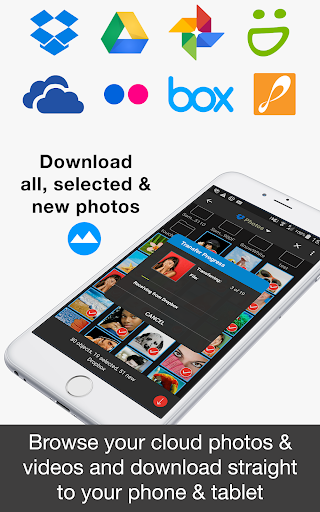
• Import photo & videos stored on cloud and photo services
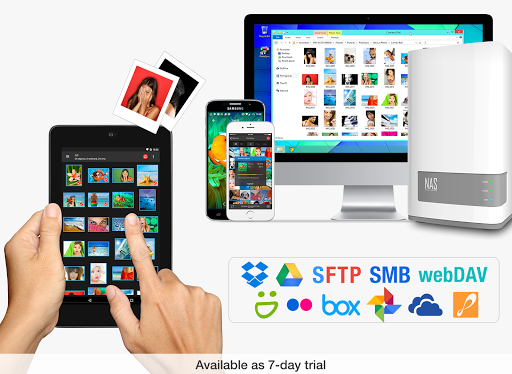
• PhotoSync supports Dropbox, Google Drive, Google Photos, Flickr, OneDrive, SmugMug, Box, Zenfolio and PhotoPrism
• No ads
HOW IT WORKS
1. Download and Install PhotoSync at https://play.google.com/store/apps/details?id=com.touchbyte.photosync
2. Download and install 'PhotoSync Cloud Add-On License'
3. PhotoSync will automatically upgrade to PhotoSync Cloud Add-On version upon the installation of PhotoSync Cloud Add-On License
PHOTOSYNC CLOUD HIGHLIGHTS
Wirelessly transfer, copy, backup and share your photos & videos to and from your favourite cloud and photo services.
Transfer to cloud and photo services
Upload and share photos & videos to your favourite cloud or photo services over WiFi and 3G / LTE. Supported services:
• Dropbox
• Google Drive
• Google Photos
• Flickr
• OneDrive
• SmugMug
• Box
• Zenfolio
• PhotoPrism
No cables needed!
Transfer from cloud and photo services
Import photos and videos stored on your favourite cloud and photo services directly to your Android phone and tablet over WiFi and 3G / LTE. Supported services:
• Dropbox
• Google Drive
• Google Photos
• Flickr
• OneDrive
• SmugMug
• Box
• Zenfolio
• PhotoPrism
You can import selected, all or new photos and videos.
Organize like a Pro
• Organize photos & videos automatically by date (recording date & transfer date), media type, album/folder and device name
• Set custom file names (recording date & transfer date)
• Browse, select or create target folder before transfer
• Delete or overwrite files after transfer to free space on device (optional)
• Choose separate transfer quality options for WiFi & cellular connections
• Set privacy levels for sharing (photo services only)
ABOUT FREE PHOTOSYNC VERSION
• Backup or restore photos & videos from Android devices to computer (PC & Mac) over WiFi or Portable WiFi Hotspot
• Send photos & videos from computer to Android phone / tablet over WiFi or Portable WiFi Hotspot
• Transfer photos & videos between Android phone and tablet over your local network (WiFi or Portable WiFi Hotspot)
• Copy and move photos & videos between Android devices and iPhone / iPad over WiFi or Portable WiFi Hotspot
• Transfer photos & videos stored on USB or SD devices connected with a USB On-The-Go (OTG) adapter
• Ad-supported
What's New
Version Information
- Version
- 3.4.1
- Downloads
- 5K+
- Updated on
- Aug 21, 2025
- Released
- Aug 10, 2016
- Requires
- Android 8.0
Statistics
Google Play Rating History
Rating Distribution
Downloads Over Time
PhotoSync Cloud Add-On has been downloaded times. Over the past 30 days, it averaged downloads per day.
Shaded area shows 30-day prediction based on historical trends
Historical data collection started recently. More data points will be available over time.
PhotoSync Cloud Add-On - Google Play Rankings
Top Rankings
| Rank | Country | Category | List | Change |
|---|---|---|---|---|
| — |
Ranking History in
No ranking data available yet. Rankings are updated daily.
#52 in Top Paid Photography in Vietnam

#53 in Top Paid Photography in India



#53 in Top Paid Photography in Thailand
#53 in Top Paid Photography in Egypt
PhotoSync Cloud Add-On users say on Google Play
 A Google user
excellent response to bug fixes, very useful app for uploading
A Google user
Many crashes and non starts. Awkward to make it work.
A Google user
I don't like how there are multiple purchases to achieve one goal with the product. I find the marketing approach deceiving. After a week of use an a Galaxy S7 the product does not automatically sync and remove files from my phone as intended. It worked when I first set it up and tested it. I'm a very technical user, and made sure battery and background management was not interfering with use. They really need to make one product with everything included IMO. Normally I like only buy what you need, but that doesn't work in the Google store's individual apk setup.
ApkTrusted Ratings & Reviews
More from touchbyte
See more apps
Scan this QR code to download

Forwarding you to the page at Google Play market in seconds...
Open Google Play market now