In Timestamp Camera Pro vVARY
Bian Di




About this app
Developer Description
Add date and location to photo and video and share to Instagram.
Main features
● Add current time and location when recording or capturing, you can change time format or select the location around easily. Timestamp Camera is maybe the only App that can record video with the time accurate to second.
- Support 20 timestamp format
- Support change font, font color, font size
- Support set timestamp in 6 positions: top left, top center, top right, bottom left, bottom center, bottom right
- Support auto add location.
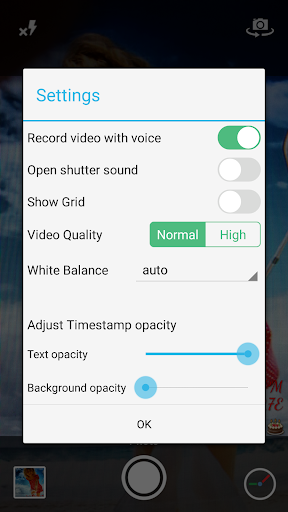
- Support change timestamp opacity
● Support display custom text and emoji on camera. For example, you can input "Good day at the zoo"
● Support portrait and landscape
● Support change resolution
Please mail us cybfriend@gmail.com if you have any problem or suggestions. Thank you.
What's New
Version Information
- Version
- -
- Downloads
- 5K+
- Updated on
- Aug 18, 2025
- Released
- Sep 7, 2017
- Requires
- Android Varies with device
Statistics
Google Play Rating History
Rating Distribution
Downloads Over Time
In Timestamp Camera Pro has been downloaded times. Over the past 30 days, it averaged downloads per day.
Shaded area shows 30-day prediction based on historical trends
Historical data collection started recently. More data points will be available over time.
In Timestamp Camera Pro - Google Play Rankings
Top Rankings
| Rank | Country | Category | List | Change |
|---|---|---|---|---|
| — |
Ranking History in
No ranking data available yet. Rankings are updated daily.
#9 in Top Paid Photography in Brazil

#49 in Top Paid Photography in Pakistan


#50 in Top Paid Photography in Philippines

#50 in Top Paid Photography in Egypt
In Timestamp Camera Pro users say on Google Play
 Wenslaus Maquilu
Very nice camera it does what I was looking for. You are able to know the altitude and location of an area where the photoes were taken.
 A Google user
Only issue I have is the bluetooth function from within the app doesnt work. It says sending failed, unknown file type. I can send the photo via bluetooth from my file manager. I work on construction sites, and would like to quickly move pictures to my laptop for my excell reports. Android S-8
A Google user
After every photo taken a share screen popup. I can't find any options to turn that off. That's super annoying
A Google user
I installed this app and I can't take pictures in 16:9 4032×2268 or 18:5:9 4032×1960 ratio why is that, and it doesn't specify megapixel, also how can I disable picture preview it's very
A Google user
Works great except for the share pop up. When I contacted support they told me that app was for sharing pics on Instagram. I had paid for the pro version too. So no refund, and I wi uninstall the app. Of course now I have to pay for the other Pro version that they offer. Very misleading
ApkTrusted Ratings & Reviews
More from Bian Di
See more apps


Similar Apps

Arenti
Free

IPC360 Home
Free

INTEGRA CONTROL
Free

Video Recorder
Paid

PicMaster - AI Photo Editor
Paid

eZy Watermark Photos Pro
Paid

ReSound Smart 3D
Free

Eventer - Unforgettable Events
Free

SuperCam Plus
Free

Via Capitale Camera
Free
GPS Map Camera
Free
Sun Seeker: Sunlight Tracker
Paid

Printicular: Print Photos
Free

Framelapse 2 Time Lapse Camera
Free

YourSweep
Free

CompanyCam
Free
Scan this QR code to download

Forwarding you to the page at Google Play market in seconds...
Open Google Play market now