Calibre Sync v6.6.4
BIL studio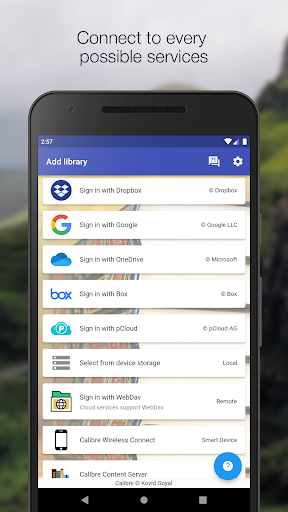




About this app
Developer Description
All in one Calibre libraries on your phones and tablets.
Calibre Sync can:
- help you access full Calibre libraries on most popular personal cloud services, including Google Drive, Dropbox, Microsoft OneDrive, Box, pCloud, MEGA, WebDav, Nextcloud and OwnCloud - simply the most supported for cloud services.
- transform your device to a smart device emulator that connects to Calibre wirelessly. It even supports Calibre libraries on your external storage and from Calibre Content Server with amazing performance.
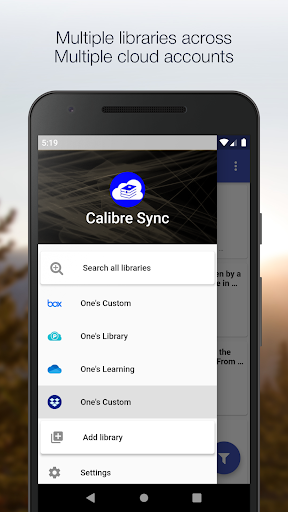
Move your Calibre libraries to your favourite cloud providers and access those libraries via Calibre Sync to browse, sort, search, download and read books on your device. Calibre Sync also supports multiple libraries across multiple Drive, Dropbox, OneDrive, Box, pCloud, MEGA, WebDav, Nextcloud, and OwnCloud accounts simultaneously.
Features:
- Unlimited Calibre libraries
- Wireless connect to Calibre effortlessly as Smart device
- Easy switch between multiple libraries across multiple accounts
- Automatic check and update libraries when launching the app
- Pull, Refresh or Remove a library from Calibre Sync
- Support different book list layouts: List - detailed and simple, Grid, and Carousel
- View your library statistics
- Search across all of your available libraries
- Search books by title, authors, and even in comments and custom columns
- Filter books on authors, series, tags, language, publishers, formats and in custom columns
- Sort libraries by title, author, ratings, and several Date options - ascending and descending
- Filter downloaded books
- Configuration for each library download location
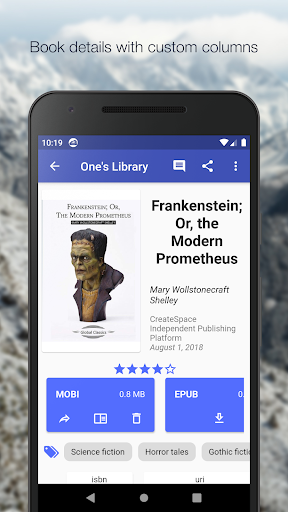
- Support for custom columns in book details view
- Quick access to book download and share via slideable list view
- Zoom the book cover
- Support "swipe from book to book" in book details view
- Email or share a copy of downloaded book
- Open downloaded book in your book reader application to read a book
- View the file size of each book format
- Show book identifiers and link to source (like ISBN, Amazon, Google Books, Goodreads, etc)
- Dark/light themes
- And many more features ...
To move your Calibre library to cloud services:
1) Open Calibre on your Laptop/PC/Desktop
2) Select "Switch/create library..." from the Calibre menu
3) Select an empty folder on your Cloud drive in "New Location" drop down
4) Select "Move current library to new location", then press OK
5) Wait for cloud sync to complete.
6) Then you are ready to use Calibre Sync.
To move your Calibre library to your phone storage, just copy the library directory to your phone storage.
Notes:
- Calibre Sync is not a reader app. You must install and use one of the many excellent reader apps available.
- Only Microsoft OneDrive for Personal accounts (shared) are supported. Please email us if you observe any inconsistencies.
- Due to restriction in Box API, Calibre Sync must acquire write permission in order to download files, download is not a read action on Box. Calibre Sync guarantees that it will not perform any write actions against your data in Box cloud account.
- Calibre Sync use WebDav API of Nextcloud and OwnCloud services, and it requires case sensitive file system to work properly. Therefore, you must make sure that your libraries are set up on case sensitive file system (Linux, recent MacOS, Windows NTFS with case sensitive enabled).
Permission explanation:
- Calibre Sync only requires "storage permission" to store downloaded book formats on your device.
*For Lollipop devices* you must have sdcard available so that the app can download books to external storage.
Please leave your reviews and suggestions to help us improve the app. For more information see https://calibresync.bitbucket.io
Calibre is © Kovid Goyal - calibre-ebook.com
Drive is © Google LLC.
Dropbox is © Dropbox inc.
OneDrive is © Microsoft
Box is © Box inc.
pCloud is © pCloud AG
Nextcloud is © Nextcloud GmbH
OwnCloud is © OwnCloud
MEGA is © MEGA
What's New
Version Information
- Version
- 6.6.4
- Downloads
- 10K+
- Updated on
- Apr 1, 2025
- Released
- Apr 13, 2020
- Requires
- Android 4.4
Statistics
Google Play Rating History
Rating Distribution
Downloads Over Time
Calibre Sync has been downloaded times. Over the past 30 days, it averaged downloads per day.
Shaded area shows 30-day prediction based on historical trends
Historical data collection started recently. More data points will be available over time.
Calibre Sync - Google Play Rankings
Top Rankings
| Rank | Country | Category | List | Change |
|---|---|---|---|---|
| — |
Ranking History in
No ranking data available yet. Rankings are updated daily.
#13 in Top Paid Books And Reference in United States
#6 in Top Paid Books And Reference in France

#17 in Top Paid Books And Reference in Egypt


#17 in Top Paid Books And Reference in Pakistan
Calibre Sync users say on Google Play
 Pradip Pant
Update after a week of use: Excellent App. This is a replacement app to the Calibre Companion (CC) App. CC used to be the best App but has now become an abandonware. One improvement request: On the 'Calibre Content Server' Library, can you put an indicator (watermark) on the book cover arts showing the status of download? I have 900+ books, which I keep synced and downloaded on my tablet. When I add new books to my desktop Calibre, I need an easy way to check which ones need to be download.
 TJ McDermott
I'd been a long-time Calibre Companion user; it took me some time to get used to Calibre Sync's interface. It's grown on me. I used CC's wireless device connection exclusively; CS's is not quite as good, but makes up for it in its content server interface. I'm now fully switched to that. I appreciate that the developer responds to customers and continues to improve this app.
 Robert Baker
Copied my Calibre database from OneDrive to pCloud. Syncing working faster now. However, with the latest Calibre Sync update (6.6.0+267) the library is no longer syncing. New books added are not showing, but I am still able to retrieve the books that are showing. Sync info showing last sync Oct 19 (two days ago).
 David
David
Not working with Nextcloud even though it says it does. There's no support, they never replied to my emails for two weeks and counting now. Update: Got it to work by continuously wiping data for the app and retrying. Seems like a bug. Keeping the rating low because the developer does not reply to support emails.
 M. Ellis
97 different places to log in, but the stupid thing is totally incapable of reading the epubs I already have in my system, so I have to go through and reload everey single one of 2000 books from my master Calibre library. Even when I tried doing that with a few, there is absolutely no help or settings to let me set up the interface so that can do anything other than scroll one line at a time for 2000 different books. This thing is so ugly and unhelpful compared to Calibre Companion.
ApkTrusted Ratings & Reviews
Similar Apps

Bookshelf
Free

ePlatform Digital Libraries
Free
Readwise Reader
Free
ReadEra Premium – ebook reader
Paid
eReader Prestigio: Book Reader
Free

Regula Document Reader
Free

Kobo | eBooks & Audiobooks
Free

CloudLibrary
Free

Dolphin EasyReader
Free
Cantook by Aldiko
Free

getAbstract: Book Summaries
Free

Bravonovel - Fictions & Webnov
Free

Pearltrees
Free

FBReader: Favorite Book Reader
Free

Pocket Prep Professional 2026
Free

eBoox: ePub PDF e-book Reader
Free
Scan this QR code to download

Forwarding you to the page at Google Play market in seconds...
Open Google Play market now