
AmpliFi Teleport v1.2.7
Ubiquiti Inc.


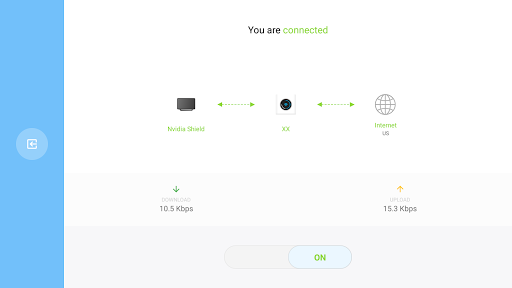
About this app
Developer Description
Teleport lets you easily create a private connection to your AmpliFi router.
Connect to your home AmpliFi router by quickly generating a VPN access code via the AmpliFi Wi-Fi app.
Experience superior network reliability, compared to traditional VPNs, since you’re relying on your own network.
Retain privacy and peace of mind when browsing on public networks.
Please note that an AmpliFi router is required to use the Teleport app.
What's New
We're constantly striving to enhance our product and we've incorporated the following changes:
- Minor improvements and fixes.
Version Information
- Version
- 1.2.7
- Downloads
- 50K+
- Updated on
- Jun 19, 2024
- Released
- Aug 13, 2019
- Requires
- Android 7.0
Statistics
Google Play Rating History
Rating Distribution
Downloads Over Time
AmpliFi Teleport has been downloaded times. Over the past 30 days, it averaged downloads per day.
Shaded area shows 30-day prediction based on historical trends
Historical data collection started recently. More data points will be available over time.
AmpliFi Teleport users say on Google Play
 A Google user
I've only used this briefly, but it has been excellent so far. To those who have been unable to connect to devices on the local network, I found that I needed to do a couple of things. 1. Once connected the first time, open the Amplifi app (not the Teleport app) and there should be an icon for the connected client. Tapping on this will display a screen with a "Local network" option to allow local access for that client. 2. If you have turned on the "Bypass DNS cache" option (through the web interface, you may need to turn that off for local DNS to work (connecting via IP address should work without doing this).
A Google user
Works as described. Set it up in a few minutes and got started. The only problem I have is that the instructions aren't as clear as they could be. Only took a few minutes of tinkering to realize that I didn't have to keep making new codes every few hours -- the code expired but the connection was still usable. The biggest improvement that this app needs is a widget to turn the VPN on/off. Then, it'll be 5 stars for certain.
A Google user
Works well but could do with a few more configuration options. I miss a function to allow local (W)LAN traffic so you can stream to a Chromecast whilst using the VPN. Also takes a long time to connect. Other than that, awesome work Amplifi!
 Gerald Valentine
Fairly useless if my phone is the only device that can VPN into my local network. I would like to be able to have my phone act as a hotspot that is also part of my local network so my other devices can take advantage.
 Alex
Alex
Stuck on the "data collection and use" page. I have to click the continue button multiple times just to get past the welcome page, but then on the very next page I get stuck. No matter how many time I hit "agree and continue" it absolutely will not let me proceed. The button does the little flashy animation to indicate I pressed it but that's it. I've uninstalled and reinstalled, and tried restarting my device. Just will not work
ApkTrusted Ratings & Reviews
More from Ubiquiti Inc.
See more apps












Similar Apps

Nedis SmartLife
Free
Wi-Fi Toolkit
Free

NETGEAR Orbi – WiFi System App
Free

Sonos S1 Controller
Free

SuperCam Plus
Free

AmpMe - Speaker Booster
Free

KrakenSDR RDF
Free

Pioneer Smart Sync
Free

UE | BOOM by Ultimate Ears
Free

eero wifi system
Free

TP-Link VIGI
Free

Ajax PRO: Tool For Engineers
Free

Linksys
Free

Speedify Fast Bonding VPN
Free
Mobile Security Camera (FTP)
Free

Boom: Bass Booster & Equalizer
Free
Scan this QR code to download

Forwarding you to the page at Google Play market in seconds...
Open Google Play market now