CNC Milling Simulator v1.0.26
Virtual Laboratories and Technical Simulators







About this app
Developer Description
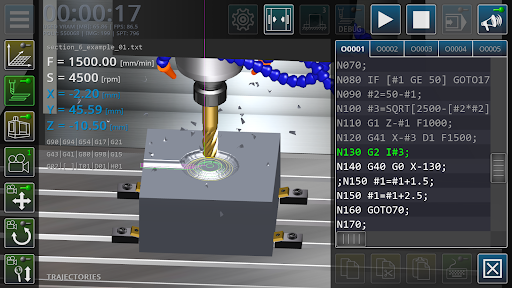
Multimedia application for simulating the milling process on a CNC machine
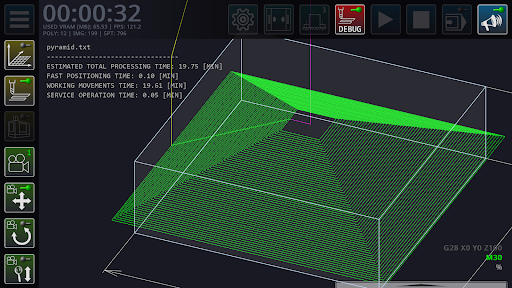
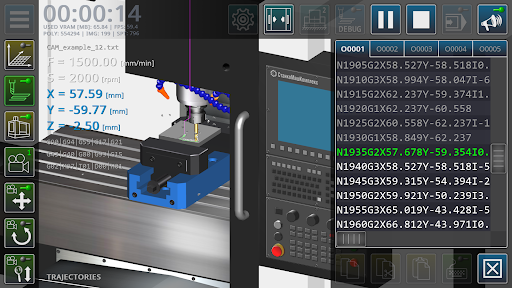
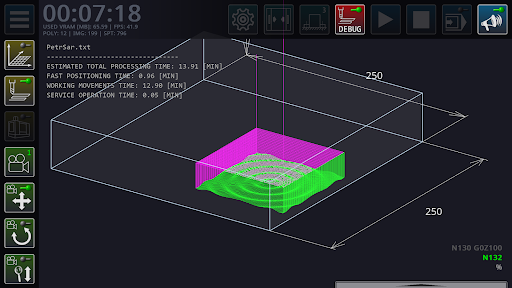
The main task of the application is syntactic analysis (parsing) of the code of control programs in order to build a graphical model of cutting tool trajectories in three-dimensional space.
The main functions of the application: editing the code of the control programs of the milling machine, operations with files of control programs, setting the geometric parameters of the cutting tool, continuous/step-by-step execution of blocks of control programs, three-dimensional visualization of tool movements in the working space of the machine, simplified visualization of the machined surface of the part, calculation of processing modes, a quick reference guide to using G-code.
The main limitations of the application are: low accuracy of cutting surface modeling, the impossibility of using polygonal geometry as a workpiece, a simplified model of machine tooling elements.
What's New
Version Information
- Version
- 1.0.26
- Downloads
- 100K+
- Updated on
- Oct 1, 2025
- Released
- Mar 12, 2022
- Requires
- Android 5.1
Statistics
Google Play Rating History
Rating Distribution
Downloads Over Time
CNC Milling Simulator has been downloaded times. Over the past 30 days, it averaged downloads per day.
Shaded area shows 30-day prediction based on historical trends
Historical data collection started recently. More data points will be available over time.
CNC Milling Simulator users say on Google Play
 Reuben Articulo
This CNC simulation app, is really helpful in learning CNC programming . However it would be nice if there is an update that it will cater higher speed for HEM machining. Because when I tried to do higher speed it give me rough surface. It would be a great experience on my student that they will be able to apply actual calculated data on feed and speed using HEM techniques.
 Kevin Pearson
Only thing I wish could be added that I can think of is the ability to use macro values to set subroutine programs like let's say #123=0002; M98P#123; I know this works as the vmc CNC I use at work utilizes this function. I know it didn't work when I tried programming it into the app, gave an error. A new issue I have is when I run a program with a macro that cycles through work offsets (G55-G58) it crashes with a parsing error. Rather annoying as it freezes the app does threading not work?
 Eren
Eren
I used to use this app without any problems but now i cant open the app for some reason it says there is an unknown bug and developer has to solve it
 GolfnotGOFF Goffer
I'm not gonna pay for this until you fix the loading issues. If it glitches and has a hard time opening and will only open after pressing the app selection button repeatedly then you all need to go back to the drawing board and figure out what's going on. This app isn't ready for market yet.
 KOTTILIL HARISH
Work piece size option for length and breadth is locked
ApkTrusted Ratings & Reviews
More from Virtual Laboratories and Technical Simulators
See more apps

Similar Apps

Logic Circuit Simulator Pro
Free

Applied Ballistics Quantum
Free

Manufacturing Engineering Pro
Free

PROTO - circuit simulator
Free
ZWCAD Mobile - DWG Viewer
Free

AutoCAD - DWG Viewer & Editor
Free

NEC Electrician Exam Prep 2026
Free

magicplan
Free

DreamBuild: Sketch to 3D
Paid

Desmos Graphing Calculator
Free

ArcSite
Free

ConstructionOnline
Free

Thingiverse Printables | 3Drop
Free

GeoGebra Geometry
Free

Periodic Table - Atomic
Free

Simple Soroban
Free
Scan this QR code to download

Forwarding you to the page at Google Play market in seconds...
Open Google Play market now