
Auto TTS v5.7.4.6
digiXMAS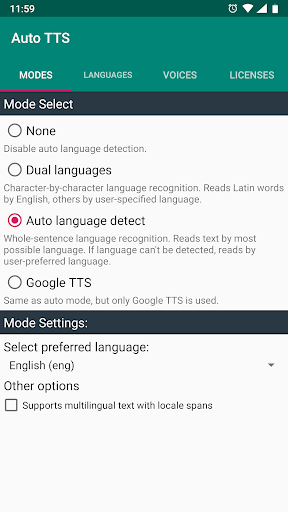

About this app
Developer Description
The unique app that changes language on the fly!
- You are blind or vision-impaired user and use TalkBack to interact with your devices. Switching TTS engines every time when arriving on ebooks/websites/applications in differrent language is too difficult for you.
- You are developing multilingual application and confused about managing TTS engines with their supported languages.
Auto TTS can help you!
Auto TTS has special switching mechanism with state-of-the-art auto language detection feature and helps switching to appropriate TTS engine according to auto-detected language of input text.
Auto TTS is fully compatible to standard Android Text To Speech Interface and can work with TalkBack, other TTS engines, web readers, eBook readers... without any problem.
Requirements:
- Auto TTS requires Android 4.0 or later.
- Auto TTS uses system Text-To-Speech engines for reading. So, you have to install appropriate TTS engine(s) for your languages.
How to use:
- Install Auto TTS from CH Play.
- Open Auto TTS.
- Select Auto Language Detection mode:
+None:Disable auto language detection,
+Dual Languages: Word-by-word language recognition: English for Latin words and user-specified language for others,
+Automatic Language Detect: Whole-sentence language auto detect, reads text by most possible language.
- Select language for your desired mode:
+ For Auto Mode: Set preferred language for reading in case language of input text can't be detected.
+ For Dual Mode: Select secondary language.
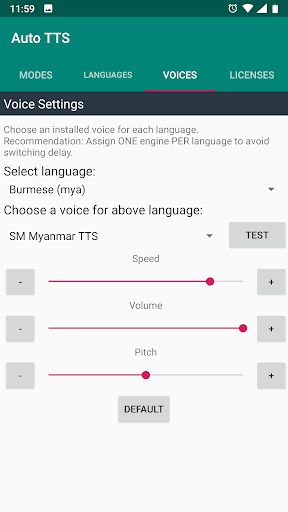
- Click "Go to Voice Settings" and select your preferred voice (from TTS engines available in your system) for each language. DON'T FORGET TO CHECK EACH VOICE BEFORE USING by clicking the Test button.
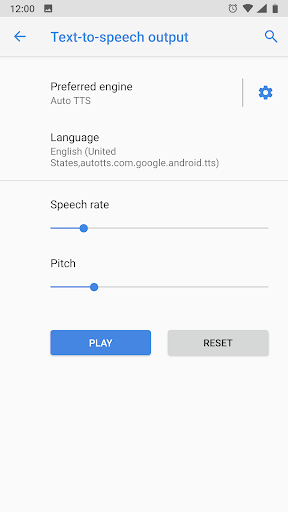
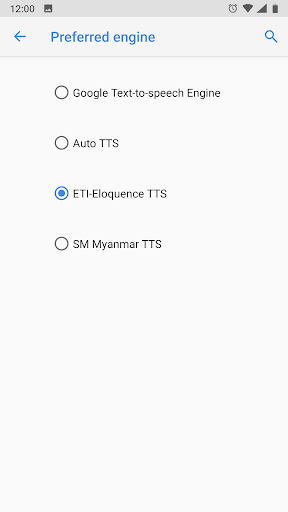
- Select Auto TTS as preferred TTS engine: Go to Settings (System/language and Input/Text-To-Speech output) and set Auto TTS as preferred engine.
- For developer: choosing "No linguistics content" (Locale "zxx-US") enables auto language detection feature for input text even user disables Auto Language Detection in setting.
Supported languages:
- AutoTTS supports all languages that TTS engines available in your system offer. Actually, Google TTS that normally comes with your phone and is freely available in Play Store, provides high quality voices for nearly 20 languages. For Vietnamese, install vnSpeak TTS.
Note:
- Switching language within one TTS engine can make some delay. You can avoid this by assigning one engine per language. For example: you set Google TTS for English, Samsung TTS for French, Ivona TTS for Polish, vnSpeak TTS for Vietnamese...
- If you added new TTS, AutoTTS needs to be restarted after configuring with new TTS by restarting your device, or by switching over another TTS and then back to AutoTTS in system settings.
Attention:
- The new Mixed Mode may NOT WORK on some devices. If you are experiencing such problem, please use different modes until we'll fix it. Sorry for causing any inconveniences.
Contributions:
- Special thanks to our user Abdelghani Zehroune, who translated Auto TTS to French and Arabic.
What's New
1. Move TAB header to bottom.
2. Add Search in language tab
3. Add Toggle button to show selected/all languages
Main improved features:
1. Android 16 support.
2. Enhanced voice scanning process.
3. Enhanced Mixed mode reading.
4. Improved performance in Mixed mode.
Version Information
- Version
- 5.7.4.6
- Downloads
- 10K+
- Updated on
- Dec 28, 2025
- Released
- Mar 22, 2016
- Requires
- Android 8.0
Statistics
Google Play Rating History
Rating Distribution
Downloads Over Time
Auto TTS has been downloaded times. Over the past 30 days, it averaged downloads per day.
Shaded area shows 30-day prediction based on historical trends
Historical data collection started recently. More data points will be available over time.
Auto TTS - Google Play Rankings
Top Rankings
| Rank | Country | Category | List | Change |
|---|---|---|---|---|
| — |
Ranking History in
No ranking data available yet. Rankings are updated daily.
#14 in Top Paid Communication in Pakistan


#14 in Top Paid Communication in Saudi Arabia

#14 in Top Paid Communication in Thailand
#14 in Top Paid Communication in India

Auto TTS users say on Google Play
 Akbarkhan Pathan
now it's working fine!!! thank you very much!!!
 yatin panchal
Please optimize the app to: 1. Reduce lag and delay 2. Improve navigation, scrolling, and typing smoothness 3. Enhance Google Text-to-Speech voice quality, especially when using auto TTS configuration with Google TTS, as we are currently unable to utilize high-quality voices. These improvements will enhance our overall experience.
 Komal Mali
Subject: CRITICAL BUG: Vocalizer TTS Engine not visible/selectable on Redmi MIUI Hello, I am writing to report a crucial issue regarding the detection of third-party TTS engines in the Auto T-Tetus app. The Vocalizer TTS Engine is currently not visible or selectable within your app’s settings, even though it is correctly installed on the device. Key Details: * Device: Redmi C13 5G * Operating System: Latest MIUI version (The issue started after a recent system update). * Prior Status: The Vo
 payal mane
हमें एक यीशु आ रहा है ऑटो टीटीएस का लेटेस्ट अपडेट आने के बाद यीशु यह आ रहा है कि ऑटो टीटीएस कोई भी चीज रीड करता है तो बार बार बुलेट बुलेट ऐसा बोलनाहै और कोई भी मैसेज व्हाट्सएप या कोई भी मैसेज हो ना तो वह बिना पोज लिए रीड करता है पहले पहुंच लेता था अभी अपडेट आने के बाद नहीं लेता है डायरेक्टली रीड करता है तो थोड़ा समझने के लिए प्रॉब्लम होता है बाकी अप बहुत अच्छा है बस इसे सॉल्व किया जाए आम्हाला एक येशू आ रहा आहे ऑटो टीटीएस का लेटेस्ट अपडेट केल्यावर येशू आलो आहे की ऑटो टीटीएस देखील काही रीड करत
 Ranjan Kumar
Hello Auto TTS Team, I've been a long-time user of your app, and it's been very useful for me. However, after the recent update, several issues have arisen that weren't there before. Please pay attention to these and fix them as soon as possible: 1. **Language Mixing Issue**: Now, Hindi text is being read with an English TTS voice, and English text with a Hindi TTS voice. This has completely disrupted the reading experience. Previously, it switched correctly based on the language. 2. **P
ApkTrusted Ratings & Reviews
More from digiXMAS
See more apps

Similar Apps

Song Detector
Free

Listening: Text to Speech
Free

LiveMic: Bluetooth Mic Speaker
Paid

Symfonik
Paid

JAMMATES
Paid
Podcast Guru - Podcast App
Free

TicNote: AI Recorder & Agent
Free

BooKeep
Paid

SoundHound ∞ - Music Discovery
Paid

Ava: Transcribe Voice to Text
Free

MagPie - Native speech
Free

Translate: Screen Translator
Paid

Dean ITC with AI Interpreter
Free

SentientMate
Paid

Text & Image to Video AI Gen
Paid

Qibla Direction- GPS Compass
Paid
Scan this QR code to download

Forwarding you to the page at Google Play market in seconds...
Open Google Play market now