
HMKWatch Digital 263 HUD vVARY
HMKWatch


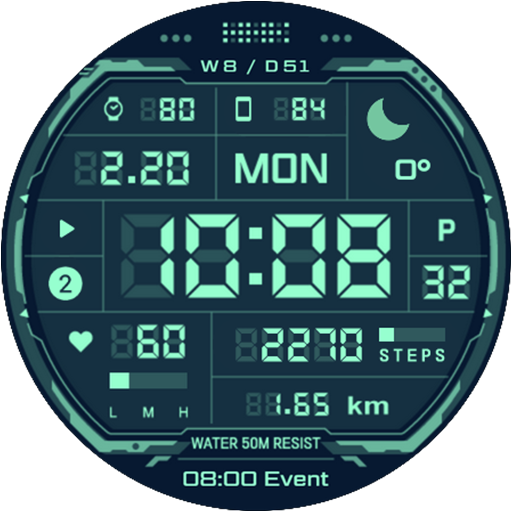


About this app
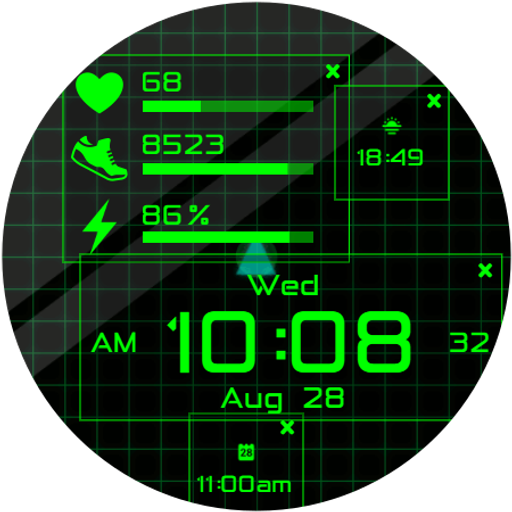
The HMKWatch Digital 263 HUD app solves the problem of providing a clear and comfortable digital watch face for Android users, benefiting those who value simplicity and readability on their wearable devices. With its excellent user rating of 4.6/5, it stands out in the Personalization category for its high-quality design. Compared to alternatives, this app's minimalistic approach and lack of permissions make it an attractive choice for users concerned about privacy. However, its limited features might make it fall short for users seeking more complex watch face customizations.
Pros
- The app's excellent user rating of 4.6/5 indicates a high level of user satisfaction, suggesting that the developer has successfully created a digital watch face that meets the needs of its target audience.
- With no permissions required, users can be confident that their data is not being collected or shared, making this app an excellent choice for those prioritizing privacy.
- The paid model of $1.49 ensures that the app is ad-free, providing a seamless and uninterrupted user experience.
- The developer's presence on Instagram and provision of an email address for contact suggest a level of accountability and support, which can be reassuring for users.
- The app's small size and lack of in-app purchases make it an accessible option for users with limited storage space or those who prefer a straightforward purchase model.
Cons
- The limited number of downloads, currently at 1,000+, may indicate a lack of visibility or awareness about the app, potentially limiting its user base and community support.
- The app's simplicity, while a pro for some, might be a con for users seeking more complex or customizable watch face options, potentially limiting its appeal to a broader audience.
- The 'Varies with device' Android requirement might lead to compatibility issues for some users, depending on their device specifications or operating system version.
- The lack of a comprehensive website from the developer, with only an Instagram presence, might make it difficult for users to find detailed information or support beyond basic contact.
Best for: The ideal user for the HMKWatch Digital 263 HUD app is likely an individual who values simplicity, readability, and privacy on their wearable device, possibly within the age range of 25-50, with a medium to high level of technical skill, seeking a straightforward and comfortable digital watch face experience without the clutter of unnecessary features or data collection concerns.
Developer Description
Comfortable and clear digital watch face.
* Please install additional apps by referring to 'About this app'.
=======================================================
[How to install]
Make sure your watch is selected first before you press the payment button.
Press the small black triangle next to the Payment button to select the watch.
If you don't follow the above method, you can use Chrome or Samsung browser on your PC or smartphone.
After entering the store with a web browser, click Install on another device to install it on the watch.
After the release of Watch 5, a new UI was applied to Watch 4.
The newly installed watchface can be found in the following ways.
1. Press and hold the watch screen to enter the 'Frequently Used Watch Face List'.
2. Turn it to the rightmost and press 'Add watchface'.
3. Then, enter the 'Installed Watchface List'.
4. Find and select the watch face you purchased.
=======================================================
[Features]
Battery
Calendar
Time format : 12h / 24h
Alarm
Heart rate
Step counter
[Complication]
4 App shortcuts complication
Phone battery level
Weather complication
Next event complication
=======================================================
[Additional installation app]
1. Smart phone battery app (Free app)
Please install the additional app of the link below on the watch and smartphone, and set up the complication.
If the link does not open, please search for the 'Phone Battery Complication' app and install it.
https://play.google.com/store/apps/details?id=com.weartools.phonebattcomp
2. Complications Suite - Wear OS (Free app)
After installing the "Complications Suite - Wear OS" free app, select and apply the world clock in 24-hour format in the application settings.
https://play.google.com/store/apps/details?id=com.weartools.weekdayutccomp
3. Heart Rate Complication (Paid app)
https://play.google.com/store/apps/details?id=com.weartools.heartratecomp
4. Health Services Complications (Paid app)
https://play.google.com/store/apps/details?id=com.weartools.hscomplications
All credits goes to original app creator:
amoledwatchfaces - https://play.google.com/store/apps/dev?id=5591589606735981545
=======================================================
Get new news from my Instagram.
www.instagram.com/hmkwatch
https://hmkwatch.tistory.com/
Please send me an email if you have any errors or suggestions.
hmkwatch@gmail.com
Privacy
Given that the HMKWatch Digital 263 HUD app requires no permissions, the risk of data collection or privacy breaches appears to be minimal. However, users should still be cautious when purchasing apps, ensuring they are buying from trusted sources like the official Play Store. It's also advisable to monitor the app's behavior and update frequency to ensure it continues to operate as expected without any unexpected changes.
Tips
To get the most out of the HMKWatch Digital 263 HUD app, users should first ensure their device is compatible and meets the necessary Android requirements. Upon installation, exploring the app's settings can help users customize the watch face to their preferences, if such options are available. Additionally, keeping the app updated can ensure that any bugs are fixed and that the user experience remains optimal.
Version Information
- Version
- -
- Downloads
- 1K+
- Updated on
- Jul 20, 2025
- Released
- Feb 20, 2023
- Requires
- Android Varies with device
Statistics
Google Play Rating History
Rating Distribution
Downloads Over Time
HMKWatch Digital 263 HUD has been downloaded times. Over the past 30 days, it averaged downloads per day.
Shaded area shows 30-day prediction based on historical trends
Historical data collection started recently. More data points will be available over time.
HMKWatch Digital 263 HUD users say on Google Play
 Zafran Zainal
I love it, but I hope the red font colour option have the same deep black level as the other colour font. For now the red font make the whole watch face lit up while the other colour font only the font lit up.
 Sven
Sven
A beautiful classic
 Edin Ra
can you please help me. Ive been using your watchface for months. for a last couple of days it changed from km to mi, and I cant change it. I even reseted watch because of it, but nothing helps... (changed my rating to 3 because noone is answering)
 Captainsting
Not seeing the option to install it on Watch
ApkTrusted Ratings & Reviews
More from HMKWatch
See more apps
HMKWatch Analog 152
Paid

HMKWatch Analog 264
Paid

HMKWatch Analog 265
Paid

HMK AD038
Paid

HMKWatch Christmas 04
Paid

HMKWatch Analog 266
Paid

HMKWatch Analog 267
Free

HMKWatch Analog 268
Free

HMKWatch Analog 160
Free
HMKWatch Analog 169
Free
HMK AD039
Paid

HMKWatch Analog 023
Paid

HMKWatch Analog 032
Free
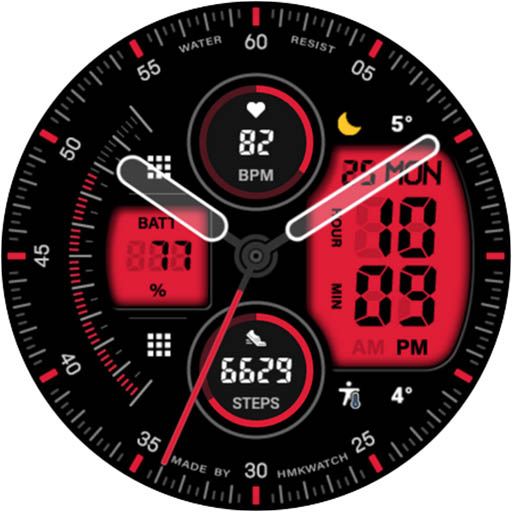
HMKWatch Analog 033
Paid

HMKWatch Analog 034
Free

HMKWatch Analog 035
Free
Similar Apps

SamWatch Digital Final 5
Free

NW070: Digital watch face
Paid
SamWatch Digital Z 2021
Free

Ballozi FRUMOS Digital
Paid
SamWatch Digital PSI 2020
Paid

JW115 jwstudio
Free

Sci-Fi Digital Pro Watch Face
Paid
TKS 02 Fracture Watch Face
Paid

G-Shock Pro
Paid

NW070 한글: Digital watch face
Free

Watch face CNW-42
Free

INTEL HUD - animated health
Free

JJ Running Track Watchface
Paid

RADAR X
Paid
Dragon Radar Animated Face
Paid
DADAM41: Retro LCD Watch Face
Paid
Scan this QR code to download

Forwarding you to the page at Google Play market in seconds...
Open Google Play market now