Productivity Challenge Timer v1.13.4
Ensit Media



About this app
Developer Description
Pomodoro work / study timer that will help you focus
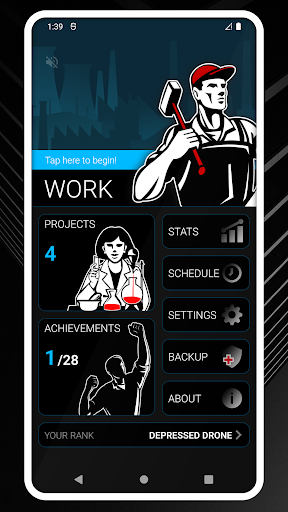
What this app is about is challenging you to work and study harder and tracking your work habits. You'll earn/lose ranks depending on your performance, earn achievements and track your productivity over time, so you'll know how long you worked on what and during which days of the week and hours of the day you're at your most productive.
Now here's a few things you should know before downloading:
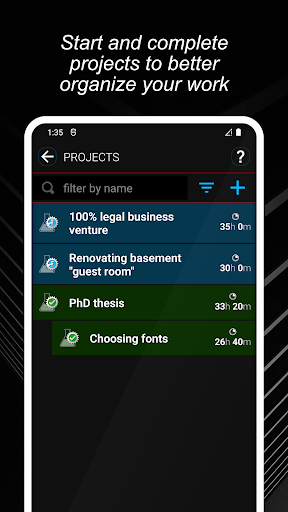
- This is not an organizer. If you can't keep track of what you're supposed to be doing, this app is not for you. The app includes tracking of projects so you know how much time you spent working on each of your clients/books/websites/whatever - like a time sheet, but it's not meant to be an organizer or a to-do list.
- This app is in English only. No translations are planned for the foreseeable future.
- This app will not let you pause work sessions or finish them early, so if you have a tiny baby-sized bladder and you need to pause every few minutes, this app is not for you. The shortest work session you can set is 10 minutes and you're not supposed to be interrupted. Also because I use this app too, and I'd be the first to abuse that pause feature to go look up useless nonsense instead of getting work done.
- The purpose of this app is not to promote a healthy work-life balance, but to get you to work harder. Because of this, it does not recognize weekends or holidays or parenting or any other excuse to take time off, and it will demote you if you start slipping. Please don't expect the app to validate your goals, its sole purpose is to make you work harder, even when you shouldn't.
- If you want to use the app with the screen off, make sure it's been exempted from any battery saving apps/features your device may be using.
That's it, thanks for reading and I hope you find this app as useful as I do.
What's New
- two new achievements, one free, one pro
- you can now wipe work stats from within the app if you want to start over
- some bug fixes
- Android SDK update
In-app purchases
$7.99 per item
Version Information
- Version
- 1.13.4
- Downloads
- 500K+
- Updated on
- Dec 22, 2024
- Released
- Apr 10, 2014
- Requires
- Android 5.0
Statistics
Google Play Rating History
Rating Distribution
Downloads Over Time
Productivity Challenge Timer has been downloaded times. Over the past 30 days, it averaged downloads per day.
Shaded area shows 30-day prediction based on historical trends
Historical data collection started recently. More data points will be available over time.
Productivity Challenge Timer users say on Google Play
 Andrew Anderson
This application is the demanding coach of pomodoro timers. It further has enough statistics to allow for strong time tracking if you invest in the pro version, which you should. As a deliberate design choice, the designer has chosen not to integrate this with a to-do app, which is a limitation. Nevertheless, I have used this app for 5 years and 3 phones: it's the first thing I install.
 Jacob Longshore
UI is easy on the eyes, easy to navigate. Text is full of a healthy sense of humor, and the developer clearly gives a damn. App doesn't account for sick days, weekends, or vacations (which I get precious few of) - I shouldn't get demoted for those. Can they be factored in somehow? Also, a Pomodoro session sometimes gets forfeited if I'm doing other work on my phone.
 Hautai Greensill
Recommendations: Have a tour to show how to use the app. Have a different default ringtone and volume that is lower so that when you complete the time, the ringtone doesn't startle people with a loud "Ding!" sound. as someone mentioned prior, design isn't the greatest. Great artwork but, it isn't a flexible theme like working on a project from a desk to then outdoors rather than 1 theme that won't relate to everyone. Not a fan of the title it starts newbies on as a "Slacker" very negative lang
 Tu
Tu
Just a suggestion: I mostly study on my Android device, so a floating timer with a session counter would be really helpful. Otherwise, the app is great! Also, it would be awesome if the app were available on Windows PC with a sync feature across devices. These three features are much needed. Thanks again for the app! I rated it 2 out of 5 stars because I was hoping for these features in the app. I’ll change my rating to 5 stars once these features are added.
 Neha Gaur
how to use this app like I recently downloaded it but I don't know how to use it please let me know what to do and what not how to use it? Then only I can give you rating? you should first give them a review how to use it then we will customize it in our own way. That will be helpful.
ApkTrusted Ratings & Reviews
More from Ensit Media
See more apps



Similar Apps

Progressive Pomo: Focus Timer
Paid

Nothing Pomodoro Timer
Free

Engross: ADHD Focus Timer
Free

Focusmeter: Pomodoro Timer
Free

Time Timer Visual Productivity
Free

School Planner - Timetable
Free

Boosted Time Tracker
Free

Weekly Planner Journal
Paid
Focus To-Do: Pomodoro & Tasks
Free

stickK: Goals & Accountability
Free

Flipd: Focus & Study Timer
Free

WaterDo:To Do List & Schedule
Free

Kaizen: Focus & Study Timer
Free

Tally Counter & Score Clicker
Free
Pomotimer - ADHD & Study Timer
Free

Mindset: Daily Motivation App
Free
Scan this QR code to download

Forwarding you to the page at Google Play market in seconds...
Open Google Play market now