
Focusmeter: Pomodoro Timer v1.18
zeitic.co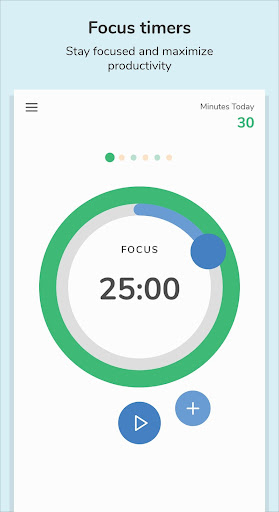





About this app
Focusmeter: Pomodoro Timer solves the problem of maintaining productivity and focus by providing a simple yet effective timer system, benefiting individuals with busy schedules or those who struggle with distractions. Compared to alternatives in the Productivity category, Focusmeter stands out with its clean interface and lack of ads, making it an attractive option for those seeking a minimalist approach. However, its limited feature set might make it less appealing to power users who require more advanced time management tools. Overall, Focusmeter's excellent user rating and moderate download numbers indicate a well-received app that effectively addresses the needs of its target audience.
Pros
- With over 100,000 downloads and an excellent user rating of 4.6/5, Focusmeter demonstrates strong social proof and a high level of user satisfaction, indicating a well-designed and effective app.
- The app's lack of ads and minimalistic design contribute to a distraction-free experience, allowing users to focus on their tasks without interruptions.
- Focusmeter's developer, zeitic.co, provides a professional website and email contact, suggesting a commitment to user support and feedback, which is reassuring for users who may encounter issues or have suggestions for improvement.
- The app's small size and lack of permissions required make it a lightweight and secure option for users concerned about data privacy and storage space.
- Focusmeter's in-app purchases offer users the flexibility to customize their experience without being forced into a one-size-fits-all model, allowing for a more personalized productivity approach.
Cons
- One potential concern is the limited feature set of Focusmeter, which may not be sufficient for users who require more advanced time management tools or customization options, potentially limiting its appeal to a broader audience.
- The in-app purchase model, while flexible, may be seen as aggressive by some users, particularly if they feel that certain features should be included in the base app, which could impact the overall user experience.
- Some users may find the app's simplicity to be a drawback, as it lacks the complexity and feature richness of other productivity apps, which could make it less appealing to power users.
- The app's requirement of Android 7.0 or higher may exclude some older devices, potentially limiting its accessibility to users with older hardware.
Best for: The ideal user for Focusmeter is an individual, likely a student, professional, or freelancer, who values simplicity and effectiveness in a productivity tool, has a moderate level of technical skill, and is seeking to improve their focus and time management skills without being overwhelmed by complex features or distractions, making it an excellent choice for those looking for a straightforward yet powerful Pomodoro timer.
Developer Description
The timer that tracks your focus & rest for better productivity and health.
HOW IT WORKS:
1️⃣ Setup your routine: customize the length of your Focus and Rest timers.
2️⃣ Start your first Focus timer. 👨💻
3️⃣ After your timer is completed, it's time for a break. ☕
4️⃣ Start the next Focus timer and stay productive! 👨💻
FEATURES
⏲ CUSTOMIZE your own timers. Pomodoro or 52/17, easily customize what works for you!
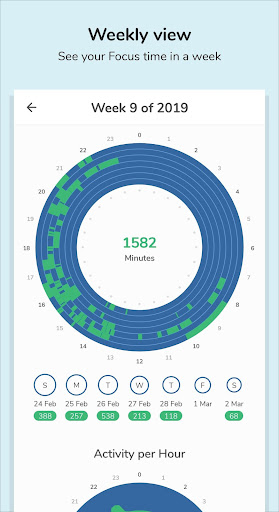
✨ INSIGHTS from your past activities in a month, week or day. See how your routine has been working for you.
🔔 CHOOSE your own Focus and Rest alerts when the timer is completed or about to be completed.
⏱️ STOPWATCH or normal timers: Both counting up and counting down timers supported.
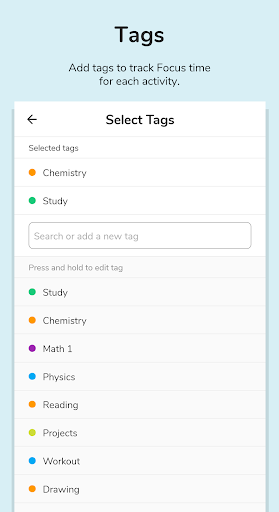
🏷️ TAG Focus and Rest sessions and keep track of distractions.
📈 STATISTICS to get insights for individual tags over time.
📝 EDIT your timeline/activities. Never forget to track your time.
✍️ Add NOTES to your timers.
➕ ADD sessions/timers anytime.
⏱️ TRACK time in minutes, hours or sessions.
🌠 TRANSITION automatically between focusing or rest. Or manual if you prefer.
🌕 CLEAN and SIMPLE interface.
🔄 LANDSCAPE and FULLSCREEN mode supported.
🌙 DARK/NIGHT theme.
👏 REPEATED completed alerts, in case you missed the completed alert. Extra time is also added.
🏃 Runs in the background. This app does not need to be constantly open to work.
🔕 Activate DO NOT DISTURB during timers.
📏 LONG sessions of up to 3/4/5 hours supported.
🎨 TAG colors supported.
📥 Export your data anytime in CSV or JSON format.
📎 APP SHORTCUTS to start timers quickly
📁 AUTOMATIC backup if your Google account is connected. Please visit https://support.google.com/android/answer/2819582?hl=en for more information.
✨ Support us with PRO FEATURES ✨
📈 EXTENDED tag and date analytics
🎨 CUSTOMIZE UI colors and more tag colors
⏱️ Start timers earlier/change duration with the TIME MACHINE
🌅 Custom START OF DAY for night owls
Watch for new features coming soon!
Visit our website for more info: https://focusmeter.app
Find our FAQ here: https://focusmeter.app/faqs.html
* Focusmeter runs in the background, please visit https://dontkillmyapp.com/ to check if your phone/device supports background services.
Privacy
Given that Focusmeter requires no permissions, users can be confident that their data is not being collected or shared without their knowledge, making it a secure option for those concerned about privacy. However, as with any app, it's essential to review the terms of service and privacy policy, available on the developer's website, to understand any potential data collection or usage. Users should also be cautious when making in-app purchases, ensuring they understand what they are buying and why.
Tips
To get the most out of Focusmeter, users should start by setting realistic goals and intervals for their Pomodoro sessions, allowing them to tailor the app to their specific productivity needs. Additionally, exploring the app's customization options through in-app purchases can help users optimize their experience, making it more effective for their unique workflow. For optimal performance, it's also recommended to keep the app updated, as the developer may release new features or improvements that enhance the user experience.
What's New
- Added transparent background for widgets
- Fixed import data bug
In-app purchases
$2.49 - $22.99 per item
Version Information
- Version
- 1.18
- Downloads
- 100K+
- Updated on
- Dec 3, 2025
- Released
- Mar 16, 2019
- Requires
- Android 7.0
Statistics
Google Play Rating History
Rating Distribution
Downloads Over Time
Focusmeter: Pomodoro Timer has been downloaded times. Over the past 30 days, it averaged downloads per day.
Shaded area shows 30-day prediction based on historical trends
Historical data collection started recently. More data points will be available over time.
Focusmeter: Pomodoro Timer users say on Google Play
 Manvi K Raj
Amazing app. Been using it for almost a year now after going through many many apps. Very simple and easy to use. But lately I do have an issue, in the calendar the addition of focus minutes in the total for the month is always wrong, usually lesser, though when I add the week total it's correct. I hope that the company fixes this issue
 Amy
Amy
Very helpful, organised and intuitive productive timer! My only note is that I would love an option to add a note at the start of each timer, so that I can remember exactly what task I was working on during the time. I know I can add tags, or a note afterwards, but it would be really helpful to have notes and tags available at the start of every timer. Thanks!
 Mani Mahmoodzadeh
It could be more useful if you could see what task you're doing on the timer screen...
 vlad tut
The pause buttons are bugged after moving from the notification to app. And the app is not in style MD3. The icon is not adaptive
ApkTrusted Ratings & Reviews
More from zeitic.co
See more apps
Similar Apps
Focus To-Do: Pomodoro & Tasks
Free

Time Timer Visual Productivity
Free
Flipd: Focus & Study Timer
Free

Engross: ADHD Focus Timer
Free

WaterDo:To Do List & Schedule
Free

TimeTune - Schedule Planner
Free

Boosted Time Tracker
Free

Pomocat - Cute Pomodoro Timer
Free
Sectograph. Day & Time planner
Free
YourHour - Screen Time Control
Free

OffScreen - Less Screen Time
Free

Digital Detox: Focus & Live
Free

Timelog - Goal & Time Tracker
Free

SupaTask - Daily Planner, Todo
Free

To-Do Adventure: Task Tracker
Free

Time Planner: Schedule & Tasks
Free
Scan this QR code to download

Forwarding you to the page at Google Play market in seconds...
Open Google Play market now