Tools & Amazfit v8.9.0
Tools & Wearables

About this app
Developer Description
Text notifications, button control, heart monitor & more for your Amazfit.
This application works very well with original Zepp / Mi Fit application (but is no way associated with Xiaomi). This means that you can always have the latest Zepp / Mi Fit version and the latest Amazfit firmware in addition to great and powerful advanced features.
Features:
• Display Text Support (see caller contact names & full contents of notifications on your Amazfit)
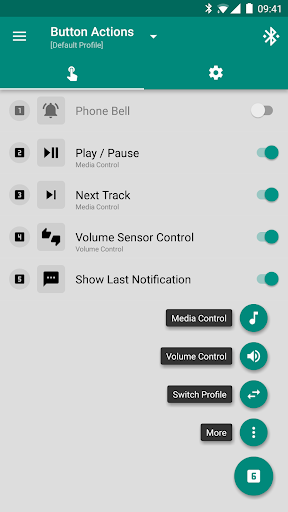
• Button Control & Sensor Control (assign actions to button presses, control media with movements of your hand)
• Button Control Profiles (create your own virtual menu to perform any number of your custom actions: control music, volume, phone vibrations & more)
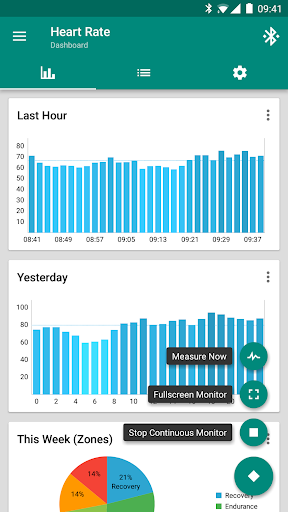
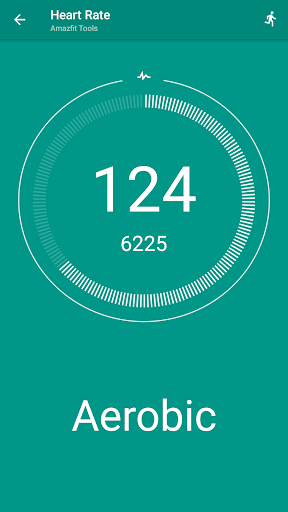
• Continuous heart rate monitoring & notifying, configurable heart rate dashboard charts
• Sleep as Android Integration (Amazfit GTS 4, 3, 2, 1, Amazfit GTR 4, 3, 3 Pro, 2, 1, Amazfit T-Rex 2, Pro, 1, Amazfit Bip, Arc, Cor, X, Band 7, Band 6, Band 5)
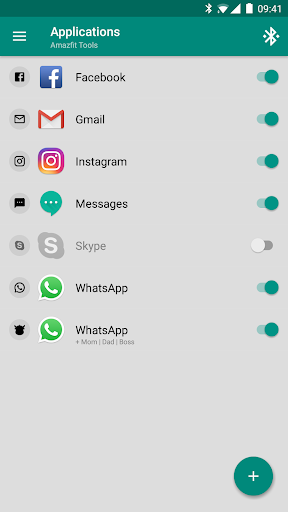
• Notifications for application & incoming calls (highly configurable times, conditions or even custom vibration patterns)
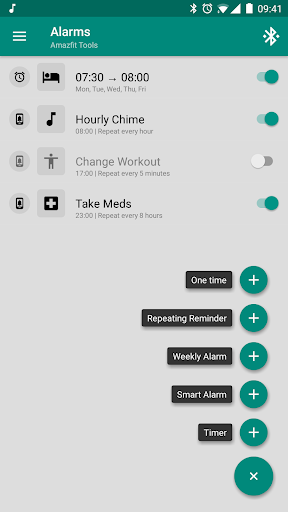
• Alarm notifications (including safety sound alarm - vibrations won't wake you up? safety sound alarm will trigger after few minutes)
• Custom repeating notifications (you can set anything you like, for example: hourly chimes, change workout reminder, take a pill reminders and more)
• Notification content filters (only interested in SMS notifications for certain people? not a problem for Amazfit Tools)
• Multiple notifications (you can for example ignore WhatsApp groups or set different icons, vibration patterns or notification times for different people)
• Power Nap feature (need a short nap? Just activate this and Amazfit will wake you up by vibrations when you're done resting)
• Idle Alerts (you can set an alert so the band will buzz you if you've been inactive for some time). You can also control the interval, time frame and inactivity threshold
• Missed notifications (notification is not lost when you are out of reach of your phone, you will get the last missed notification on reconnect)
• Advanced settings (disable non-interactive notifications, shake to dismiss power nap, disable in silence mode, disable while screen is on, …)
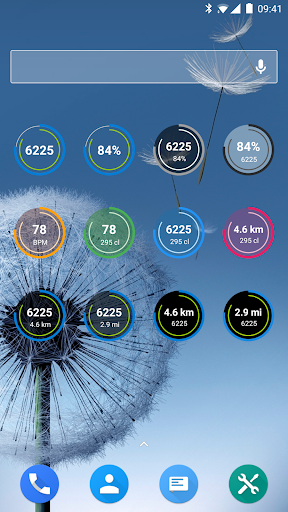
• Fully customizable widgets (daily fitness goal progress, bracelet battery, heart rate, etc)
• Export/Import Settings (to your storage or to the cloud)
• Tasker, Automagic, Automate and Locale support (advanced and fully customizable action and event plugins)
• Fully supports Amazfit GTS 4, Amazfit GTR 4, Amazfit GTS 3, Amazfit GTR 3 (GTR3, GTR 3 Pro), Amazfit T-Rex 2 (T-Rex 2, T-Rex Pro, T-Rex), Amazfit GTS 2 (GTS2, 2E, 2 Mini), Amazfit GTR 2 (GTR2, 2E), Amazfit GTS, Amazfit GTR, Amazfit Bip, Amazfit Bip S, Amazfit Bip Lite, Amazfit Arc, Amazfit Cor, Amazfit Cor 2, Amazfit X, Amazfit Band 7, Amazfit Band 6, Amazfit Band 5 bracelets
• Works on all Android versions from 4.3 to 13+
• Many and many more yet to come!
Localization:
Please help us translate Amazfit Tools into your language by translating some phrases on http://i18n.amazfittools.com Thank you!
Twitter:
@AmazfitTools
FAQ:
http://help.amazfittools.com
Important:
If you have any problem with this application, please contact us on info@amazfittools.com before down rating and we will help you resolve your issue.
What's New
• Watch Faces Management
• Android Icon Synchronization
• Music Button & Sensor Control
• Display Text Support (names & multi-line contents of notifications)
• Sleep as Android Integration
• Advanced Heart Rate Monitor
• Widgets, Tasker Plugins, extract SMS verify codes
& more http://goo.gl/6F2tJd
Version Information
- Version
- 8.9.0
- Downloads
- 100K+
- Updated on
- Oct 25, 2025
- Released
- Nov 27, 2017
- Requires
- Android 4.3
Statistics
Google Play Rating History
Rating Distribution
Downloads Over Time
Tools & Amazfit has been downloaded times. Over the past 30 days, it averaged downloads per day.
Shaded area shows 30-day prediction based on historical trends
Historical data collection started recently. More data points will be available over time.
Tools & Amazfit - Google Play Rankings
Top Rankings
| Rank | Country | Category | List | Change |
|---|---|---|---|---|
| — |
Ranking History in
No ranking data available yet. Rankings are updated daily.
#23 in Top Paid Health And Fitness in Germany


#46 in Top Paid Health And Fitness in Turkey

#46 in Top Paid Health And Fitness in Pakistan
#46 in Top Paid Health And Fitness in Philippines
Tools & Amazfit users say on Google Play
 Andrei Tapia
I'm using a Samsung Galaxy s23 ultra. The app works well for me. I use it mainly to sync it with the sleep as Android App and to get my heartbeat data every few seconds. The watch can only send the data to either the Zepp app or the Amazfit app so you got to balance the pros and cons between the two. Zepp will let you store steps and exercise routines which you can't do with this app but can't sync with sleep tracking apps and can only track every 5 minutes instead of every few seconds.
 Sergey T
Update: works again. Previously: Was working good with amazfit bip back in the day. Now it does not show a persistant notification panel, and sending signals manually does not work too. Basically no notifications at all.
 Lucas Ferreira
I cannot use it at the same time as the zepp app (when tools connects to my watch, zepp cannot connect), can't upload any watch faces (it shows progress bar but when finished nothing happens). Also, when trying to get Amazfit security token I couldn't use Google account cause it said it was unsafe. I've used this since my Amazfit BIP from 2019, last year I used it with a GTR 2e and they both worked perfectly for me, it saddens me that with GTR4 I can't use this amazing app 😭😭😭
 Tereza Machačová
Worked great, but few days ago all my settings I used for years have been deleted. Older exported settings cannot be imported - success message appears, but nothing happens.
 Billy Liu
Latest version now crashes and app won't restart. worse yet, the settings I exported won't import after reinstalling! reinstalling doesn't help because it corrupts itself eventually after a few hours again and won't restart again. Don't update! edit 11/18- after uninstalling and reinstalling, this time it worked for a few weeks. then it suddenly stopped working and won't start again. everytime this happens I have to uninstall, reinstall, and set up the app notification rules all over again.
ApkTrusted Ratings & Reviews
More from Tools & Wearables
See more apps
Similar Apps
WatchCharts
Free

Fitbeing
Free

HODINKEE
Free

QR & Barcode Scanner
Paid
Runmefit
Free

Wristcheck
Free
Mi Band 5 Watch Faces
Free

G Band
Free

QWatch Pro
Free
Cubitt
Free
Amazfit GTR 4 GTS 4 WatchFaces
Free

RDFit
Free

WaiverForever - Online Waiver
Free

Print Master
Free

My Emotional Compass
Paid
WhatisRemoved+
Free
Scan this QR code to download

Forwarding you to the page at Google Play market in seconds...
Open Google Play market now