Callipeg: 2D Animation App v1.6.22
ENOBEN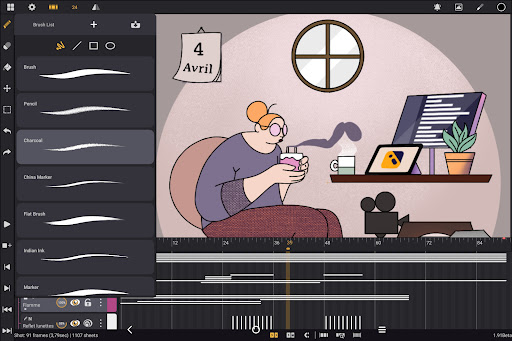
About this app
Developer Description
2D animation studio for Android tablets - unlimited layers, infinite timeline
Optimized for Android tablets and stylus support—no subscriptions, all updates included.
Key Features
- Studio-like Organization:
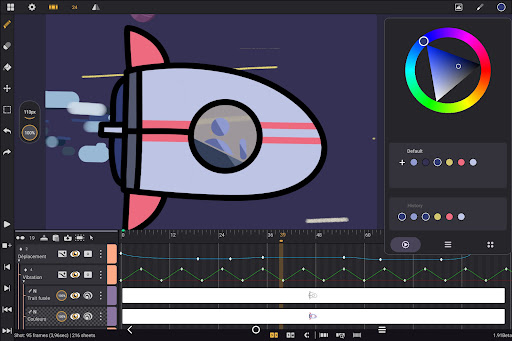
Arrange your shots by dragging and dropping, organize them into scenes and folders, and apply color tags and filters to manage assets effectively. Quickly locate shots using the integrated search function
- Adjustable Frame Rates and Large Canvas:
Set your preferred frame rate, including 12, 24, 25, 30, or 60 frames per second. Work with canvas size up to 4K to meet professional standards
- Unlimited Layer Support:
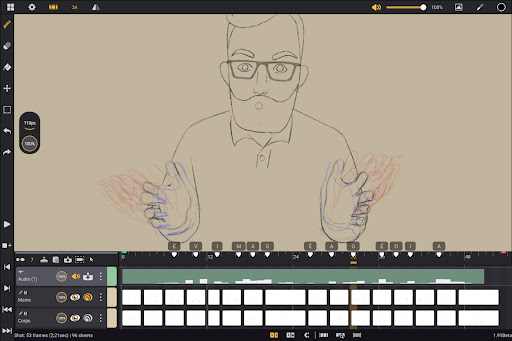
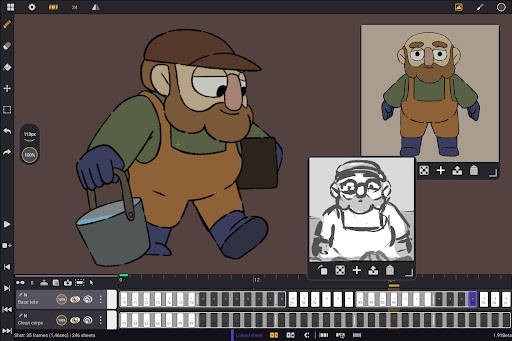
Add as many layers as you want, whatever the type: drawing, video, transformation, audio, or group. Import images, video clips, and audio files for draw-over, rotoscopy or lip-sync
- Comprehensive Drawing Tools:
Access a versatile brush set including pencil, charcoal, ink, and more. Customize brushes' smoothing, tip shape, and texture. Use the color wheel, sliders, and palettes to manage your colors and optimize your coloring process
- Onion Skinning and Animation-Focused Tools:
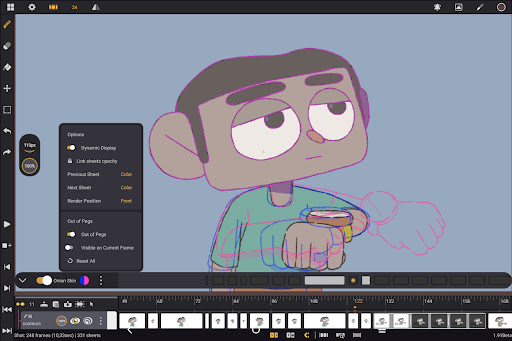
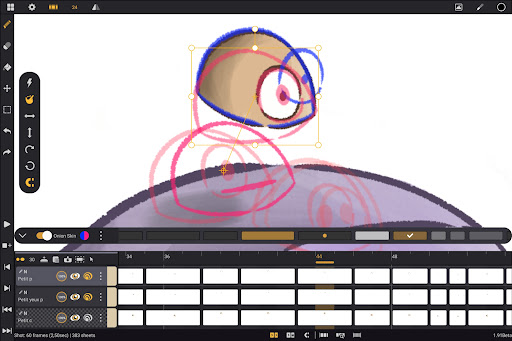
Display up to eight frames before and after the current frame with adjustable opacity and color settings. Use gestures for playback, flipping frames, selection, and transformation to streamline your workflow
- Customizable Workspace:
Switch between right- and left-handed interfaces, position sidebars as preferred, import unlimited reference images, and invert the canvas to check proportions
- Flexible Import and Export Options:
Export your animations in multiple formats such as .mp4, .gif, .png, .tga, .psd, and .peg. Import and export project files in .json, .xdts, and .oca formats to maintain timing and layer structure across industry standard software
- Supportive Learning Resources and Community:
Access detailed tutorials available on our YouTube channel to help you get started and make the most of Callipeg’s features. Join our Discord channel to contribute to the development
---
Callipeg is designed to provide a professional-grade animation environment on Android devices, with an emphasis on usability and flexibility. Whether you are working on feature-quality shots, bouncing ball exercises, 2D effects, or simple rough sketches, Callipeg offers the necessary tools to support your workflow.
Supported languages: English, French, Japanese, Simplified Chinese and Spanish
---
Why Choose Callipeg?
- All-in-one 2D animation app for Android—no subscription, just a one-time purchase
- Designed for pressure sensitive styluses for the most natural hand-drawn animation experience
- Constantly updated with new features and improvements
- Trusted by professional animators, illustrators, and studios worldwide
Start animating anywhere. Download Callipeg and transform your Android tablet into a powerful 2D animation studio today!
What's New
More fixing around onion skin crashes
Version Information
- Version
- 1.6.22
- Downloads
- 1K+
- Updated on
- Dec 15, 2025
- Released
- May 20, 2025
- Requires
- Android 11
Statistics
Google Play Rating History
Rating Distribution
Downloads Over Time
Callipeg: 2D Animation App has been downloaded times. Over the past 30 days, it averaged downloads per day.
Shaded area shows 30-day prediction based on historical trends
Historical data collection started recently. More data points will be available over time.
Callipeg: 2D Animation App - Google Play Rankings
Top Rankings
| Rank | Country | Category | List | Change |
|---|---|---|---|---|
| — |
Ranking History in
No ranking data available yet. Rankings are updated daily.
#9 in Top Paid Art And Design in United States


#1 in Top Paid Art And Design in France
#4 in Top Paid Art And Design in Canada
#12 in Top Paid Art And Design in Argentina

Callipeg: 2D Animation App users say on Google Play
 JmR 19
Love this app thank you for bringing this to android (・∀・) one thing I experienced is that the drawing while playing feature is not working, I hope you fix the issue.
 TG_Clips
great app, although lacking a few features compared to the ipad version, which i know will be implemented in the future. A few new features that would greatly improve the animation workflow and general drawing process would be a curved line drawing tool, a symmetry tool,a masking option for layers and more features for the fill tool such as spread control and to specify which layers to fill on. This app has great potential and I want to see it improve in the future.
 NoSignificantLillypop
a great app, however very buggy. while making an animation, i undid a bunch of times and the app crashed. now i cant open any project. ive tried duplicating it, opening and closing the app multiple times, exporting and importing it, clearing my storage, and restarting my tablet, but it still won't open. i had to uninstall and reinstall the app to get it to open projects again. it honestly sucks since i was really looking forward to using this.
 The Low-par Animator65
this app is alright as of now for the s6 Lite, but I just can't give it 5 stars because it's buggy as all heck! it's a struggle to animate anything as it's slow to register pausing, it keep buffering, then quitting out, then coming back into the app, and there isn't even any audio scrubbing and voice recording tools! I know this has just come out for android, and it is one of the only good options on tablet, but as of now, this is a buggy mess. hope for more recent updates in the future.
 Selena Lopo
Hello, I need some assistance I downloaded this app last Fri, I tried to import psd files but they show up blank so I tried to import it as a sequence from clip studio but the app keeps crashing. I got a pop-up notice saying to update the app and contact the developer. I would really appreciate some assistance before I have to request a refund. I was really looking forward to using this app.
ApkTrusted Ratings & Reviews
Similar Apps

ArtFlow: Paint Draw Sketchbook
Free

DreamBuild: Sketch to 3D
Paid
Handy Art Reference Tool
Paid
ibis Paint
Paid

MediBang Paint:Draw Art, Comic
Free
Picsart Animator: GIF & Video
Free

HiPaint: Sketch & Draw art
Free

Sketch Pro: Draw & Create Art
Free

Pixilart - Make Pixel Art
Free

AR Drawing - Paint and Sketch
Free
Nomad Sculpt
Free

Infinite Painter
Free

PixelFlow: Intro Video maker
Free

Sketchar AR Drawing Sketchpad
Free

Likcut
Free

Invitation Maker & Card Design
Free
Scan this QR code to download

Forwarding you to the page at Google Play market in seconds...
Open Google Play market now