
Wakelock Revamp - PowerManager v3.4.0
darken
About this app
Developer Description
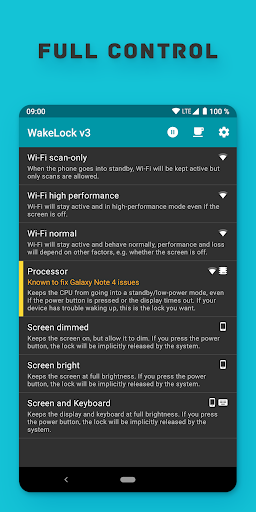
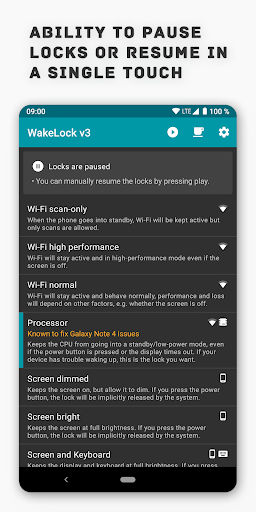
Easy control over Android's PowerManager.
You can use it on any Android phone or tablet.
Examples of what it can do for you:
• Force the PowerManager to keep the screen on
• Have the CPU still running in standby mode
• Ensure the Wifi connection keeps running at full performance
• Keep the screen on in full brightness or dimmed mode during movies
• Override power saving measures if they are causing issues
This is the modernized version of my app "WakeLock - PowerManager".
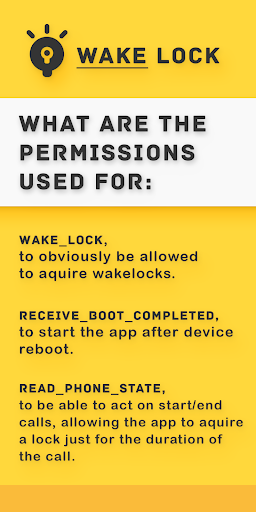
What the permissions are used for:
• WAKE_LOCK, to obviously be allowed to acquire wakelocks.
• RECEIVE_BOOT_COMPLETED, to start the app after device reboots.
• READ_PHONE_STATE, to act on start/ending calls, allowing the app to acquire a lock just for the duration of the call.
• INTERNET, for automatic crash tracking. There is an option to disable this, but why would you 🙁?
What's New
- Maintenance
- Dependency updates
Version Information
- Version
- 3.4.0
- Downloads
- 100K+
- Updated on
- Oct 27, 2021
- Released
- Sep 11, 2012
- Requires
- Android 4.1
Statistics
Google Play Rating History
Rating Distribution
Downloads Over Time
Wakelock Revamp - PowerManager has been downloaded times. Over the past 30 days, it averaged downloads per day.
Shaded area shows 30-day prediction based on historical trends
Historical data collection started recently. More data points will be available over time.
Wakelock Revamp - PowerManager users say on Google Play
 Brian
Brian
Samsung Galaxy Note 4 owners -- Install Wakelock Revamp PowerManager to fix the rebooting, overheating issue. You can purchase a new battery for less than $10 which I also suggest. The Wakelock app has an option in Settings for the Note 4. All you have to do is select it. Since installing Wakelock my phone has had zero issue. I have run the Amazon Music app for hours with very little battery drain. All other apps are working fine and the phone HAS NOT HAD ONE ISSUE. I hope everyone who uses this app to save them from having to upgrade to a new phone joins me in donating to this developer (the darken). He deserves our heartfelt appreciation and support.
 Shubam Gupta
Sir, I love your app please do something about Android 10. Is there is no way to implement all your app like function for Android 10. Please bring update for android 10. Thank you 😊❤️... Love to support your work also... But till now not working for android 10 even any function. Wake lock works, but when app is opened. Can you add the permission to change system settings. Might be then it works for the same.
 A Google user
Compared with the original app, this one doesn't seem to work, at least it makes no significant effect. For example, with "wifi high performance" and "processor" locks held (and battery optimization for this app is off), I tried connecting to my phone via SSH (rooted, with SSH server running) when screen is off, it took multiple seconds to respond to each key press, it's nearly the same as without the app. While the original one can make the latency some shorter.
 Stjepan Nikolic
in previous version i was able to see which apps are waking up too often making phone running slow. I then uninstalled/disabled that app. I can't see that option now, hence 2 stars.
 Dennis Flores
Doesn't work on android 10. Was a great app until it doesn't work on my Note 20 Ultra or even the Samsung S20 Ultra. Here's hoping the devs will fix and will modify my rating for the app.
ApkTrusted Ratings & Reviews
More from darken
See more apps






Similar Apps

Lib of Dev (Open Source)
Free

Cold Shower
Free
CPU Monitor - temperature
Free

Castro Premium - system info
Paid
ChargeNow
Free

Morning Routine Builder
Paid

Eye Break Reminder
Paid

Al Quran- Qibla & Prayer Times
Free

1Tap Cleaner (clear cache)
Free

Threat-Watch
Free

Norton Cleaner – Junk removal
Free

Progressive Pomo: Focus Timer
Paid

Clean Simple Eats +
Free

TAP Kiln Control Mobile
Free
Charge Meter
Free

G-CPU:Monitor CPU, RAM, Widget
Free
Scan this QR code to download

Forwarding you to the page at Google Play market in seconds...
Open Google Play market now