Calculator v6.3.0
Appsys


About this app
Developer Description
Super easy calculator for editing formulas by using a cursor
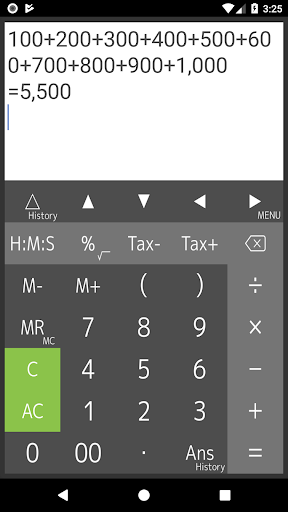
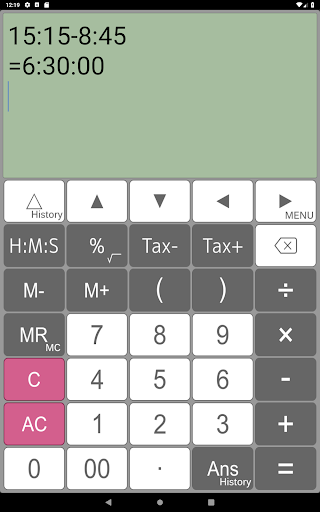
The cursor indicates on the display, and you can tap or press the arrow keys to quickly navigate to where you want to edit. It has a powerful, flexible and intuitive user interface with support for swiping to scroll through formulas and long-tap to copy and paste.
[ Features ]
- Easy operation for editing formulas
- Re-calculation by using history
- Four arithmetic operations, root, percentages, time, tax and parentheses calculations
- Memory, M+, M-, MR, MC
- Scroll up/down lines
- Cut, copy and paste
- Expressions and answer history
- Grouping separator and decimal point
- Various settings (Long tap MENU key)
[ What do you use "Calculator" for ]
- General calculator
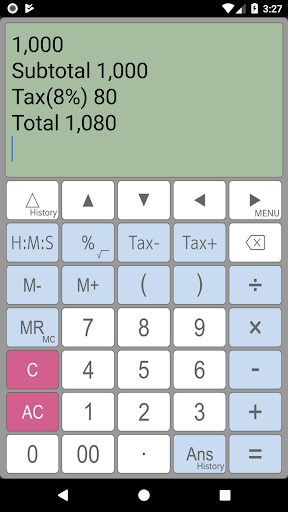
- Tax and VAT
- Sales, profit and cost
- Split a payments at restaurant
- Long formulas calculation
- Formula include parenthesis
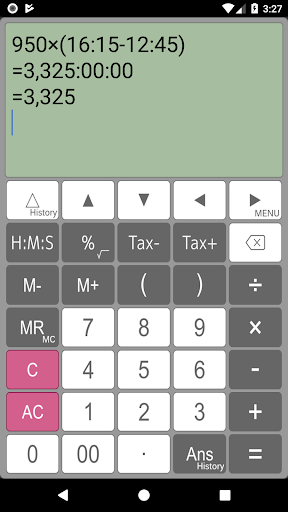
- Elapsed time, time addition and subtraction, production time, costing from time
[ Four arithmetic operations ]
1 + 2 - 3 × 4 ÷ 5 = 0.6
[ Time calculation ]
16:15 - 12:45 = 3:30:00
1.5 × (16:15 - 12:45) = 5:15:00
Press [H:M:S] key for changing value after calculation.
=5.25
[ Root calculation (Long press)]
√( 2 × 2) = 2
[ Percentage calculation ]
500 + 20% = 600
500 - 20% = 400
500 × 20% = 100
100 ÷ 500% = 20
[ Tax calculation ]
500 Tax+ = 525
525 Tax- = 500
[ Parenthesis calculation ]
( 1 + 2 ) × ( 3 + 4 ) = 21
( 1 + 2 ) ( 3 + 4 ) ( 5 + 6 ) = 231
[ Display ]
Calculator indicates long expressions on the display. If you may mistake to input expressions, you can correct this expressions easily and quickly using by back space key, arrow keys and C(clear) key.
[ Re-play and history functions ]
Calculator has "Re-play function". It indicates expressions that you inputted in the recently using by △(re-play)key. If you long-press re-play key, expressions history table is available.
[ Last answer and history functions ]
Last answer is that indicates the last calculation result by using Ans key. If you long-press Ans key, a last answer history table is available.
[ Percent calculator ]
If you would like to calculate “20% more $50”, you can input 50+20% and get a result.
[ Tax calculator ]
This calculator can store tax rate in the setting. And you can get price including / excluding tax easily and quickly using by Tax+/Tax- keys.
[ Disclaimer ]
Please note in advance that Appsys is not responsible for any damage or lost profits caused by the use of this software, or any claims from third parties.
What's New
Version Information
- Version
- 6.3.0
- Downloads
- 5M+
- Updated on
- Jul 8, 2025
- Released
- Aug 8, 2013
- Requires
- Android 6.0
Statistics
Google Play Rating History
Rating Distribution
Downloads Over Time
Calculator has been downloaded times. Over the past 30 days, it averaged downloads per day.
Shaded area shows 30-day prediction based on historical trends
Historical data collection started recently. More data points will be available over time.
Calculator users say on Google Play
 A Google user
it helps me cheat
A Google user
I just love it when it says calculation error it makes me think I broke the calculator and it makes me laugh
A Google user
What kind of calculator has adds
A Google user
Ads for a calculator app?! Collecting user info for ads that are more useful to me? If I open a calculator, it's to do math...not browse advertisements! Uninstalled!
ApkTrusted Ratings & Reviews
More from Appsys
See more apps

Similar Apps
Champ Scientific Calculator
Free
Calculator Pro: Calculator App
Free

Scientific Calculator Pro
Paid
All in One Calculator
Free

OneCalc: All-in-one Calculator
Free
Simple Calculator
Free

CalcTape Calculator with Tape
Free

KiWi Vault: Hide Photos, Video
Paid
Smart Calc: Daily Calculator
Free
Scientific Calculator
Free
Real Scientific Calculator
Free

Calculator
Free
HiPER Scientific Calculator
Free

EMI Calculator Premium
Paid
Scientific Calculator He-580
Free

Tally Counter & Score Clicker
Free
Scan this QR code to download

Forwarding you to the page at Google Play market in seconds...
Open Google Play market now