
RICOH IWB Client v1.4.1
Ricoh Co., Ltd.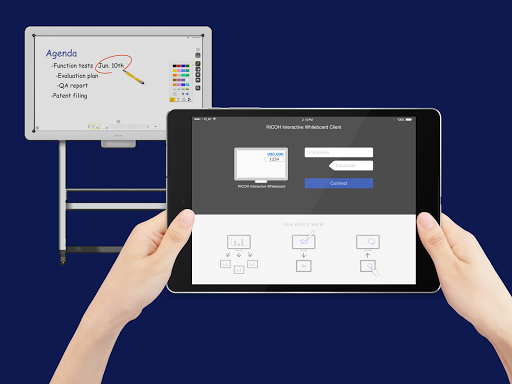
About this app
Developer Description
RICOH IWB can enforce your discussion more interactively and productively.
*To use RICOH Interactive Whiteboard Client, RICOH Interactive Whiteboard ( https://www.ricoh.com/products/interactive-whiteboards ) and the license for remote whiteboard function are required.
■Features available
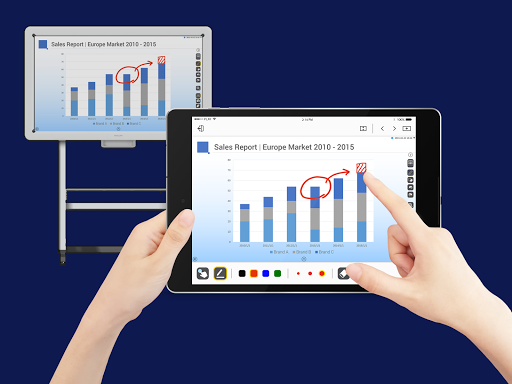
・View screen of RICOH Interactive Whiteboard
・Draw strokes on the screen of RICOH Interactive Whiteboard
・Draw markers on RICOH Interactive Whiteboard (drawn marker automatically disappears in a few seconds after it is drawn)
・Delete strokes on RICOH Interactive Whiteboard
・Add new pages on RICOH Interactive Whiteboard
・Turn pages of RICOH Interactive Whiteboard
・Switch external inputs of RICOH Interactive Whiteboard
・Upload image file to RICOH interactive whiteboard
■How to use
1. Start a RICOH Interactive Whiteboard, and start a Remote Whiteboard session
2. Run the RICOH Interactive Whiteboard Client
3. Input IP Address or host name of the RICOH Interactive Whiteboard and the passcode displayed on the RICOH Interactive Whiteboard
■Supported OS
Please refer to "Notes for Users" from the link below.
http://support.ricoh.com/bb_v1oi/html/oi/r/model/op10/op10en.htm
*The Requires Android in Additional Information section indicates whether this application can be installed or not. This is different from supported OS, on which operation is guaranteed.
■Connectable RICOH Interactive Whiteboard
・D5510 (firmware version 1.6 and later)
・D2200
・RICOH Interactive Whiteboard Controller Type 1
・RICOH Interactive Whiteboard Controller Type 2
・RICOH Collaboration Board Controller Type 3
・RICOH Interactive Whiteboard Controller OP-5/OP-10 (with RICOH Interactive Whiteboard Lt for Open Controller)
What's New
-Security update
Version Information
- Version
- 1.4.1
- Downloads
- 10K+
- Updated on
- Apr 27, 2023
- Released
- Feb 15, 2016
- Requires
- Android 7.0
Statistics
Google Play Rating History
Rating Distribution
Downloads Over Time
RICOH IWB Client has been downloaded times. Over the past 30 days, it averaged downloads per day.
Shaded area shows 30-day prediction based on historical trends
Historical data collection started recently. More data points will be available over time.
RICOH IWB Client users say on Google Play
 A Google user
Really cool app to use with your whiteboard.
ApkTrusted Ratings & Reviews
More from Ricoh Co., Ltd.
See more apps
RICOH Device Manager NX
Free
THETA+
Free

RICOH THETA
Free

RICOH Smart Device Connector
Free

RICOH360 Tours
Free
RICOH360 Tours
Free

RICOH360:THETA Capture App
Free
RICOH Remote Field Settings
Free

RICOH CloudStream
Free

RICOH M 2310 Mobile Print&Scan
Free
RICOH Support Station
Free

RICOH360 Projects
Free
Scan this QR code to download

Forwarding you to the page at Google Play market in seconds...
Open Google Play market now