
Video Creator v1.4.1.A.0.3
Sony Corporation
About this app
Developer Description
Video Creator lets you quickly and easily create and share short videos.
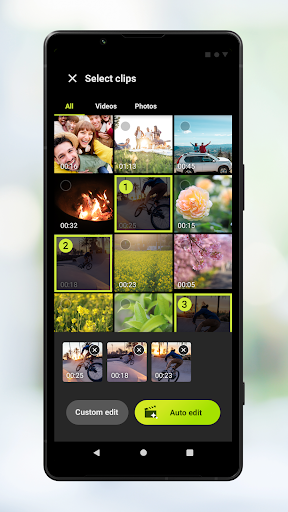
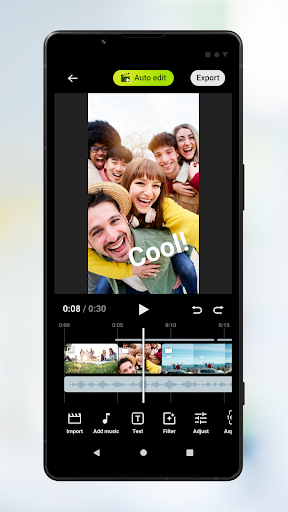
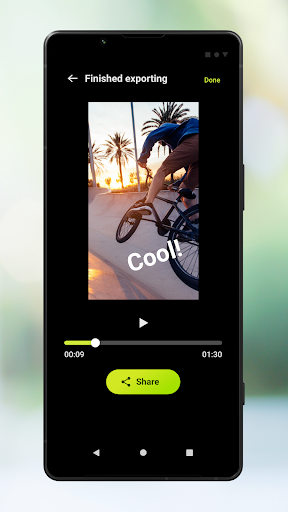
Auto edit: Easily create 30 second videos by selecting your clips (video or photos) and music then tapping Auto edit. The completed video can be shared as-is, or you can further edit the length of clips, adjust video filters, color, brightness and more. If you select a different music track on the Auto edit screen, you can create a new video with a different mood.
Custom edit: Choose how to cut your clips (video or photos), add your own music tracks, and speed up/slow down clips to create a video entirely to your liking. The clips you select will be placed on the timeline.
Main editing features
- Import: Import photos and videos.
- Music: Choose from music presets. In Custom edit you can insert music files stored on the device.
- Text: Insert text on the video. Font and color can also be adjusted.
- Filter: Choose from filters to apply various textures and colors.
- Adjust: Adjust the exposure, contrast, highlights, shadows, saturation, color temperature, and sharpness.
- Aspect ratio: Set the aspect ratio.
- Export: Change the resolution and frame rate.
- Volume: Change the volume. In the Fade menu you can fade in or fade out inserted music tracks.
Version Information
- Version
- 1.4.1.A.0.3
- Downloads
- 1M+
- Updated on
- May 27, 2025
- Released
- Sep 3, 2023
- Requires
- Android Varies with device
Statistics
Google Play Rating History
Rating Distribution
Downloads Over Time
Video Creator has been downloaded times. Over the past 30 days, it averaged downloads per day.
Shaded area shows 30-day prediction based on historical trends
Historical data collection started recently. More data points will be available over time.
Video Creator users say on Google Play
 Leonhart Leong
Very thank & appreciate for the app thus no need get a third party app. By the way there is seem a bug where import some bright white (hair or plate) in 119.88fps clip capture by CinemaPro, there will be auto over-exposure by default (maybe because of high ISO during recordeing?). Can pls fix if this happened to all, thank. Oh yeah if clip can be fade in/out too then would be great. - request fade in/out video/ image.
 John Markward
An excellent, and simple video editing tool. Very nice that it is first party and add free. My only complaints are that I wish the interface could rotate to landscape mode, and that there is no chroma-keying (green/blue screen editing). If chroma keying is added in the future, I will definitely rate 5 stars! I have also noticed it doesn't handle HDR content well at all.
 Gleb Palchin
Missing HDR support, without that I don't see a point using it right now. Will update my review once the support will be added.
 Amigo Favor
it still need lot of options... please fix it
 O Daetsemoh
It's really limited and only available for the latest Xperia models. Last year's models are not supported. There are way better editors out there
ApkTrusted Ratings & Reviews
More from Sony Corporation
See more apps
Sony | Music Center
Free

Sony | Sound Connect
Free

REC Remote: Sony IC Recorder
Free

Music
Free

Fiestable
Free

Advanced car audio setting
Free

HDD Audio Remote
Free

Content Browser Mobile
Free

Video & TV SideView : Remote
Free

Living Decor
Free

My BRAVIA
Free

mocopi
Free

Sony | Imaging Edge Mobile
Free

TV Control with Smart Speakers
Free
Sony | Creators' App for ENT
Free

mocopi link
Free
Scan this QR code to download

Forwarding you to the page at Google Play market in seconds...
Open Google Play market now