
DRIVE Electric for Tesla vVARY
KlokkProjects


About this app
Developer Description
This Wear OS app combines NFC, Bluetooth and the internet to access your Tesla.
* ANNOUNCEMENT
Tesla's recent announcement that they will charge developers for access to the Fleet API starting in February 2025 will result in the discontinuation of remote access. The basic app will now only work with NFC or Bluetooth access near the vehicle. A new premium subscription plan will provide remote access to the Fleet API and will be required for older Tesla models without BLE hardware. Please be aware of this before purchasing the app. Subscription revenue will be used to cover developer costs to Tesla and does not contribute to the app's revenue. The change will take effect without further notice. If in doubt, please read the disclaimer that states that you were and are willing to take the risk set forth in the disclaimer. Please, use the mobile app if you want to subscribe.
Also read the section "Is my Wear OS smartwatch compatible?" in the FAQ before buying this app. Tizen OS is not supported!
TOP FEATURES
- Supports NFC and Bluetooth access.
- Remote access (internet*) available through monthly subscription.
- The app will never see your credentials or proxy anything through any third-party server. The app will only communicate with Tesla's servers or directly with the vehicle itself using NFC or BLE.
- Quickly unlock, drive or send commands over BLE when near the vehicle.
- Pair the app as a key card and tap the b-pillar to lock/unlock & drive.
- Tiles: Six different tiles for quick access to commands.
- Watch complication: Battery level (time remaining when charging).
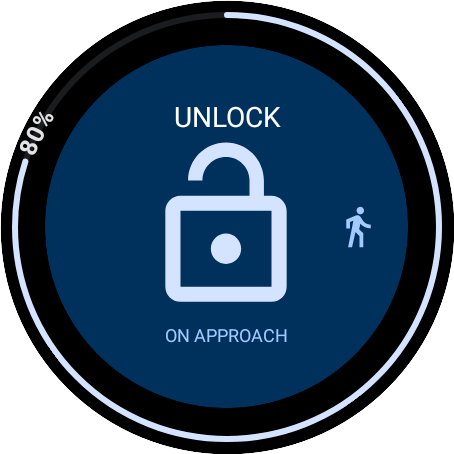
- On Approach: Tap to delay a command until you arrive at your vehicle. Useful when carrying heavy groceries from the shop. (#2)
OTHER FEATURES
- Most commands from the official app are supported over BLE.*
- Use compass view or map view to find your vehicle when parked. (#3)
- Optional PIN code access for added security.
- And more...
INSTRUCTIONS
- Read the first three sections 'Start here...', 'Important Login Information' and 'General tips', to get going: https:/drive.klokkprojects.no/FAQ
- The Bluetooth key needs location access to search for the vehicle\'s BLE signal even when the app is not in use, such as from a tile. Please allow "all-the-time" permission if you want the vehicle to connect from the tiles.
#1. Only models with built-in NFC & Bluetooth LE: (Model 3/Y & 2021 S/X onward).
#2. Example: Use the OnApproach tile and choose the trunk command. Tap ok to confirm. Within 10 minutes, as soon as you approach your vehicle, the trunk will open. Also see #1.
#3. In demo mode the vehicle is stationary and located in Oslo, Norway. Demo mode is for showcasing features and will not interact with a real vehicle.
This app is not affiliated with Tesla, Inc.
The car manufacturer can at any point render this app useless by alter, stopping access to, or by any other means restrict access to the APIs used by this app. No refund will be given. Keep your official phone app available at all times.
No credentials are stored in this app or otherwise shared with any 3rd party or the developer. Tokens from the phone app are stored locally in the encrypted key manager provided by the watch OS. If you choose to save your password for the Remote Start feature, you do so at your own risk.
It is strongly advisable to protect your app or watch with PIN-code access in case your watch gets stolen, as this app otherwise will give access to vital vehicle operations.
Please read and accept the disclaimer on the watch before use.
Privacy Policy: https://drive.klokkprojects.no/privacy
What's New
- Fixed Tonneau commands for the CyberTruck.
- Minor bug fixes and improvements.
In-app purchases
$1.99 - $9.99 per item
Version Information
- Version
- -
- Downloads
- 5K+
- Updated on
- Dec 4, 2025
- Released
- Nov 10, 2021
- Requires
- Android 8.0
Statistics
Google Play Rating History
Rating Distribution
Downloads Over Time
DRIVE Electric for Tesla has been downloaded times. Over the past 30 days, it averaged downloads per day.
Shaded area shows 30-day prediction based on historical trends
Historical data collection started recently. More data points will be available over time.
DRIVE Electric for Tesla - Google Play Rankings
Top Rankings
| Rank | Country | Category | List | Change |
|---|---|---|---|---|
| — |
Ranking History in
No ranking data available yet. Rankings are updated daily.
#16 in Top Paid Lifestyle in United States

#22 in Top Paid Lifestyle in Philippines


#22 in Top Paid Lifestyle in Saudi Arabia
#22 in Top Paid Lifestyle in Turkey
DRIVE Electric for Tesla users say on Google Play
 Mark Rudholm
Love this app. Really enhances the value of my smart watch. It supports all three Tesla access modes; Bluetooth LE, NFC, and online. The Tesla credentials handling is easy and secure. Easily worth the money.
 Tracy Rieless
Originally only gave this 1 star because it wouldn't connect to my car. Runar emailed me and gave some suggestions to get it working. I ended up uninstalling it from both devices, removing the permissions and letting the token expire. I reinstalled the next day and everything seems to be working now so I updated this review rating. A little more difficult setup than i would have hoped for so I couldn't give it 5 stars but it all seems to be working now. Thanks for the support.
 Gary Garland
Can use with Bluetooth on your watch as an emergency key. Remote features now require a monthly subscription.
 Spencer Putt
Unfortunately due to some external factors, this app no longer works nearly to the effectiveness it was when I bought it. Very disappointing. 1. There is now a subscription fee to access the vehicle over the Internet, such as to turn on climate control. 2. The Bluetooth key can't connect in the background, so you're required to use your watch to unlock the car. 3. The key disconnects during the drive so the car won't lock itself, requiring you to again use your watch.
 Andrew M
Used to work with out phone being in range of car. Upgraded to 3.0hw and can no longer operate anything remotely from my watch. Reinstalled keys, reinstalled app, reinstalled keys, nothing. Only functions now if the watch is connected to the phone. Essentially nonfunctional. Developers solution is to do what i just said i did lol. Came back a year later. Still non functional.
ApkTrusted Ratings & Reviews
Similar Apps
Tesla
Free

ChargePoint
Free

PlugShare - EV & Tesla Map
Free

ev.energy: Home EV Charging
Free

A Better Routeplanner (ABRP)
Free

Elton - The EV charging app
Free
Chargehub EV & Tesla Charging
Free

BimmerCode for BMW and MINI
Free

Driving Theory Test 2026 Kit
Free

DFW Airport
Free
SmartRace for Carrera Digital
Paid

Ford™
Free

Lexus
Free

Citymove: Parking & Transport
Free
Scan this QR code to download

Forwarding you to the page at Google Play market in seconds...
Open Google Play market now