
Aero XC : weather for flying vRevine 7.416
Ori:Go










About this app
Developer Description
Weather forecast with high vertical profile. For flying and professionals.
Do you want to know what the wind will blow at height or at the ground?
Would you like to go soaring or are you looking for proper thermals?
Do you fly paragliding, rogalo or ultralight or maybe with something bigger?
Then this application is for you.
Aero XC displays forecast information as easily as possible.
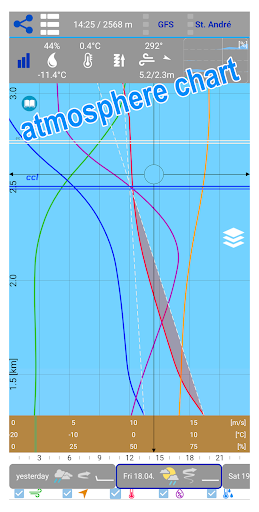
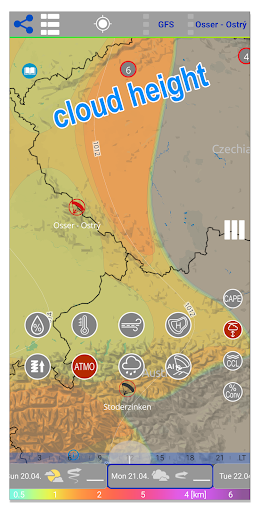
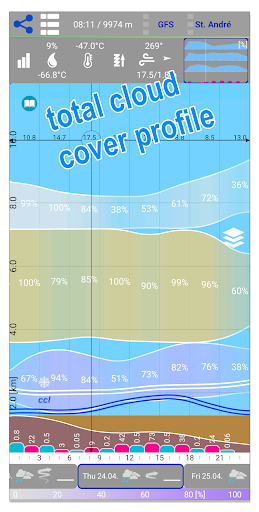
In a clear vertical profile from the ground up to a height of about 12 km, the basic parameters such as force (color scale is adapted to flying) and wind direction, gusts and temperature, humidity and dew point are displayed.
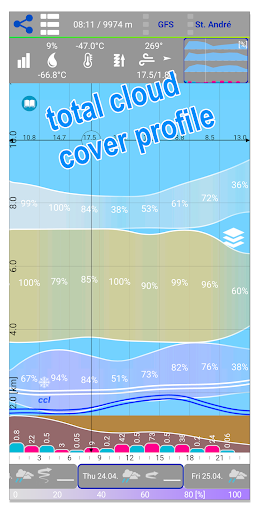
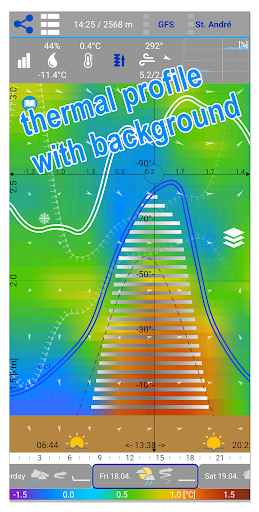
Furthermore, the power and height of instability, convection condensation level, zero isotherm and clouds of all floors on a scale. The cloud floors are color-coded and correspond to the clouds on the map.
A new feature is the indication of the inverse level, which can affect the thermal flow.
Everything can be zoomed in the range from about 2km to about 12km above sea level.
To obtain the vertical profile of a particular place simply hold your finger over any place or maps of the airport or the starting area.
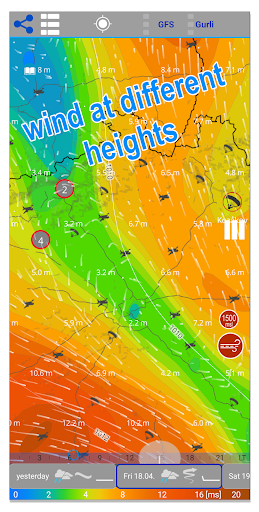
On the map, you can view the different levels you need or look at the extent of unstable areas or simply rely on the map usability.
The map shows gusts both absolute and relative, which is the difference between the basic wind and the gust and is more suitable for flying.
A distinctive Jet Stream map is intended for professionals.
You can display clouds on maps separately or combine them for each floor. The Cape index allows you to make the most of the day while avoiding storms.
There is a map of pressure units and for the USA and its surroundings we also have a map of queues.
The bottom bar then shows schematically the basic characteristics of the day.
There are thousands of airports and start-faces, you can select them on map or from the online list.
The sun card tells you when to land, unless you are flying IFR. :)
There are 3 prediction models available and further improvements are being worked on.
The application is free and is funded by voluntary user contributions.
In-app purchases
$0.99 - $11.99 per item
Version Information
- Version
- Revine 7.416
- Downloads
- 10K+
- Updated on
- Oct 22, 2025
- Released
- Jul 15, 2016
- Requires
- Android 10
Statistics
Google Play Rating History
Rating Distribution
Downloads Over Time
Aero XC : weather for flying has been downloaded times. Over the past 30 days, it averaged downloads per day.
Shaded area shows 30-day prediction based on historical trends
Historical data collection started recently. More data points will be available over time.
Aero XC : weather for flying - Google Play Rankings
Top Rankings
| Rank | Country | Category | List | Change |
|---|---|---|---|---|
| — |
Ranking History in
No ranking data available yet. Rankings are updated daily.
#34 in Top Grossing Weather in Argentina


#38 in Top Grossing Weather in Mexico

#57 in Top Grossing Weather in Poland


#78 in Top Grossing Weather in Italy

Aero XC : weather for flying users say on Google Play
 Daniel White
Bit of a learning curve, but once I read a bit of the online manual it made sense. Absolutely incredible amount of information in this app and I love the format!! I just wish there was an iOS version! I'd happily pay for this app! Please donate to the devs! This app is fantastic and needs to stay alive and updated!
 Chris Rudisill
I think this is giving me a lot of great information, but I'm not sure how to read all of it (for example... Is the time strip at the bottom of the screen local time or UTC). A feature (if you are looking to add) would be the ability to enter a departure and destination and indicate a distance and have it pick locations along your route to display. It can obviously be done manually, but automation would be nice. Overall, I would just like to see better instructions and user guide.
 Costas Lilitsas
Minus 2 stars because it can't detect the current location.
 David Reitter
advertised for flying, this app is only good for gliding I think. It starts with something basic.. adding a location. I fly an airplane that's located near Newark airport, which has good weather data, so I add EWR. why an international app doesn't take a standard ICAO Code (4 Letters) is beyond me. what does it find for EER? some "Newry Airport". what gives? the UI is unintuitive and nonstandard. As a GA pilot (and not in a glider) I want different data than this...
 alex marko
it's fine to show ads in the free version of the app. but lock TOMORROW forecast in forecast app... if you need more money - make it fully payware. you do not deserve free-to-pay label.
ApkTrusted Ratings & Reviews
More from Ori:Go
See more apps


Similar Apps





Scan this QR code to download

Forwarding you to the page at Google Play market in seconds...
Open Google Play market now