
Camera Opus vVARY
Mobimax Apps


About this app
Developer Description
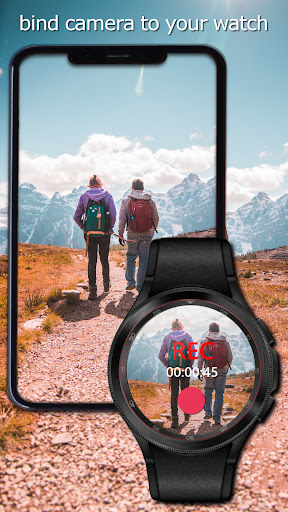
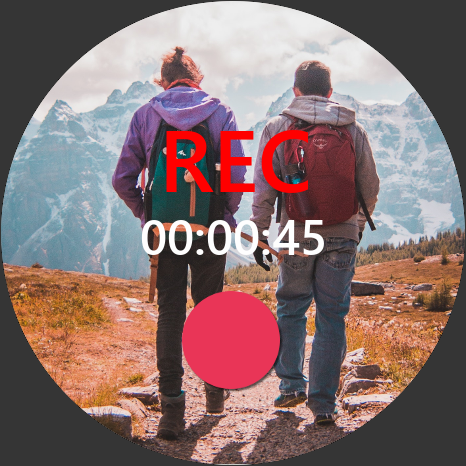
Bind phone camera to your smartwatch.
Camera Opus supports smartwatches with: Wear OS, Harmony OS, Garmin and Fitbit.
Key features:
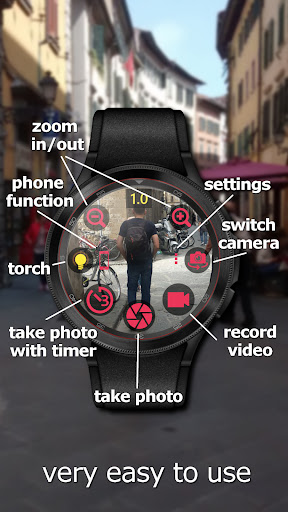
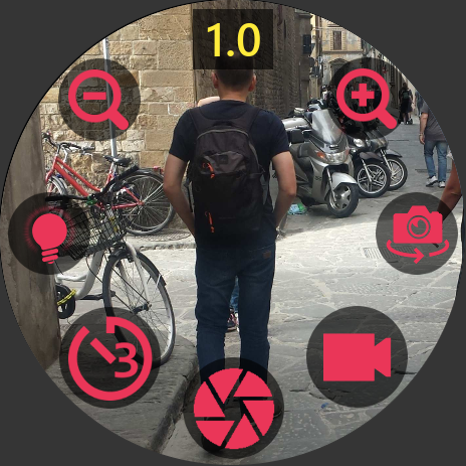
• Take picture
• Take picture with time delay
• Video recording
• Camera preview on watch
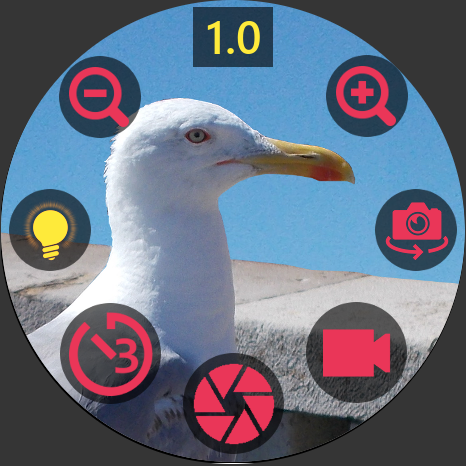
• Zoom in/out
• Torch
• Camera switch
• Motion detection sensor
• Find My Phone
• QR/Bar codes scanner
When to use? Examples.
1) Turn on your phone’s torch and use your smartwatch to see an inaccessible places.
2) Take a selfie with friends using only smartwatch to trigger camera button from distance.
3) You can watch your baby using smartwatch on a wrist and phone in baby’s room using camera preview or observe the room by motion detection engine.
4) Scan QR codes or bar codes from products and labels.
Camera Opus needs below permissions to work properly:
1. Camera permission: to control phone camera.
2. Microphone permission: to record video with audio.
3. Storage permission: to save photos and video recording files.
4. Display over other apps: this function allows to run camera view direct from background by watch app. Important: since Android 10 you have to add this permission manually in phone Settings / Apps / Camera Opus / Advanced.
5. Location: only when you enable adding location to taken pictures.
ⓘ The app required to be added to the list of apps which ignore Power Saving function. Otherwise background service will be killed by some phone manufacturers like Huawei or Xiaomi. Background service allows to connect to watch app automatically. It takes a little battery power and you always can turn it off in app’s settings in section Power Management if you don’t use this app for further time.
ⓘ This application works with Wear OS smartwatches since Wear OS version 2.1. Download watch app from Play Store on your watch.
ⓘ For Harmony OS powered watches you have to download app from Health / AppGallery.
ⓘ For Garmin watches you have to download app from Garmin Connect IQ Store. Supported the most of touch and button devices.
ⓘ For Fitbit watches you have to download app from Fitbit Apps Gallery.
ⓘ FREE version limitations: not all functions are available. Picture and video quality max. 1MP.
ⓘ You can buy premium version by phone or watch app in case Wear OS watch. For all watches you can buy premium version in Camera Opus on phone.
Found bugs and ideas please send us at support email. In case bugs click settings view in Camera Opus on phone, scroll down and click 'Send bugs report to developer' and write shortly what happens.
What's New
Updated camera api.
Added 16KB page size for all native libraries.
Compiled under Android 16.
In-app purchases
$3.99 per item
Version Information
- Version
- -
- Downloads
- 500K+
- Updated on
- Dec 11, 2025
- Released
- Dec 12, 2022
- Requires
- Android Varies with device
Statistics
Google Play Rating History
Rating Distribution
Downloads Over Time
Camera Opus has been downloaded times. Over the past 30 days, it averaged downloads per day.
Shaded area shows 30-day prediction based on historical trends
Historical data collection started recently. More data points will be available over time.
Camera Opus users say on Google Play
 Com Func
A handy little app. Don't get waylaid by the reviews. It's confusing to have 2 devices active and talking to each other, so I think a lot of people just don't get it. (1) You pay to get rid of ads. This is normal. (2) The refresh rate is normal for bluetooth. (3) You can't see much but if you tap the watch 7 times, it goes full screen, and if you swipe down it gets rid of the buttons. (4) This is using camera on your phone. Your watch doesn't have a camera. (5) The developer is very responsive.
 Rifqi Yusry
Using the premium version with my Huawei GT4. Works pretty much as advertised. Only complaints are the slow preview on the watch and lack thereof when video recording. My guess is watch is just not built for it.
 Sukiman Tongkodu
Already buy pro version, there is no option to switch between which camera lens, only use 3rd and lower quality lens on my redmi note 13 pro 5g. And camera preview on my GT4 is so laggy and not in full preview like photo on this app ads. Do not buy it if you don't won't lose your money
 Pratyush Pol
I'm reviewing the free version. The only real functionality of this app is so that you can take group pictures from a distance. I thought that the camera would open up while the phone was locked, so that if I lost my phone I could also see where it was, but no. This app seems to only open up on the lock screen 2% of the time. I did this on the Fitbit Versa 2.
 Reneeda Kivimaa
The most useless application I have ever installed. Should have believed the previous reviews but I was slightly hopeful. Just buy a Bluetooth camera shutter remote because Huawei watch GT5 does not allow you to operate your camera. This app just downloads a new camera app to your phone that is absolutely useless. Also, after installing this, my watch just activated itself every 30 seconds, asking me to open this Opus app. Doesn't matter if I restarted the watch, still demanded to open the Opus.
ApkTrusted Ratings & Reviews
More from Mobimax Apps
See more apps







Similar Apps

Timestamp Camera Pro
Paid
Cameringo Lite. Filters Camera
Free

MiX Camera for Mi Camera
Free

Cool S20 Camera Galaxy S20 cam
Free

eZy Watermark Photos Pro
Paid

Beauty Sweet Plus - Beauty Cam
Free

celebrate: share photo & video
Free

Cymera - Photo Editor Collage
Free

Framelapse 2 Time Lapse Camera
Free

PicMaster - AI Photo Editor
Paid
Camera - HD Camera for Android
Free
Camera360 Lite -Stylish Filter
Free
POV – Disposable Camera Events
Free

Video Recorder
Paid

Professional HD Camera
Free

Camera FV-5 Lite
Free
Scan this QR code to download

Forwarding you to the page at Google Play market in seconds...
Open Google Play market now