OBD Fusion (Car Diagnostics) v6.14.0
OCTech, LLC







About this app
Developer Description
Read OBD2 data and DTCs Create custom dashboards Enhanced diagnostics available
Is your check engine light on? Do you want to monitor fuel economy and usage in your vehicle? Do you want cool looking gauges on your Android phone or tablet? If so, then OBD Fusion is the app for you!
OBD Fusion is a vehicle diagnostics tool that connects to OBD-II and EOBD vehicles. Not sure if your vehicle is OBD-2, EOBD or JOBD compliant? See this page for more information: https://www.obdsoftware.net/support/knowledge-base/how-do-i-know-whether-my-vehicle-is-obd-ii-compliant/. OBD Fusion works with some JOBD compliant vehicles and in some cases requires modifications to the connection settings in the app. Please contact us for more information.
You must have a compatible scan tool to use this software. For recommended scan tools, see our website https://www.obdsoftware.net/software/obdfusion. Please note that cheap ELM clone adapters can be unreliable. OBD Fusion can connect to any ELM 327 compatible adapter, but the cheap clone adapters tend to have slow refresh rates and might disconnect randomly.
OBD Fusion for Android is brought to you by OCTech, LLC, the developers of TouchScan and OBDwiz for Windows and OBDLink for Android. Now you can get the same great features for your phone or tablet.
OBD Fusion has the following features:
• Android Auto support. Note that Android Auto does not support dashboard gauges.
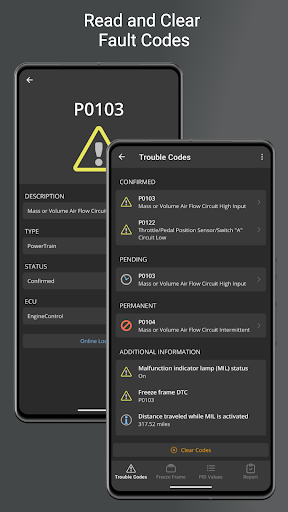
• Read and clear diagnostic trouble codes and your Check Engine Light (MIL/CEL)
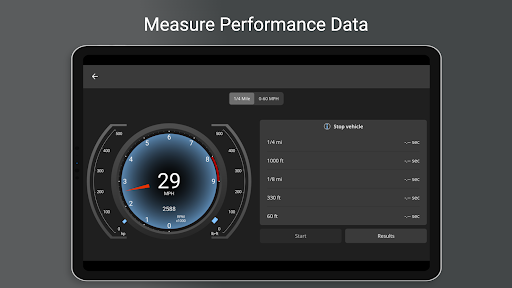
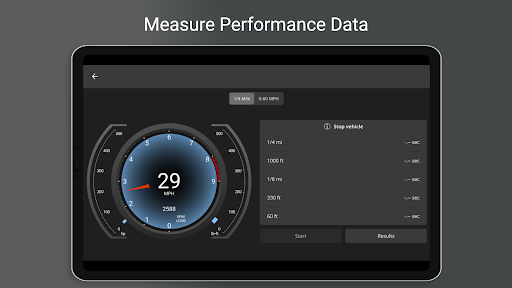
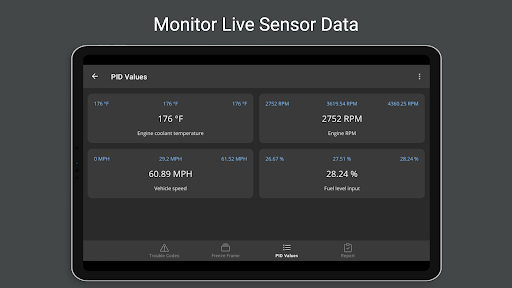
• Real-time dashboard display
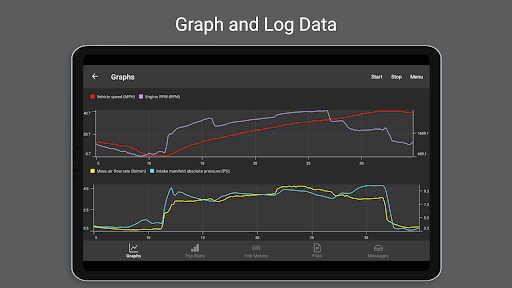
• Real-time graphing
• Fuel economy MPG, MPG (UK), l/100km or km/l calculation
• Create custom enhanced PIDs
• Includes some built-in enhanced PIDs for Ford and GM vehicles including engine misfires, transmission temp, and oil temp.
• Multiple trip meters for tracking fuel economy, fuel usage, EV energy economy, and distance
• Customizable dashboards with fast dashboard switching
• Log data to CSV format and export for viewing in any spreadsheet application
• Display battery voltage
• Display Engine Torque, Engine Power, Turbo Boost pressure, and air-to-fuel (A/F) ratio (vehicle must support the required PIDs)
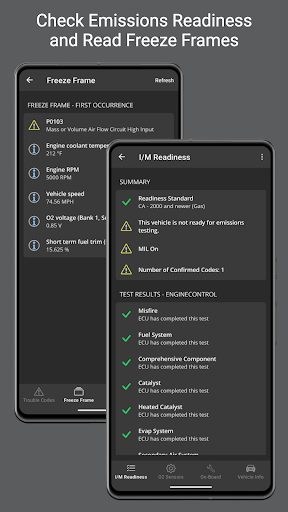
• Read freeze frame data
• English, Imperial, and Metric units that are fully customizable
• Over 150 supported PIDs
• Displays vehicle information including VIN number and calibration ID
• Emissions readiness for each US state
• Oxygen Sensor Results (Mode $05)
• On-board Monitoring Tests (Mode $06)
• In-performance Tracking Counters (Mode $09)
• Full diagnostic report that can be stored and emailed
• Option to select the connected ECU
• Built-in database of fault code definitions
• Bluetooth, Bluetooth LE*, USB**, and Wi-Fi*** scan tool support
• Available in English, Spanish, French, Italian, German, Czech, Greek, Chinese, and Portuguese
* Your Android device must have Bluetooth LE support and be running Android 4.3 or newer.
** You must have a tablet with USB host support to connect using a USB device. Only FTDI USB devices are supported.
*** Your Android device must support ad-hoc Wi-Fi connections to use a Wi-Fi adapter.
OBD Fusion is a trademark of OCTech, LLC registered in the U.S.
What's New
- Minor bug fixes and improvements.
In-app purchases
$14.99 - $74.99 per item
Version Information
- Version
- 6.14.0
- Downloads
- 100K+
- Updated on
- Oct 7, 2025
- Released
- Jun 7, 2012
- Requires
- Android 6.0
Statistics
Google Play Rating History
Rating Distribution
Downloads Over Time
OBD Fusion (Car Diagnostics) has been downloaded times. Over the past 30 days, it averaged downloads per day.
Shaded area shows 30-day prediction based on historical trends
Historical data collection started recently. More data points will be available over time.
OBD Fusion (Car Diagnostics) - Google Play Rankings
Top Rankings
| Rank | Country | Category | List | Change |
|---|---|---|---|---|
| — |
Ranking History in
No ranking data available yet. Rankings are updated daily.
#3 in Top Paid Communication in United States

#3 in Top Paid Communication in Australia
#3 in Top Paid Communication in United Kingdom
#4 in Top Paid Communication in Vietnam
OBD Fusion (Car Diagnostics) users say on Google Play
 Jamo
Jamo
Overall, very much worth the $!! I paid for this app, plus the enhanced diagnostic capabilities for my '21Mazda CX30. Ive tried many other OBD2 apps, even paid for the pro version of a few others, but in comparison to OBD Fusion, none have come close to providing the level of diagnostic capabilities as FUSION. This app has given me insight to inner workings of my vehicle that I didnt think was possible. Has already paid for itself 10 fold in the 2 months ive used it! Highly recommend!
 private private
2024 Update: Please add phone current battery, date, time as a DISPLAY. I love using this app. However I was in the middle of nowhere, app refused to connect to my OBD without validating the app. I had no internet access. This needs to be fixed asap. If there is no internet, at least allow the app to run in normal mode.(temporarily disable the enhanced diagnostics). Also my OBD adapter is WiFi, so the enhanced diagnostics randomly get enabled please fix it.
 Timothy Garreans
App is ok, I was directed here from the Torque App, people were commenting saying this app does Android Auto..before you pay, even 5bucks it's not worth the Android auto it displays. While it's ok on the phone, it is glichie. And you can pay extra for your car (mine is a 23 Explorer ST) still not worth it. So 20 bucks work and junk so do what you want but I'll save you the time and money. I'll give them the benefit that maybe there working on making it better but Android Auto is a big deal
 beanieb2009
Great app but unless I'm missing something there is no option for gauges in Android Auto. That was my only reason for purchasing this app and it turns out it's the same output in Android Auto as the free app without paying. The output is delayed as well so much so that the RPM is back to idle before the increase even registers. I'm using a VEEPEAK adapter too, not one of those cheap ones so that's not the issue. I'm pretty disappointed but hopeful the devs will add gauges.
 Mr. S
Mr. S
I purchased this car diagnostic program expecting it to include all the features I needed, as advertised. Unfortunately, after buying it, I discovered that I have to pay an additional $15 to access the essential services I assumed were already included in the initial price. This lack of transparency feels misleading and unfair. If you're considering purchasing this program, I highly recommend checking exactly what you're getting for the price to avoid disappointment.
ApkTrusted Ratings & Reviews
Similar Apps

FIXD OBD2 Scanner
Free

Carista OBD2
Free
AUTOsist Fleet Maintenance App
Free

BimmerCode for BMW and MINI
Free
ScanMaster for ELM327 OBD-2
Free
OBDocker - OBD2 Car Scanner
Free

Car Scanner ELM OBD2
Free
EOBD Facile: OBD 2 Car Scanner
Free
myCadillac
Free

Copart - Online Auto Auctions
Free

myChevrolet
Free
Froling Connect
Free
xHP Flashtool
Free
Automile
Free

ev.energy: Home EV Charging
Free

Klarstein
Free
Scan this QR code to download

Forwarding you to the page at Google Play market in seconds...
Open Google Play market now