
Dashboard Screen Saver v2.96
RafC02




About this app
Developer Description
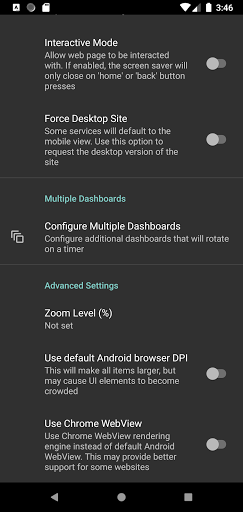
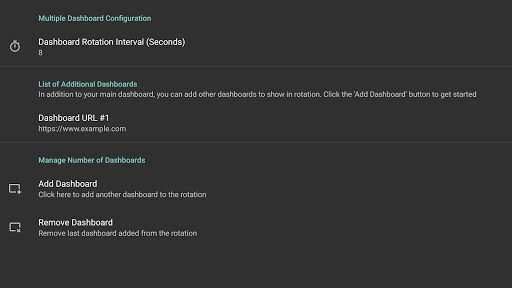
Display your Dakboard dashbaord (or any web page) as your screen saver
One-time payment. No ads or upgrades required. 24h trial.
Instructions:
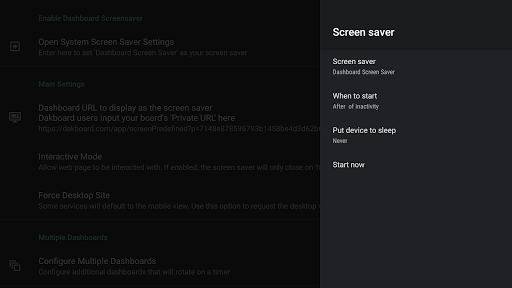
1) Set the URL of the webpage to display as your screensaver
2) Go to 'Open System Screensaver Settings'
3) Select 'Dashboard Screen saver' to make it the screensaver.
WARNING: Google Chromecast devices removed the ability to set third-party screensavers in Aug 2022 update. This can only be circumvented through adb commands. Other devices can be set through the included UI.
What's New
Version Information
- Version
- 2.96
- Downloads
- 1K+
- Updated on
- Apr 20, 2024
- Released
- Feb 16, 2019
- Requires
- Android 6.0
Statistics
Google Play Rating History
Rating Distribution
Downloads Over Time
Dashboard Screen Saver has been downloaded times. Over the past 30 days, it averaged downloads per day.
Shaded area shows 30-day prediction based on historical trends
Historical data collection started recently. More data points will be available over time.
Dashboard Screen Saver users say on Google Play
 Aaron Groom
You're the best! This is exactly what I have been looking for. Wanted a way to display my calendar as my TVs screensaver. The fact that it uses Dakboard is even better. Have only had it installed for a day, but it's been working perfect on my two Sony Bravia's. A suggestion would be to link to our Dakboard account so we can easily select the screen we want to display. The URLs can get pretty long, and using the remote is tedious, especially having to do it on multiple devices. Or if that's not possible, just be able to store multiple URLs.
 Avranches AUTOMATIC
Hello ! Thank you very much for this solution which is very useful for my activity and almost perfect. Indeed, I've seen a bug and I do not if you can fix it. When I turn off/On the TV with the remote it works perfectly but when I switch off / on directly at the power outlet, the webpage does not appear as a screensaver, nothing appear. Did you already have the same issue, is there any solution to fix it ? Best regards ! Leo
 Tharin P
I tried to sign in to Google account, but google doesn't allow me to do so. It says "This browser or app may not be secure". How am I suppose to show my google calendar view on the screen saver? 😢
 Belgarath Sorceror
This is not working on Andoid TV there is no way to set this as screensaver in ambient mode
ApkTrusted Ratings & Reviews
Similar Apps

Autio - Travel Companion
Free

Planning Center Services
Free
Rocketbook
Free

Boosted Time Tracker
Free

Workflowy |Note, List, Outline
Free

Life Time Digital
Free

Brightline
Free

Progressive Pomo: Focus Timer
Paid

Nothing Pomodoro Timer
Paid

ParkUsher: Find Parking Easily
Free

SCRIBZEE®
Free

CalendarTask
Free

1 Second Everyday Video Diary
Free

Nested Folder Notes - Folino
Free

Cardata Mobile
Free

Timeshifter Jet Lag
Free
Scan this QR code to download

Forwarding you to the page at Google Play market in seconds...
Open Google Play market now