App Usage - Manage/Track Usage v6.03
AZSoft Technology Inc.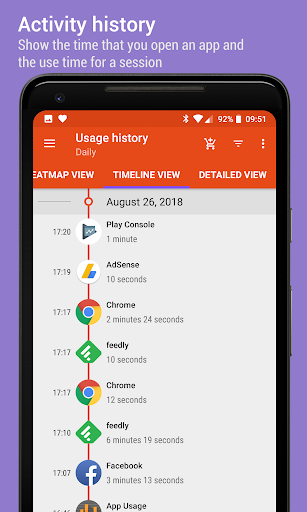

About this app
Developer Description
Show app usage history, most-used apps, and the over-use reminder!
It provides the following key features:
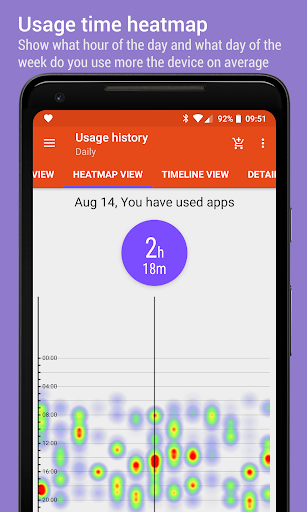
★ App usage history: gather the usage time about apps that you used
★ Check phone history: gather counts of you checked the phone
★ Activity history: gather the time that you open apps
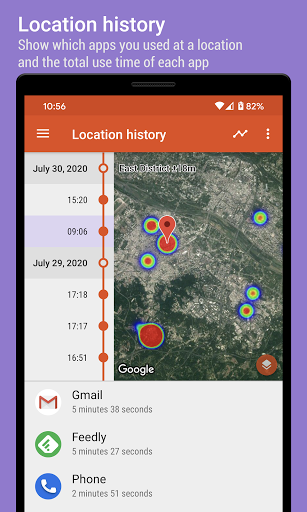
★ Location history: display apps you used at a location
★ Notification history: show the time that apps posted notifications
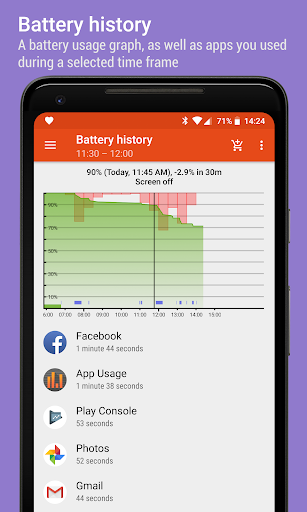
★ Battery history: display the battery usage graph
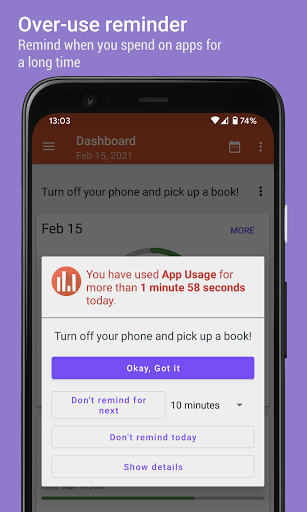
★ Over-use reminder: remind when you spend on phone or apps for a long time
★ Lock mode: lock app settings and over-use reminder options with a PIN
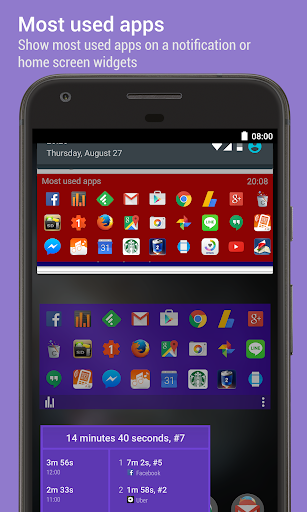
★ Most used apps - show most used apps on widgets or a notification
★ Track all installs: keep track of all installs and uninstalled apps
★ App install reminder: notify when apps are installed and the summary of daily installed apps
★ Manage apps: 1-tap to uninstall apps, sort apps by various options
Due to the restriction of Android, the app usage can only be tracked when you are using the app and the screen is on.
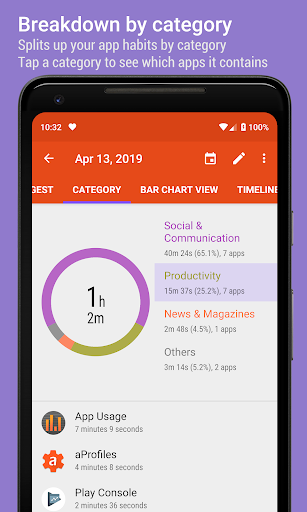
► APP USAGE HISTORY
Do you know how much time you spend on an app? Do you know the total use time of a day or the average use time of an app?
It lists the usage time of apps by your preferred sorting order. This usage information is helpful for you to check which apps should be uninstalled as they are not used. It can also be used for spying whether an app has been used by someone else.
► CHECK PHONE HISTORY
Do you know how many times a day that you check your phone?
It shows the daily count that you checked on your phone in either a bar chart or calendar view.
► ACTIVITY HISTORY
Do you know the time that you open Messaging or E-Mail app in a day?
It shows the time that you open an app in either a timeline or calendar view.
► NOTIFICATION HISTORY
It shows you the number of notifications you received for each day and the time that an app posted the notification.
► OVER-USE REMINDER
It reminds you of when you spend on phone or apps for a long time.
► MOST USED APPS
It shows a list of your most used apps on widgets or system notifications. It's a convenient way to quickly start the apps you use most frequently. The more you use it, the better it gets.
► TRACK ALL INSTALLS
It tracks and lists the history of all installed and uninstalled apps by your preferred sorting order. It's convenient for you to track how many apps are updated in a day, and how frequent updates of an app.
► APP INSTALL REMINDER
It reminds you when an app is installed and the summary of daily apps installation.
► MANAGE APPS
It lists apps by app name, usage time, access count, update time or size, and allows you to uninstall apps easily and quickly.
FEATURES
★ Phone/App usage, activity, check phone, notification, and battery history
★ Daily usage, over-use reminder
★ Lock app settings and over-use reminder options with a PIN
★ Most used apps
★ Export/backup/restore usage data
★ App installation history
★ App install reminder
★ Keep track of uninstalled apps so you can install them later
★ Root uninstaller, 1-tap to uninstall apps, rooted device required
★ Add personal notes for each app
★ Sort apps by name, usage time, access count, update time or size
★ Batch clear apps cache or data
★ Easy search apps by name
This app collects location data to enable the location history function even when the app is closed or not in use.
PRIVACY
Your privacy is very important to us, we understand this problem and won't collect/sell your usage data
We have been selected as a Google I/O 2011 Developer Sandbox partner, for its innovative design and advanced technology.
If you'd like to help the translation, please send me an email.
What's New
★ new function to displays detailed information for a specific day in time-based mode
★ bar chart displaying rounded corners
★ see FAQ #1 if it fails to track the usage
★ send me an email if you'd like to help with the translation
★ bugs fixed and optimizations
In-app purchases
$0.99 - $19.99 per item
Version Information
- Version
- 6.03
- Downloads
- 1M+
- Updated on
- Dec 25, 2025
- Released
- Jul 17, 2013
- Requires
- Android 6.0
Statistics
Google Play Rating History
Rating Distribution
Downloads Over Time
App Usage - Manage/Track Usage has been downloaded times. Over the past 30 days, it averaged downloads per day.
Shaded area shows 30-day prediction based on historical trends
Historical data collection started recently. More data points will be available over time.
App Usage - Manage/Track Usage users say on Google Play
 Qrystal Dragon
I'm loving the information this app provides and it just keeps getting better and better. Personally, other than the app control feature the main thing I use is the timeline view. This helps me overcome my weak memory and track what I've done in the day, via which apps I've used. I just wish notification info on the timeline had a grey background or something to make it look different from actual interactions with the phone. (I also wish I could get info like this about my computer usage!)
 Carlo Boyer
I like the 'screen on/off' in Timeline View! The reason i rate 4/5 stars is that this app doesn't respect privacy, taking your IDs. It doesn't have a proper website and uses an unprofessional Gmail address.
 Teri Pierce
how do you turn off 24 hour clock in app usage?
 ಹರಿ ಓಂ
The app kept locking my device, it stopped only after force stopping this app. It worked fine on my other mobile. I'm using Poco F1, (Android 10).
 Spinningday (Spinningday)
The app was useful to an extent, it technically does what's advertised. I don't like the "You have 63 browser virus, open browser" ads, or the "You have 6 photos that will be permanently deleted, click to find out" ads. Since the dev wanted to try and play innocent and say "we need ads to make money". I'm lowering my rating. I support developers making money, but I don't support developers using fraudulent ad networks at the expense of their consumer base. I'd say avoid this app
ApkTrusted Ratings & Reviews
More from AZSoft Technology Inc.
See more apps
App Usage Pro
Paid
aCurrency Pro (exchange rate)
Paid
AppMgr Pro III (App 2 SD)
Free
1Tap Cleaner (clear cache)
Free
AppMgr III (App 2 SD)
Free
aCurrency (exchange rate)
Free
3D Compass Plus
Free

aProfiles - Auto tasks
Free

Big Font (change font size)
Free

aSpotCat - Permission Checker
Free
aCurrency Pad for tablet
Free
1Tap Cleaner Pro (clear cache)
Free
Similar Apps

Screen time: App blocking
Free
GlassWire Data Usage Monitor
Free
My Data Manager: Data Usage
Free

Uninstaller
Free
Boosted Time Tracker
Free

Storage Analyzer & Disk Usage
Free
Modes and Routines
Free
StayFree - Screen Time
Free

SubX - Subscription Manager
Free
Qustodio Parental Control App
Free

Swift Backup
Free
App Limit - Limit apps
Free

Timelog - Goal & Time Tracker
Free
WhatisRemoved+
Free
BlockerHero - Porn Blocker
Free

Daypad - Simple Time Tracker
Free
Scan this QR code to download

Forwarding you to the page at Google Play market in seconds...
Open Google Play market now