Cloudcast v1.3
Appestry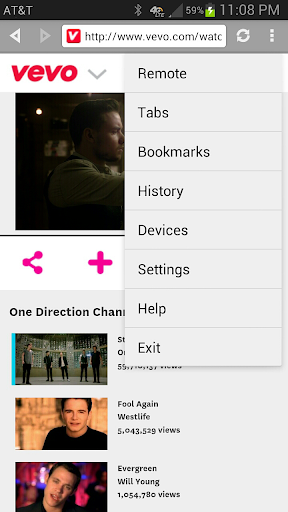


About this app
Developer Description
Play online videos from one device to another, from anywhere on the planet!
Cloudcast lets you play online entertainment from one device to another device, from anywhere on the planet! The device could be your child's tablet in the next room or a loved one's on the other side of the world! Unlike Chromecast, Cloudcast is NOT limited to your Wi-Fi network and you can stream content from ANY website in your device! The process of casting through the cloud is also called 'cloudcast'. Yes, it's a verb and we invented it! So the term 'Cloudcast' not only refers to the app or the service but also the process itself.
Pairing two devices is easy. There is no account signup, just enter a pairing key from one device into the other. Browse and play online videos in the web browser and cloudcast them using the remote to any paired device.
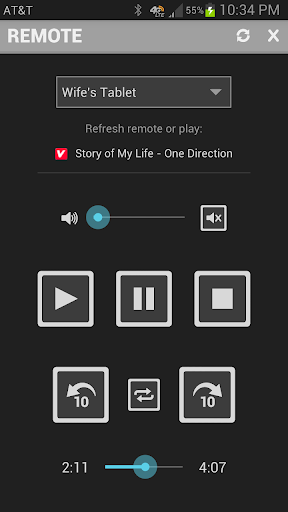
Once you start cloudcasting you can pause, rewind, skip, seek, loop, mute or adjust the volume just like you would using a TV remote. You could use Cloudcast to play videos from your phone to a TV using an Android stick even if you're nowhere near the TV! Please note that not all videos in the web are in high definition, so they might not look the same on your HD TV as they look in a small screen. You can find Android sticks here: https://www.google.com/search?q=android+stick
Depending on your device's Wi-Fi sleep policy you will even be able to wake the device up and play the media. Cloudcast comes with the necessary controls to block devices when you don't want to be disturbed or prefer to get a notification instead of playing the video directly. Yes, if you're pulling pranks on your friends with Cloudcast they could block your device!
You can cloudcast entire YouTube playlists! Skip forward and backward between videos in the playlist as well. A great way to keep kids entertained even if you can't be right next to them.
Think of Cloudcast as a more powerful Chromecast for the cloud! Cloudcast requires the latest version of Google Play and YouTube apps. It runs on Android 2.2 and above.
Please share your experiences with Cloudcast and track issues here: https://plus.google.com/communities/114472572789223334184
How do I cloudcast?
Cloudcasting is easy and fun! Follow these steps:
* Install Cloudcast in two or more Android devices
* Pair devices using pairing keys in the devices menu
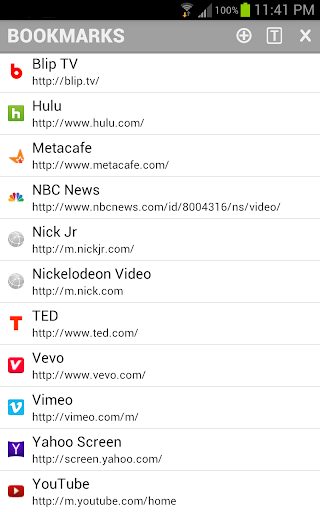
* Browse the web for entertainment
* Play videos in full view to launch the cast menu (in Android 4.3 & earlier)
* Start videos to launch the cast menu (in Android 4.4 & later)
* Select the device to cast
* Press play in the remote and voila!
* Cloudcast to any paired device in the world!!
Why should I cloudcast? What do I use it for?
To have fun, of course! Imagine a world where you can play a video from one phone to another, half way across the world! Surprise that someone with a video you found on the web. Entertain a child even when you are not right next to them. Control your TV when it is connected to an Android device from anywhere in the world. Share a laugh with a friend while watching a video together even if you're in two different places!
Does Cloudcast work with Chromecast?
No, Cloudcast only works in Android devices. One device acts as a remote, which casts the video and the other device acts as a player that plays the video. You could plug an Android stick or any tablet with HDMI output to your TV and cloudcast videos from your phone to your TV. Download "Split Browser with Chromecast" app to cast videos from a web browser.
What is the difference between the free and UNLIMITED versions?
• Free version contains ads and can only cloudcast for 10 minutes at a time.
• UNLIMITED version has no time limits and contains no ads.
HTC USERS:
HTC Phones (Jelly Bean and older Android versions) can only cast YouTube videos.
For more FAQs on Cloudcast: http://www.appestry.biz/cc
What's New
• Removed app permissions that are no longer used
• App optimizations, bug fixes and support for more devices
----
1.2:
• Fixes YouTube player in Lollipop and newer versions
----
Thanks y'all for your feedback!
In-app purchases
$1.49 per item
Version Information
- Version
- 1.3
- Downloads
- 50K+
- Updated on
- Feb 2, 2017
- Released
- Nov 29, 2013
- Requires
- Android 2.3
Statistics
Google Play Rating History
Rating Distribution
Downloads Over Time
Cloudcast has been downloaded times. Over the past 30 days, it averaged downloads per day.
Shaded area shows 30-day prediction based on historical trends
Historical data collection started recently. More data points will be available over time.
Cloudcast users say on Google Play
 A Google user
I use it to stream video to other devices and it does a great job. I wish it were free though, even if it's not that costly "the wallet" still hurts
A Google user
Still feeling this out, but I was able to get it to work. It wasn't as intuitive as I expected to pair devices (it wasn't clear which device name I was entering, and it wasn't obvious how to start cloud casting, but the help section was adequate, so vi it working). Still unsure about how often I will use it, but makes me want to get an android stick!
A Google user
What happened to the Appgratis vers. I had?
A Google user
Versiunea free este limitata la 10 minute de redare, asta in conditiile in care multe altele free au durata nelimitata...
A Google user
Google Chromecast not supporting..
ApkTrusted Ratings & Reviews
More from Appestry
See more apps


Scan this QR code to download

Forwarding you to the page at Google Play market in seconds...
Open Google Play market now