Quick Remote for Google Home/A v1.5.6
Appestry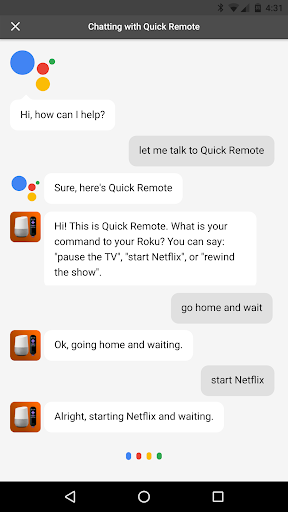




About this app
Developer Description
Voice control your Roku using Google Home! No additional hardware required!!
Quick Remote helps you control your Roku with voice commands! Play or pause the movie. Rewind or fast forward your favorite shows. Start Netflix or CBS News channel. Navigate Roku's menu by saying go left, right or select!
It can follow multiple commands at once and also control multiple Rokus! You can even ask for it to wait for your next command.
Use Shortcuts in Google Home app to create shortcuts for your favorite commands! Just say "hey Google, pause the TV" instead of "hey Google, ask Quick Remote to pause the TV and wait". Look for Shortcuts in Google Home app > Left Menu > More Settings > Shortcuts
This app works with all Google Home devices and with Google Assistant in any phone.
Quick Remote app in Google Assistant: https://goo.gl/sUkDGM
You will never touch the Roku remote again! No hub or additional hardware required!!
Quick Start:
At Google Home or Google Assistant:
• Say "Ok Google, let me talk to Quick Remote" to your Google Home or Google Assistant
• It will ask you to link your Google Home/Assistant to Quick Remote account:
-- When using Google Home or Google Home Mini, look for the Quick Remote link card to popup in the Google Home app
-- You can find Quick Remote in the Google Home app's left menu > Explore > Search for 'Quick Remote' > Link
-- You can also open this link: https://goo.gl/sUkDGM in Google Assistant app to link Quick Remote
• Follow the link to sign into Quick Remote using your Google account -- you will only be sharing your email for linking
In your phone:
• Install Quick Remote for Google Home app in your phone
• Connect your phone to the same Wi-Fi network as your Roku device
• In your phone's Wi-Fi settings set it to keep Wi-Fi ALWAYS on during sleep
• Select the Roku device you want to control in the devices menu
• Sign-in using the same Google account as your Google Home device or Google Assistant app -- your email will only be used for linking the two
IMPORTANT: Your phone's Wi-Fi needs to ALWAYS stay on during sleep for it to receive commands from Google Home and send it to your Roku. Also, if your phone has trouble connecting with your Roku then turn off battery optimization for this app in Android Settings > Battery Optimization
Back at Google Home or Google Assistant:
• Say "Ok Google, ask Quick Remote to pause the TV" -- Voila! your Roku will do as you say!
• Say "Ok Google, ask Quick Remote to go home, right, down and select" -- it will follow multiple commands at once!
• Say "Ok Google, ask Quick Remote to start Netflix and wait" -- it will start a channel and wait for your next command!
• Say "Ok Google, ask Quick Remote to switch to Family Room Roku" -- it will even control multiple Rokus!
Help & FAQs: http://www.appestry.biz/qr
Demo Video: https://youtu.be/BaK-Dq8e5g8
The free version has a limit of 50 commands per calendar month. Upgrade to Full Pass subscription to use Quick Remote without limits!
Full Pass Subscription is needed to use more than 50 voice commands per month.
Monthly Full Pass: $0.99/month + tax
Includes 1 week free trial
Annual Full Pass: $9.99/year + tax
Includes 2 weeks free trial
Cancel your subscription any time in Google Play Store > Tap Menu > Subscriptions
What's New
• Raise or lower the volume by 5, 10, 15 or 20 points - adjust it in the settings
• Using Shortcuts in Google Home app you can just say "hey Google, pause the TV"
• Set your phone's Wi-Fi settings to ALWAYS STAY ON during sleep
----
Thank you all for your feedback!
In-app purchases
$0.99 - $9.99 per item
Version Information
- Version
- 1.5.6
- Downloads
- 100K+
- Updated on
- May 19, 2020
- Released
- Feb 26, 2017
- Requires
- Android 4.0
Statistics
Google Play Rating History
Rating Distribution
Downloads Over Time
Quick Remote for Google Home/A has been downloaded times. Over the past 30 days, it averaged downloads per day.
Shaded area shows 30-day prediction based on historical trends
Historical data collection started recently. More data points will be available over time.
Quick Remote for Google Home/A users say on Google Play
 A Google user
Easy to install, works fine. I had a bit of an issue with the subscription but support team helped me right away. You will blow through your 50 free commands really fast but the full pass is only $1.29. Worth it.
 Andrew Olivier
App works great when it's working. Is there a way to stop it from signing out of Google account sporadically?
A Google user
I installed it for my Roku TV and Google Home. The remote works when I tap the buttons on my phone, but it will not work with Google home voice commands. I signed in on the app to my google account, but when I try to use it on Google home it asks me to link my account to google. I then click the google email account and I get a message "Unable to link your Google account to quick remote! Please try again. I tried many times on my phone and then on my computer with the help link they gave me, but I get the same message. I wanted this so I can give voice commands, but it won't let me. I only gave it 3 stars because the onscreen remote works. I do not need this because Roku has it's own onscreen app.
 Mason Orton
Great idea, but trying to control a Roku TV with your Google home via quick remote is more of a hassle than it is worth. Every time you want to press any button via voice prompts, it is a two step process then times out. If you want to then hit another button, you have to go through the two step voice commands process again. I could not get my Google home to play specific channels or videos on YouTube.
A Google user
I just got the app and I log in to my Google account but I can't find my Roku tv. I try entering the IP address didn't work.
ApkTrusted Ratings & Reviews
More from Appestry
See more apps

Similar Apps

Travel Packing Checklist
Paid
Home + Control
Free

Yatse: Kodi remote and cast
Free

Nedis SmartLife
Free

Yubii Home
Free

INTEGRA CONTROL
Free

Universal Remote for Smart TV
Free

Fothong Pass - Pass Manager
Free
ICG Training
Free
GHome work with Gosund
Free

Candy simply-Fi
Free

Coolina
Free

Home V
Free
Aqara Home
Free
Philips Sonicare For Kids
Free
Philips Avent Baby Monitor+
Free
Scan this QR code to download

Forwarding you to the page at Google Play market in seconds...
Open Google Play market now