
Split Browser Trial v3.1
Appestry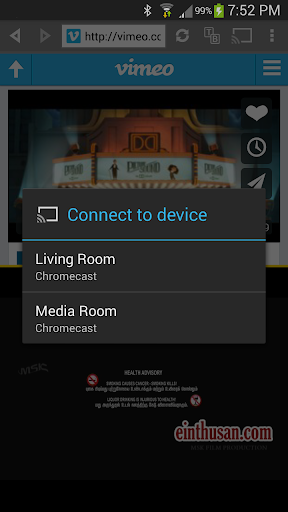


About this app
Developer Description
Browse two web pages side by side and cast videos to Chromecast!
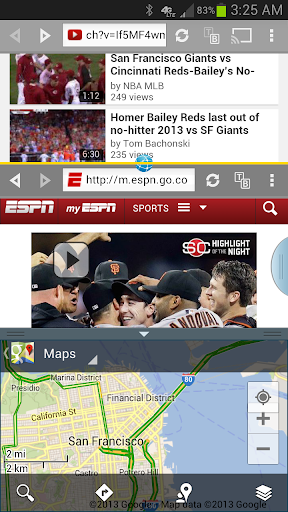
Imagine if you could watch videos and write emails at the same time using your tablet! Or compare two web pages side by side, or take notes alongside a web page. Well, you can do all of that and more!
Split Browser is two browsers in one, working side by side. It lets you browse two web pages independent of each other. You can open links from one half into the other half. It also includes a notepad that allows you to take notes from a web page. You can open multiple tabs and swap them between two halves. You can also resize the two halves to suit your needs. Simply put, it is a powerful tool for multitasking.
Best suited for tablets and "phablets".
1/14/16 - SAMSUNG UPDATE: Split Browser Trial now works in newer Samsung devices in multi-window mode.
- - - - -
CHROMECAST & NEXUS PLAYER:
Requires Google Play services (4.2 or above) to be enabled. Look under Android Settings > Applications. Not all videos can be cast (Flash videos, YouTube, live streams, etc). Low resolution videos might not look the same on your HD TV as they look in a small screen. Play videos in full view to cast.
UPDATE 7/30/14: YouTube videos will not cast in Android 4.4 devices, please use the YouTube app.
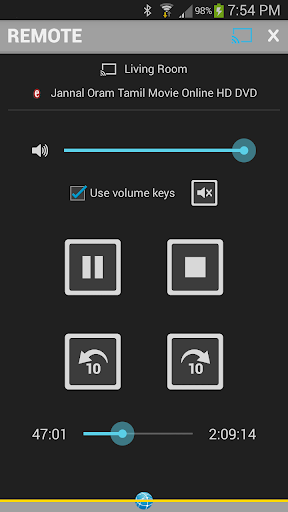
Steps to cast videos: http://www.appestry.biz/sb#cast
See the main demo video for detailed casting instructions: http://youtu.be/fnKnVt6oY4A
- - - - -
Here's a quick rundown of its important features:
• Resize the two browser halves by dragging the yellow divider line.
• Rotate yellow divider (vertical/horizontal) independent of the screen orientation.
• Watch videos in full view within each half.
• Cast videos to Chromecast using the remote.
• Start new tabs and switch them between the two halves.
• Copy the current page over to the other half.
• Open links and bookmarks in the other half and/or in a new tab.
• Autocomplete address input from bookmarks and history.
• Press and hold back/forward arrows to view history and jump to a page in the list.
• Manage history across all tabs in one place, sorted reverse chronologically showing the time of last visit.
• Search for text in the web page in either halves separately.
• Separate clipboard option to paste the last 10 items copied.
• Open notepads in either halves to take notes and save/share them.
• Select text to copy and paste between two halves and notepads.
• Links to useful tools like calculator, translator, converters... etc.
• Remember form data and passwords.
• Clear cache, history, cookies, form data and passwords.
• View pages in desktop mode.
• Works in dual view in Samsung devices that support multi-window mode.
• Works in both cascade and dual views in Samsung Galaxy Note 10.1 tablets.
This ad-free trial version closes every 10 minutes and allows only 3 bookmarks and 3 tabs. Using Chromecast the trial version can cast only 5 minutes of video at a time. Consider upgrading to the full version if you are satisfied with this trial version.
Video review by @howtomen: http://youtu.be/bm5uoVhghh0
A quick look at multi-window support: http://youtu.be/1Czhk8OXAnM
SWIFTKEY USERS:
You might experience text input issues with SwiftKey keyboard in some websites. We are currently working to resolve this issue. More details in this SwiftKey forum thread: http://support.swiftkey.net/forums/116693-2-bug-reports/suggestions/3749006-nothing-is-written
What's New
• Fixes crash when casting videos to newer Chromecast devices
----
2.3.4:
• Works in dual and cascade views in Samsung devices that support multi-window mode.
----
Thanks y'all for your feedback!
Version Information
- Version
- 3.1
- Downloads
- 10K+
- Updated on
- Jun 21, 2017
- Released
- Jan 30, 2013
- Requires
- Android 4.0
Statistics
Google Play Rating History
Rating Distribution
Downloads Over Time
Split Browser Trial has been downloaded times. Over the past 30 days, it averaged downloads per day.
Shaded area shows 30-day prediction based on historical trends
Historical data collection started recently. More data points will be available over time.
Split Browser Trial users say on Google Play
 A Google user
Simply fantastic
A Google user
Fast and small app. But no adblocker.
A Google user
This is what I'm talking about
A Google user
This dual browser has not any security certificate proving page is encrypted. Not safe to use. Still must pay not worth it.
A Google user
Bad browser
ApkTrusted Ratings & Reviews
More from Appestry
See more apps





Scan this QR code to download

Forwarding you to the page at Google Play market in seconds...
Open Google Play market now