
Work Log - Shift Tracker v2.1.2
AR Productions Inc.



About this app
Developer Description
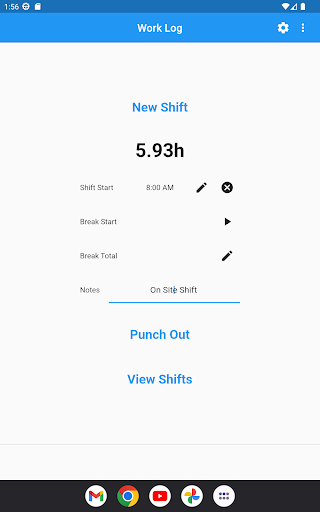
Quickly and easily keep track of your work shifts
• Fast, simple and straightforward way to track your hours, expenses, tips, mileage and much more
• Includes a wide variety of features to fit your needs: Overtime, Premium/Differential Hours, Tips, Sales, Expenses, Raises, Holiday Pay, Bonuses, Deductions, Per Diem, track Paid Shifts, and Mileage
• Save time with features like automatic break deduction, "Quick-Shifts" and pay period settings
• Punch In and out, or enter your hours manually
• Customize how Work Log looks with options like date and time formatting, when your week starts and a light or dark theme
• View your hours in a variety of ways such as by week, month, year, day, pay period or all of your shifts at once
• Set your pay period to automatically calculate how many hours you worked and your wages for each pay check
• Use the deductions and/or bonuses options to automatically calculated for pay check estimates
• Keep track of overtime hours by week/pay period/shift up to three separate overtimes
• Use the Premium/Differential Hours feature to automatically track premium rates during any times like weekends or evenings
• Use the notes section to keep track of detailed notes
• Automatic cloud backups and syncing between devices (logging in is required in to use these features)
• Upgrade to Work Log Pro to remove ads, add unlimited new jobs, and export your records
Work Log - Shift Tracker vs Work Log:
Work Log was originally created for Android in 2013 and has been continuously added to and improved since then. In 2023 Work Log - Shift Tracker was created from scratch. Creating a new app from scratch made it possible to add many features users have been requesting over the years, such as automatic cloud backups and syncing, and per shift wages.
In order to support the long term continued development of the improvement of all Work Log products and to cover the ongoing cost of cloud backups and syncing, the new business model is a subscription model. The original Work Log will not be going away, and you can continue to use it indefinitely.
What's New
- Added ability to sort jobs
- Added ability to have longer notes in PDF exports
- Restored time picker to original round clock
- Fixed Auto-Break bug
- Fixed subscription bug
- Fixed 24hr clock issue with Spanish language selection
In-app purchases
$0.99 - $9.99 per item
Version Information
- Version
- 2.1.2
- Downloads
- 50K+
- Updated on
- Nov 6, 2025
- Released
- Feb 22, 2023
- Requires
- Android 6.0
Statistics
Google Play Rating History
Rating Distribution
Downloads Over Time
Work Log - Shift Tracker has been downloaded times. Over the past 30 days, it averaged downloads per day.
Shaded area shows 30-day prediction based on historical trends
Historical data collection started recently. More data points will be available over time.
Work Log - Shift Tracker users say on Google Play
 David “Keiko” Hamilton
4 stars for a handful of reasons. 1) I'm a little hurt you made a new, cleaner app with separate licensing vs the pro key purchase. 2) EDIT: in light of developer feedback, I am noting that my complaint, new app has no new features, was factually incorrect. 5 stars because I feel like a bully and I was wrong. I would like to see an option to change header color, even just a couple preset ones. If it was added as a job specific setting in addition to/lieu of a general setting it'd be perfect
 Stan Janssen
Looks much better than the previous version of the app, however I am not a huge fan that it is now a subscription model compared to a one time purchase. The importing feature from the old app works perfectly here; you just have to remember to enable the imported jobs, or else you won't see them.
 Edward Mendoza
I like the app but my biggest complaint, which is the reason why I use the old app still, is the auto break feature. On the old app, I didn't have to track breaks in order for the auto break to work. I have to turn on break tracking for the auto break to work on this app. If it wasn't for that reason this app would be 5 stars for sure
 K A P
K A P
New update crashes. I loved this app., I've been using it for well over a year now and it has helped me track my hours and pay etc. with just a simple tap. I could look back at what I'd logged and view how much I was due to be paid. However, it now keeps crashing on the loading screen/viewing shifts/ punching out. It's frustrating as I feel like I found the ideal app I was looking for. Maybe these 'bugs' are fixable, if so this is definitely an app worth having.
 Rory Conlan
Worked for a year. Subscription was paid for 2025 now it keeps sending me back to pay for subscription. Won't export time for new year.
ApkTrusted Ratings & Reviews
More from AR Productions Inc.
See more apps
Similar Apps

carVertical: Check Car History
Free

Supershift Shift Work Calendar
Free
Fuelio: gas log & gas prices
Free

Jakdojade: public transport
Free
Automile
Free

Calendly Mobile
Free

Mapy.com: Offline hiking maps
Free

Booksy for Customers
Free

TimeTune - Schedule Planner
Free

Klarstein
Free
SupaTask - Daily Planner, Todo
Free

Citymove: Parking & Transport
Free

Bring! Grocery Shopping List
Free
Sectograph. Day & Time planner
Free

Taskrabbit - Handyman, Errands
Free

getquin - Portfolio Tracker
Free
Scan this QR code to download

Forwarding you to the page at Google Play market in seconds...
Open Google Play market now