
BookFusion - EPUB & PDF Reader v2.20.18
BookFusion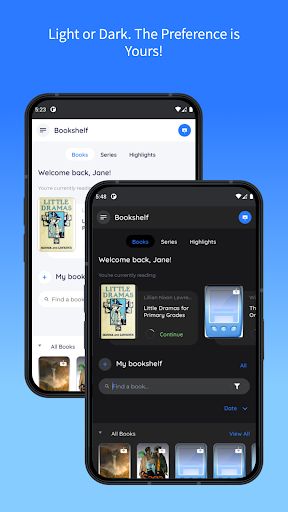





About this app
Developer Description
Read & Sync Your eBooks, Progress, Highlights & Notes. eBook Reader & Manager
BookFusion is the best cross platform eBook reader and manager with cloud sync that allows you to easily read, organize and manage your eBooks across all your devices.
NOTE: You need to create an account using your Email or sign in with Twitter, Google, Apple IDF or Facebook to allow us to sync your ebooks, bookmarks, comments and highlights across all devices, our web reader, use send to kindle and other functionality. DO NOT INSTALL IF YOU DO NOT WANT TO CREATE AN ACCOUNT.
◇ Features ◇
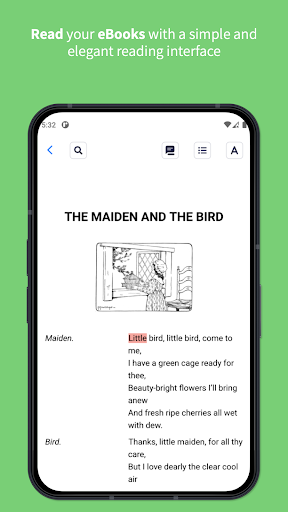
- Integrated Reader - Read all your EPUB, PDF, & CBZ/CBR eBooks both online and offline with clean and intuitive interface .
- Extensive Reader Settings - Customize your reading experience from vertical/horizontal margins, line spacing, fonts, bold/italics, colors and much more.
- Seamless Syncing - Sync your reading progress, highlights & annotations, eBooks and bookmarks across all devices. Pick up exactly where you left off.
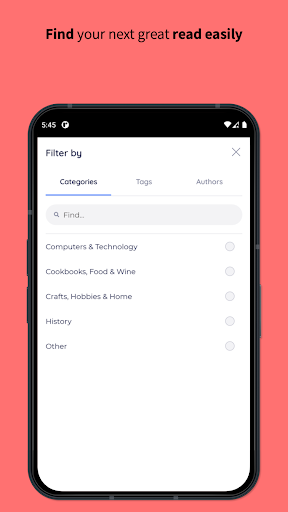
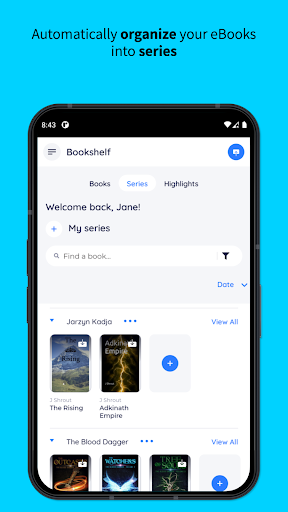
- Organize & Manage - Easily organize and access all your eBooks seamlessly whether offline or online. Organize your eBooks using virtual bookshelves or place them into Series. Quickly find the eBook you are looking for using the category, tags or author filters. The perfect eBook Organizer & eBook Manager in one.
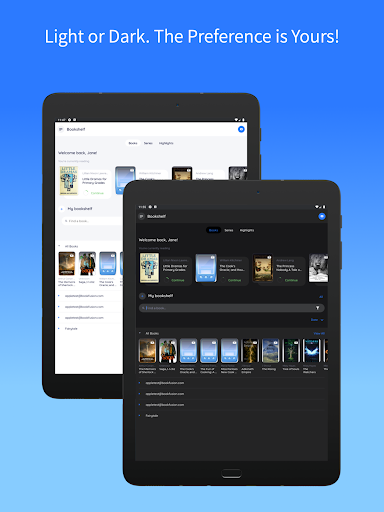
- Light & Dark Mode – Dark or Light the preference is yours!
- Highlights & Annotations - Highlight with your preferred colors and add tags to highlights to keep them organized. Sort your highlights by date or reading progress and easily export them to use in other apps in CSV, Markdown, HTML and PDF formats
- eBook Cloud - Keep your entire eBook collection at the tips of your fingers by storing them in the cloud and downloading them to read offline only when you need to. Any title just a click away.
- Send to Kindle – Organize and quickly send your next read to your Kindle device with one click.
- Calibre Integration - The perfect Calibre Ally. Sync metadata, custom columns, series, tags and incremental updated PDF & EPUB files to all your devices. Your entire Calibre library on your devices when you need it.
- Image/Area Highlights & Annotations (PDFs) - Easily annotate/highlight images, tables, graphs or even text. Any element at all in your PDF can now be highlighted and annotated.
- EPUB 3 Support - With support for the full EPUB 3 spec. You can read eBooks with rich interactivity support that includes video, audio, Q&A, games and much more.
NOTE: You will need to install the BookFusion Calibre Plugin to sync your eBooks to all your devices. See the tutorial at https://support.bookfusion.com/hc/en-us/articles/360018852052-Installing-Using-the-BookFusion-Plugin-for-Calibre
- Open With - Don’t like the integrated reader? Use the open with functionality to send and read your eBooks with your preferred app. No lock-in
- Metadata & Book Details – Know what an eBook is about at a glance or easily edit the cover, description, author tags and other information.
- Additional Formats Supported via Web - These include: AZW, AZW3, AZW4, CBC, CHM, DJVU, DOCX, FB2, FBZ, HTML, HTMLZ, LIT, LRF, PRC, PDB, PML, RB, RTF, SNB, TCR, TXT, TXTZ in a single app. These must be uploaded via the Web App before using the Android App
- Free eBooks - Browse the store to access over 70,000 free eBooks or borrow from NASA, Standard eBooks and others
◇ Other ◇
Have feedback or just want to chat? We would love to hear from you. Drop us a line at support@bookfusion.com or join us for a chat on Discord at https://www.discord.gg/7v34UYq
Businesses and other organizations can also create their own private library to share eBooks with their members. Visit us on the Web or reach out to us at support@bookfusion.com to get more details about launching a private library for your organization
Terms of Service - https://www.bookfusion.com/terms
Privacy Policy - https://www.bookfusion.com/privacy
What's New
** New **
- Monochrome launcher icon support.
** Fixes & improvements **
- Fixed All Books rotation + e-ink issues.
- Fixed Currently Reading not updating.
- Larger covers; faster shelf loading/search.
- Fixed blank shelf after returning to book details.
- Fixed reading position changes with TTS/font size.
- Reader UI updates for theming + Android 15.
- Updated splash screen to new Google API.
- Other minor improvements.
In-app purchases
$1.99 - $94.99 per item
Version Information
- Version
- 2.20.18
- Downloads
- 100K+
- Updated on
- Dec 23, 2025
- Released
- Apr 17, 2015
- Requires
- Android 6.0
Statistics
Google Play Rating History
Rating Distribution
Downloads Over Time
BookFusion - EPUB & PDF Reader has been downloaded times. Over the past 30 days, it averaged downloads per day.
Shaded area shows 30-day prediction based on historical trends
Historical data collection started recently. More data points will be available over time.
BookFusion - EPUB & PDF Reader - Google Play Rankings
Top Rankings
| Rank | Country | Category | List | Change |
|---|---|---|---|---|
| — |
Ranking History in
No ranking data available yet. Rankings are updated daily.
#69 in Top Grossing Books And Reference in Egypt


#84 in Top Grossing Books And Reference in Pakistan


#149 in Top Grossing Books And Reference in Thailand

BookFusion - EPUB & PDF Reader users say on Google Play
 Olivia Cherry
One feature I would find amazingly helpful would be being able to use a pen stylist to annotate. Even something simple would be helpful. Right now I can highlight and add notes to the highlights but I wish I could write directly in the document, that would be much easier for me. Maybe like a transparent text box overlay? Other than that, this is now my preferred app, cross platform (iPad, Android), for about 2000+ books. I am paying the subscription cost and share with family as well.
 Carlos Pita
I really want to say take my money, please. Believe me. But it's still not quite there. Specially for pdf reading. For example, once you zoom there is no snap or lock for vertical scrolling and the page moves sidewise in a way that renders the reader barely usable. Also the lack of dictionary integration or even share selection is a deal breaker. I will give a try next year as I do every year and hopefully I will then subscribe for my entire life.
 Tobi Kuik
I don't want to spend money just to read. I switched to another app. Sorry, I really wanted to like it.
 Tash Hepting
Calibre integration is oversold and requires plug-in for same functionality you can get through OPDS. I downloaded it because the description mentioned "SYNC" with calibre, but it's one-way downloading, with no sync back to Calibre. Disappointing, especially since it has a plug-in.
 LukaNyan
Force you to sign up. After the sign up it says you can only upload 10 books for free and need a subscription
ApkTrusted Ratings & Reviews
Similar Apps

Cantook by Aldiko
Free

Readwise Reader
Free

ePlatform Digital Libraries
Free

FBReader: Favorite Book Reader
Free

Bookshelf
Free

eReader Prestigio: Book Reader
Free

eBoox: ePub PDF e-book Reader
Free

Dolphin EasyReader
Free

ReadEra Premium – ebook reader
Paid

Anyplay Audiobooks & Stories
Free

Inoreader: News & RSS reader
Free

CloudLibrary
Free

BooKeep
Free

Bookclubs: Book Club Organizer
Free

Smart AudioBook Player
Free

PressReader: News & Magazines
Free
Scan this QR code to download

Forwarding you to the page at Google Play market in seconds...
Open Google Play market now