Notion Calendar v1.39.0
Notion Labs, Inc.

About this app
Notion Calendar solves the problem of disorganized schedules and tasks by providing a centralized platform for users to manage their work and life, benefiting individuals and teams who rely on Notion's ecosystem. Compared to alternatives in the Productivity category, Notion Calendar stands out with its seamless integration with Notion's note-taking and project management features. However, its limited functionality as a standalone calendar app might fall short for users seeking more advanced features. Overall, Notion Calendar is a solid choice for Notion users seeking to streamline their workflow.
Pros
- With over 1 million downloads and a 3.6-star rating, Notion Calendar has demonstrated its value to a significant user base, indicating a high level of social proof and user satisfaction.
- The app's lack of ads and in-app purchases ensures a distraction-free experience, allowing users to focus on managing their schedules and tasks without interruptions.
- Notion Labs, Inc.'s reputation for developing user-friendly and feature-rich apps is evident in Notion Calendar, which provides a clean and intuitive interface for users to navigate.
- The app's compatibility with Android 8.0 and later ensures a wide range of device support, making it accessible to a broad user base.
- Notion Calendar's offline capability allows users to access and manage their schedules even without an internet connection, making it a reliable tool for users with unstable or limited internet access.
Cons
- One concern is that Notion Calendar's functionality might be too limited for users who rely heavily on calendar features, such as advanced reminders, invite management, or integration with other calendar services.
- Some users might find the app's design and features too closely tied to the Notion ecosystem, which could limit its appeal to users who prefer a more traditional calendar app experience.
- The lack of permissions requested by the app might raise questions about its ability to provide features that rely on device data, such as location-based reminders or calendar event suggestions.
- User complaints about the app's performance and stability might be a concern for some users, although the developer's active update schedule suggests a commitment to addressing these issues.
Best for: The ideal user for Notion Calendar is a tech-savvy individual or team member who is already invested in the Notion ecosystem, values a simple and intuitive calendar interface, and requires seamless integration with note-taking and project management features to streamline their workflow and stay organized.
Developer Description
For your work and life
Along with speed, beauty, and light/dark modes, Notion Calendar includes powerful features:
- CONNECTED TO NOTION — add Notion docs, projects, and timelines.
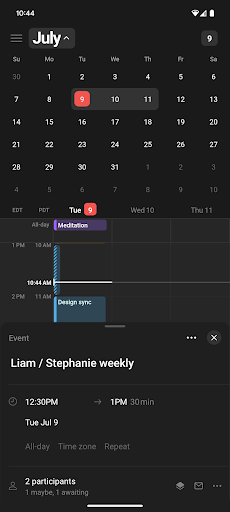
- MULTIPLE TIME ZONES — pull the time zone column to the right to “travel to any city” and add more time zones.
- ALL IN ONE PLACE — see one unified view across multiple calendars and auto-sync events between them.
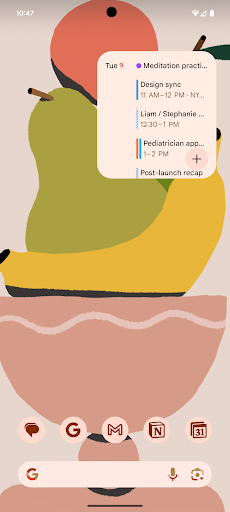
WIDGETS — featuring multiple sizes, rich previews of upcoming events, and a quick-add event button.
- AVAILABLE IN 12 LANGUAGES — Japanese, Korean, French, German, Spanish, Portuguese, Danish, Dutch, Finnish, Norwegian, and Swedish.
It’s time.
Privacy
Given that Notion Calendar requests no permissions, users can be assured that their device data is not being accessed or collected by the app. However, users should still be cautious when integrating Notion Calendar with other Notion services, as this may involve sharing data between apps. To maintain privacy, users should review Notion's data sharing policies and adjust their account settings accordingly.
Tips
To get the most out of Notion Calendar, users should start by integrating it with their existing Notion account and setting up their calendar templates and reminders. Additionally, users can optimize the app's performance by regularly updating the app and clearing unnecessary data. For a more streamlined experience, users can also explore Notion's other productivity tools and features, such as task management and note-taking.
Version Information
- Version
- 1.39.0
- Downloads
- 1M+
- Updated on
- Jul 10, 2025
- Released
- Jul 16, 2024
- Requires
- Android 8.0
Statistics
Google Play Rating History
Rating Distribution
Downloads Over Time
Notion Calendar has been downloaded times. Over the past 30 days, it averaged downloads per day.
Shaded area shows 30-day prediction based on historical trends
Historical data collection started recently. More data points will be available over time.
Notion Calendar - Google Play Rankings
Top Rankings
| Rank | Country | Category | List | Change |
|---|---|---|---|---|
| — |
Ranking History in
No ranking data available yet. Rankings are updated daily.
#76 in Top Free Productivity in South Korea


Notion Calendar users say on Google Play
 Emmanuel
If you have any problem logging in, just change your browser. Notion calendar is a good app by itself and a great app when combined with the notion app, especially since you can link it with your pc and be able to organize everything on your pc when working and phone when you need to quickly add something. Great app 10/10
 Donald Forbes
still haven't fully worked it out
 Nicolas Passaro
App is constantly crashing.
 David L
I really like the desktop program and thought I'd try the phone app and its well-designed and simple for daily use. However, my personal preference is a monthly overview where I can see all my events at once, rather than the focused on todays timeline.
 Akash Kumar Singh
stuck at the notion logo, unable to see what is inside the app. unusable.
ApkTrusted Ratings & Reviews
More from Notion Labs, Inc.
See more apps
Similar Apps
Trello: Manage Team Projects
Free

Daily Planner Organizer: Brite
Free

Workflowy |Note, List, Outline
Free

Evernote - Note Organizer
Free

TickTick:To Do List & Calendar
Free

Any.do - To do list & Calendar
Free

UpNote - notes, diary, journal
Free

Todoist: To Do List & Calendar
Free

Miro: your visual workspace
Free
Taskito: To-Do List & Planner
Free
SupaTask - Daily Planner, Todo
Free
Sectograph. Day & Time planner
Free

monday.com - Work Management
Free
DigiCal Calendar Agenda
Free

EdrawMind: AI Mind map & Note
Free
Microsoft To Do: Lists & Tasks
Free
Scan this QR code to download

Forwarding you to the page at Google Play market in seconds...
Open Google Play market now