DrawNote: Drawing Notepad Memo v8.7.2
DragonNest










About this app
Developer Description
All-in-one notepad for notes, memo, todo list, mind mapping, sketch, drawing.
⭐ Infinite Canvas - Create Infinite Possibilities
• DrawNote has an infinite canvas, allowing your imagination and creativity to be fully utilized.
• Using the flexible canvas, you can place text, pictures, recordings, tables, mind maps and other content arbitrarily.
• You can sketch, draw and paint on the notepad and whiteboard with your finger or stylus. Writing, drawing diagrams and annotating content as freely as on paper.
• Abundant stickers make your notes more lively and interesting.
⭐ Various note types
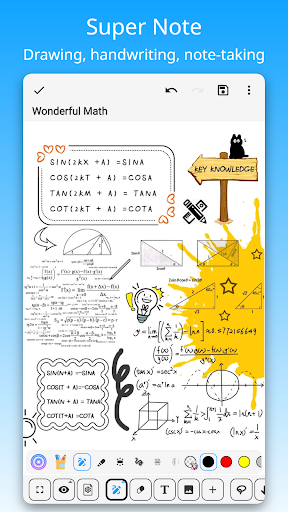
• There are a variety of note types for notes, including Super Note, Text Note and Mind Mapping, to meet different usage scenarios.
• Super Note combines handwriting, drawing, text, picture, table, mind map and other elements to fully express your creativity and artistic talent.
• Text Note focus on text. Support rich text settings, such as color, thickness, size and margin, etc.
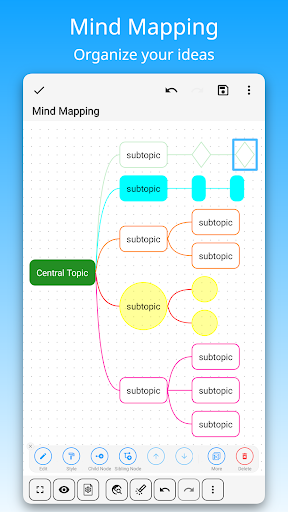
• Mind Mapping help you quickly record ideas and organize knowledge. You can freely choose styles, borders, colors and styles.
⭐ Easily manage notes and share
• Organize your work, study and personal life by managing your notes with unlimited folders.
• You can sort notes by date, name, etc., and manually sort them.
• Supports exporting notes in the notebook as high-quality pictures for easy sharing with others.
• Use DrawNote as a notebook, journal or notepad. Access, organize and share your notes anytime, anywhere.
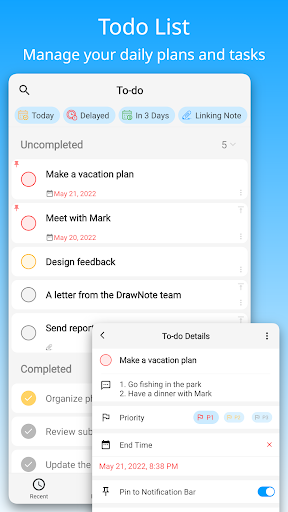
⭐ Efficiently manage to-do list
• Create to-dos in DrawNote to make sure you never miss something important.
• Set the priority and end time for the to-do items, and pin the to-do items to the system notification bar.
• Use the notepad to manage your daily plans and tasks.
⭐ Data security and privacy protection
• Cloud backup via Google Drive, turn on the auto backup option to ensure that your data will not be lost.
• Set passwords for specific notes and folders to fully protect your privacy.
⭐ Other Features
• DrawNote can be used as a digital whiteboard and notepad. The markup function helps you find important points and attract attention, which is very suitable for teaching and presentations.
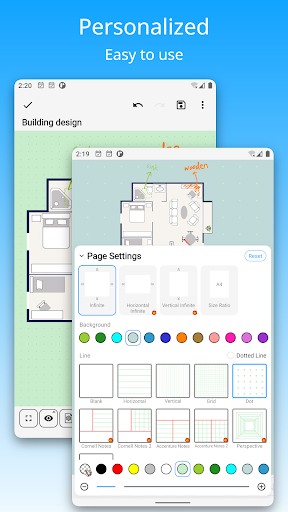
• Support dark mode and switch different theme colors according to personal preference and mood.
• The user interface is simple and elegantly designed for ease of use. Of course, no ads.
DrawNote is a super notebook & notepad. It is the first choice for you to record study notes, make teaching materials, conceive creative ideas, manage task lists, write literary works, record personal moods, and even pursue artistic creation.
There are many more features waiting for you to discover! Download now to experience DrawNote APP and stimulate your creativity!
Have a beautiful day!
What's New
- Shape drawing improvements: circles, rectangles, and more can now be drawn from the center point
- Note export improvements: added new watermark styles
- UI optimizations for better display on different screen sizes
- Other minor improvements to enhance the overall experience
In-app purchases
$1.49 - $19.99 per item
Version Information
- Version
- 8.7.2
- Downloads
- 1M+
- Updated on
- Jan 15, 2026
- Released
- Dec 13, 2021
- Requires
- Android 5.0
Statistics
Google Play Rating History
Rating Distribution
Downloads Over Time
DrawNote: Drawing Notepad Memo has been downloaded times. Over the past 30 days, it averaged downloads per day.
Shaded area shows 30-day prediction based on historical trends
Historical data collection started recently. More data points will be available over time.
DrawNote: Drawing Notepad Memo users say on Google Play
 Robert Kiesel
This hits the nail on the head. Don't look anywhere else. I use a galaxy tab s8 ultra with its stylus. The drawing features are what I use the most. This app has the fundamentals that other apps don't have quite yet. Even if you don't use the pro version, it STILL feels like a complete app. Customer support got back to me within a day when I had a couple questions on how to use the app, there's no ads, ONLINE AND OFFLINE BACKUP, and an infinite canvas to do work with. I hope this app never dies.
 Joseph Kishore
its a very good application.. but not a perfect one.. i wish there were different brush textures or an option to make one ourselves.. artists use various brushes and pen preasure is very important. and another thing i wish was instead of infinite canvas, there should be note book formate like orderly pages.. so we can keep everything organised..
 Chandra
Overall a good app with Smooth performance but missing tape and scale options makes diagram work difficult . Auto Shape conversion while drawing is also missing. Please add these features being a pro user it will be worth paying for the app ( already paid ) and when we change the font of a particular word the whole Text box changes to another font please fix it .. it would be nice if only the particular word can be converted to one particular font not changing whole Text box. Do consider it
 Arif Mahmood
searched task can't be pinned and it's a big issue
 Artifex Rwanda
excellent app
ApkTrusted Ratings & Reviews
More from DragonNest
See more apps
Similar Apps
Squid: Take Notes, Markup PDFs
Free

StarNote: Handwriting & PDF
Free
Jnotes: Note-Taking, AI, PDF
Free

Huion Note : Easy note-taking
Free

Noteshelf 3: Digital Notes
Free

MyScript Notes (Nebo)
Free

Notewise - AI Notes, PDF, Docs
Free

Goodnotes: AI Notes, Docs, PDF
Free
Kilonotes-Notes & Mark up PDF
Free

touchnotes
Free
Flexcil Notes & PDF Reader
Free
Microsoft Whiteboard
Free

Mind Notes: Note-Taking Apps
Free

Miro: your visual workspace
Free

PENUP – Drawing-sharing SNS
Free
Bamboo Paper
Free
Scan this QR code to download

Forwarding you to the page at Google Play market in seconds...
Open Google Play market now