PDF Document Scanner - PixScan v4.0.3
Eco Mobile for Work



About this app
Developer Description
Trusted PDF scanner and document scanner for office use, convert photo to PDF
PixScan is a powerful PDF scanner and document scanner designed for fast and high-quality scanning. Whether you need to scan contracts, invoices, receipts, reports, or handwritten notes, this app transforms paper documents into photo to PDF files with clarity and precision. With AI-powered technology, PixScan makes document scanning smooth and effortless, perfect for office work, business, and personal use.
With just one tap, you can scan, edit, sign, and share PDF scanner files instantly. Say goodbye to bulky scanners and enjoy a smart document scanner that fits right in your pocket.
🚀 Main Features of PixScan - PDF Scanner & Document Scanner
📌 AI-Powered Document Scanner
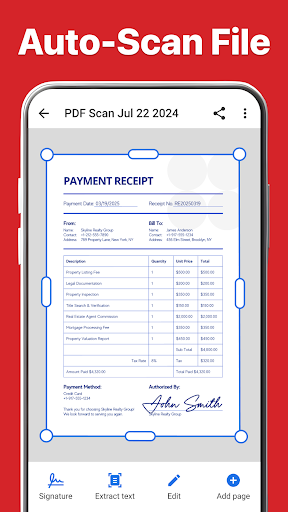
PixScan’s PDF scanner automatically detects document edges, corrects angles, and enhances clarity using AI technology. Whether scanning a receipt, a contract, or notes, this document scanner ensures precise and professional results.
📸 Photo to PDF - Convert Images Easily
Turn any image into a photo to PDF file in seconds. Capture documents using your camera or import images from your gallery. The document scanner processes images with high accuracy, making it easy to store and share scanned files.
🎨 Filters to Enhance Image Quality
Improve scanned documents with multiple enhancement filters. Adjust brightness, contrast, and sharpness to make text clearer. Whether scanning handwritten notes or printed documents, this PDF scanner delivers high-quality results.
✍️ Add Digital Signatures to PDFs
Need to sign an important document? With PixScan’s PDF scanner, you can add digital signatures directly to your scanned files. Sign and approve documents without printing—perfect for office work and business transactions.
🔍 OCR - Recognize Text from Scans
Extract text from scanned documents with OCR (Optical Character Recognition). This document scanner allows you to copy, edit, and reuse text from scanned pages. Convert printed or handwritten notes into digital text effortlessly.
👤 Share Scanned Documents Instantly
Easily send scanned photo to PDF files via email, messaging apps, or cloud storage. Whether sharing contracts in an office setting or submitting forms online, PixScan ensures fast and secure document sharing.
💼 Why Choose PixScan - PDF Scanner & Document Scanner?
✔ AI-powered document scanner for accurate and professional scans 💑
✔ Fast photo to PDF conversion with high-quality results 🖤
✔ Smart filters to enhance text and improve readability 🎧
✔ Digital signature feature for easy document approvals ✍️
✔ OCR technology to recognize and edit text from scanned documents 🗁
✔ Organize files for efficient office work and personal use 📂
✔ Easy sharing of PDF scanner files via email, cloud storage, and messaging apps 🌍
🏢 Perfect for Office, Business, and Everyday Use
PixScan is the ideal document scanner for professionals, students, and anyone needing a portable PDF scanner. Whether scanning reports in an office, saving handwritten notes, or digitizing important paperwork, PixScan helps manage documents efficiently.
Download PixScan today and turn your phone into a high-quality document scanner and PDF scanner. Enjoy fast, smart, and professional photo to PDF scanning anytime, anywhere. 📲
In-app purchases
$1.99 - $49.99 per item
Version Information
- Version
- 4.0.3
- Downloads
- 5M+
- Updated on
- Dec 22, 2025
- Released
- Aug 7, 2020
- Requires
- Android 5.0
Statistics
Google Play Rating History
Rating Distribution
Downloads Over Time
PDF Document Scanner - PixScan has been downloaded times. Over the past 30 days, it averaged downloads per day.
Shaded area shows 30-day prediction based on historical trends
Historical data collection started recently. More data points will be available over time.
PDF Document Scanner - PixScan users say on Google Play
 David Grimes
very easy to use well set up and very good price.
 Sravan P
Today I updated my app i could see all my scanned documents gone and currently no pldocs under my account and also no option to login 😔😔
 Ofentse Thomas
Doesn't disappoint the best so far
 sudeep Sangannavar
super
 Brett Salling
Useless without paying!!! Lets you go through the whole process to create the pdf, then won't let you save it until you sign up. I photographed 45 pages, adjusted everything, only for this to be useless!
ApkTrusted Ratings & Reviews
More from Eco Mobile for Work
See more apps




Similar Apps

Mobile Scanner App - Scan PDF
Free

PDF Scanner app - TapScanner
Free

Tiny Scanner - PDF Scanner App
Free

PDF Scanner - Document Scanner
Free

PDF Scanner Plus - Doc Scanner
Free

Mobi PDF・Editor・Scanner・Reader
Free

PDF Reader(KDAN PDF): Edit PDF
Free
pdfFiller Edit, fill, sign PDF
Free

Adobe Scan AI PDF Scanner, OCR
Free

PDF Merge: Scan, Sign & Edit
Free

vFlat Scan - PDF Scanner, OCR
Free

iLovePDF: PDF Editor & Scanner
Free

Photo to PDF Maker & Converter
Free

PDFEsign.com PDF E-Sign
Free

Genius Scan - PDF Scanner
Free

Smallpdf: Scanner & PDF Editor
Free
Scan this QR code to download

Forwarding you to the page at Google Play market in seconds...
Open Google Play market now