
Gallery v1.9.2.712403868 release
Google LLC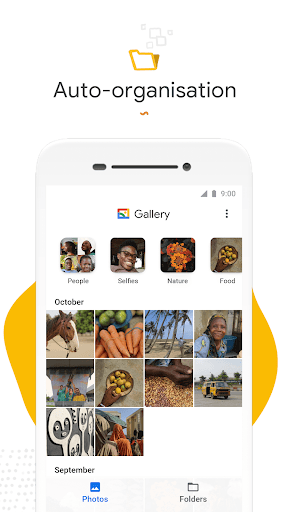
About this app
The Gallery app by Google LLC solves the problem of efficiently managing and viewing photos and videos on Android devices, benefiting casual users and professionals alike with its smart, light, and fast interface. Compared to alternatives in the Photography category, Gallery stands out with its seamless integration with Google services and minimalistic design, although it may fall short in terms of advanced editing features. With over 1 billion downloads and a 4.3-star rating, it's clear that Gallery has met the needs of a vast user base. Its strength lies in its simplicity and performance, making it a go-to choice for those seeking a hassle-free gallery experience.
Pros
- With a 4.3-star rating from millions of users, Gallery has demonstrated its ability to meet user expectations with its high-quality performance and feature set.
- The app's minimalistic design and lack of ads provide a clean and distraction-free user experience, allowing users to focus on their photos and videos.
- As a product from Google LLC, Gallery benefits from the company's reputation for delivering reliable and regularly updated software, ensuring users have access to the latest features and security patches.
- The absence of in-app purchases and ads means that users can enjoy the full functionality of Gallery without any additional costs or interruptions.
- Gallery's compatibility with Android 8.0 and above ensures that a wide range of devices can utilize the app, making it accessible to a broad audience.
Cons
- Despite its strengths, Gallery may not be the best choice for users seeking advanced photo editing capabilities, as it focuses more on organization and viewing.
- Some users might find the app's integration with Google services to be a double-edged sword, potentially raising concerns about data privacy and synchronization across devices.
- The lack of permissions requested by Gallery, while generally a positive aspect, might also limit its functionality in certain areas, such as location-based photo organization.
- Users with very large media libraries might experience performance issues, although this is not commonly reported.
Best for: The ideal user for Gallery is anyone seeking a straightforward, ad-free, and high-performance photo and video viewing experience on their Android device, particularly those already invested in the Google ecosystem and valuing simplicity and ease of use over advanced editing capabilities.
Developer Description
Smart, light, and fast photo and video gallery
✨ Find photos faster with automatic organization
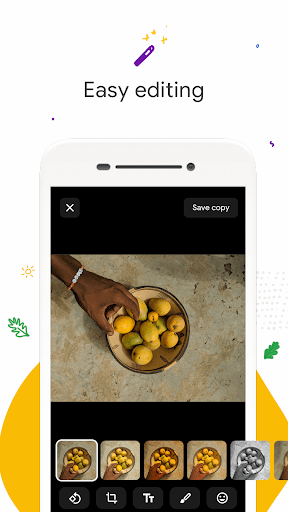
😎 Look your best with editing tools like auto-enhance
🏝️ Use less data - works offline, all in a small app size
AUTOMATIC ORGANIZATION
Each night, Gallery will automatically organize your photos to group by: People, Selfies, Nature, Animals, Documents, Videos and Movies.
Gallery helps you stay organized, so you can spend less time scrolling for that photo of your friend or family member, and more time sharing memories with them.*
AUTO-ENHANCE
Gallery has easy to use photo editing tools, such as auto-enhance which will make your photos look their best with one-tap.
FOLDERS AND SD CARD SUPPORT
Use folders to organize photos in any way you want. All while still being able to view, copy and transfer to and from SD Cards, easily.
PERFORMANCE
Gallery comes in a small file size which means even more space for your own photos. All while using less memory on your device - so it won’t slow down your phone.
WORKS OFFLINE
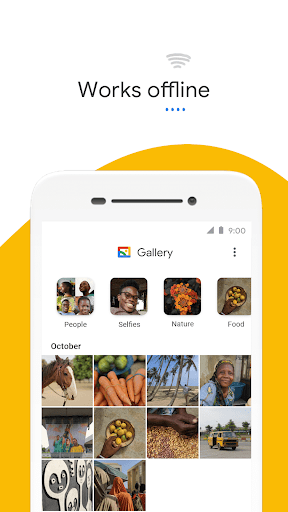
Optimized to work offline, Gallery can easily manage and store all your photos and videos without using up all your data.
*face grouping not currently available in all countries
Privacy
Given that Gallery requests no permissions, the risk of data collection for malicious purposes is significantly minimized. However, users should still be aware of Google's broader data collection policies, especially if they use other Google services. To maintain privacy, users can review Google's privacy policy and adjust their account settings accordingly.
Tips
For the best experience, users should initially set up Gallery by allowing it to access their device's media, and then explore its features such as automatic photo and video organization. To optimize performance, regularly cleaning up unused or duplicate media can help keep the app running smoothly. Additionally, integrating Gallery with Google Photos can provide a seamless and cloud-backed experience across all devices.
What's New
Version Information
- Version
- 1.9.2.712403868 release
- Downloads
- 1.0B+
- Updated on
- Jan 8, 2025
- Released
- Jul 23, 2019
- Requires
- Android 8.0
Statistics
Google Play Rating History
Rating Distribution
Downloads Over Time
Gallery has been downloaded times. Over the past 30 days, it averaged downloads per day.
Shaded area shows 30-day prediction based on historical trends
Historical data collection started recently. More data points will be available over time.
Gallery - Google Play Rankings
Top Rankings
| Rank | Country | Category | List | Change |
|---|---|---|---|---|
| — |
Ranking History in
No ranking data available yet. Rankings are updated daily.
#44 in Top Free Photography in United States


#20 in Top Free Photography in Spain


#22 in Top Free Photography in Pakistan


#24 in Top Free Photography in Mexico

Gallery users say on Google Play
 Nelson Boekhoudt
Nice applications for use it
 Jitendra Paikray
ok
 Dinesh Rawat
AI features are missing editing tools are missing
 Michael Howarth
Very basic app to organise photos on your device, but lacks a few extra basic features to make it truly useful such as changing the display photo for each gallery - it seems to select a random photo from each collection. Also the sorting order of photos completely breaks when you transfer data from one Pixel to another which is suuuper annoying, and there's no way to arrange photos by in the app, or even chanage the photos sorting order, so you're just stuck with it. I wish they'd fix that.
 Anuraj Kumar
this app does not get updates ad when we open video then unsupported media is seen there so this app is not working good
ApkTrusted Ratings & Reviews
More from Google LLC
See more apps
Chrome Beta
Free

Magnifier
Free

Chrome Dev
Free

Chrome Canary (Unstable)
Free

Lookout - Assisted vision
Free

Fitbit
Free

Test DPC
Free

Google Chrome
Free

Accessibility Scanner
Free

Compose Material Catalog
Free

Sound Amplifier
Free

Action Blocks
Free

Switch Access
Free

Reading mode
Free

Pixel Camera
Free

Android AICore
Free
Scan this QR code to download

Forwarding you to the page at Google Play market in seconds...
Open Google Play market now