
Assistive Volume Button vVARY
mCreations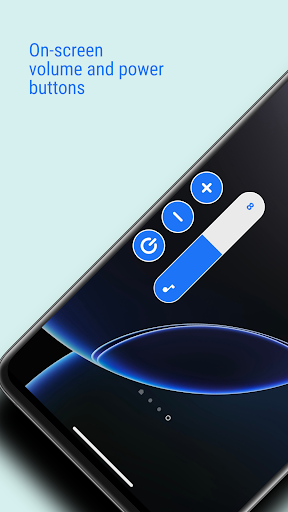







About this app
Developer Description
Volume control + booster, power button, auto screen on/off, lower brightness.
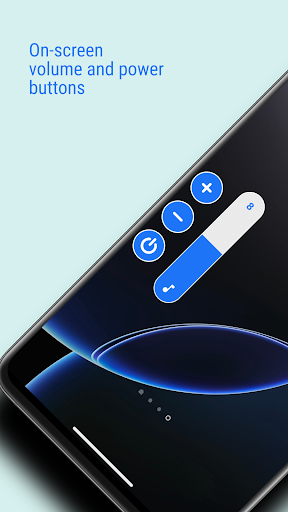
Assistive Volume Button shows the volume and power buttons on the edge of the screen which simulates the volume control and screen on/off functionality of the phone's physical keys.
App also provide the option to show the app's own volume slider or system volume slider.
Buttons can be moved on the screen to be placed anywhere on the side edge.
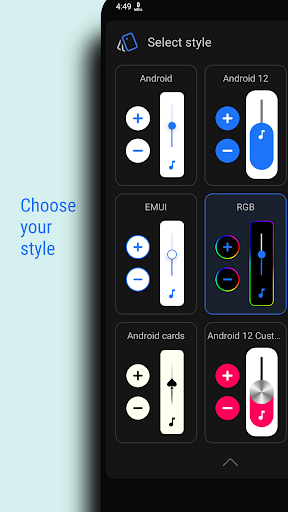
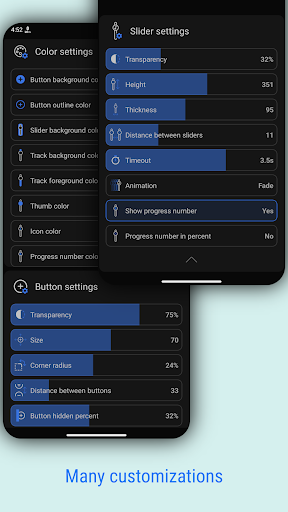
Customize buttons and sliders with predefined styles like Android, iOS, MIUI, RGB & more and appearance like size, transparancy, color & more.
PREMIUM FEATURES
Very useful premium features which can also be activated by watching an ad:
☞ Volume booster - Boost the volume of your speakers more than the phone's maximum volume.
☞ Lower brightness - Reduce the screen brightness below system minimum screen brightness.
☞ Auto screen on/off - Based on the proximity sensor input, turn screen on/off without pressing the power key.
SINGLE BUTTON
Show only one button on the screen and tap on it will open the sliders you choose:
• Media volume
• Media booster (Speaker booster / Volume booster)
• Ring volume
• Notification volume
• Call volume
• Brightness
• Darkness (Lower brightness)
With single button, you can control wide range of Media volume from normal to boosted volume and brightness from normal brightness to lower than system minimum brightness.
POWER BUTTON (Android 9+)
Shows power button which simulates phone's physical power key to turn screen off.
AUTO SCREEN ON
Use proximity sensor to turn the screen on.
When you hover over the phone's proximity sensor, the screen will turn on automatically.
USECASE: When you take the phone out of your pocket, your phone screen will turn on without pressing any key.
So now it truely simulates functionaliy of the power key by turning screen off with power button from the screen and turning screen on by the proximity sensor.
CONFIGURATION PER APP
You can set per app volume, brightness and buttons visibility.
When you open particular app, your defined configuration will be applied.
KEYBOARD
To avoid interruption in typing, app automatically moves the buttons up when keyboard opens so that it won't interrupt with your typing.
WIDGET
App offers following widget for home screen:
• Volume button
• Mute button
• Power button
ACCESSIBILITY
This app uses accessibility API for the following features to work:
• Power button
• Configuration per app
• Sensitive to keyboard
NOTE
App requires permission to run the service in background.
Some phones stop the background service. Those users need to follow steps mentioned in the app.
What's New
☞ Power button widget.
☞ Bug fixes and other app improvements.
In-app purchases
$0.99 - $9.99 per item
Version Information
- Version
- -
- Downloads
- 5M+
- Updated on
- Jan 2, 2026
- Released
- Oct 31, 2018
- Requires
- Android Varies with device
Statistics
Google Play Rating History
Rating Distribution
Downloads Over Time
Assistive Volume Button has been downloaded times. Over the past 30 days, it averaged downloads per day.
Shaded area shows 30-day prediction based on historical trends
Historical data collection started recently. More data points will be available over time.
Assistive Volume Button - Google Play Rankings
Top Rankings
| Rank | Country | Category | List | Change |
|---|---|---|---|---|
| — |
Ranking History in
No ranking data available yet. Rankings are updated daily.
#49 in Top Free Music And Audio in Indonesia

#99 in Top Free Music And Audio in Pakistan


Assistive Volume Button users say on Google Play
 Leonardo Luiz
Really good app, convenient volume control and reduces wear on physical buttons. Had to subscribe to the yearly, no regrets
 XGAMEX
it is a good application but there is a problem it's when I rotate the phone screen the volume button stucks in the upper sider of the of and I need to disable and and enable it again, I wish to fix this mistake, and thanks for listening.
 vilas lakkabathini
button long press is not working on Android 16 after update, button volume is not consistent some time it goes up & when u press down it still continues to go up then goes down..
 Muhammad Zeeshan
It was perfect before update but now it's on screen floating button conflicts with other app's popups. To interact with other apps sometimes it needs to hide the on screen floating button.
 Systerm Root
The recent update makes the widget icon smaller! Can't the dev provide a choices for people who wants a normal size icon! I hate the smaller widget icon! what's wrong with these dev! No common sense at all!!!
ApkTrusted Ratings & Reviews
Similar Apps

dynamicSpot - Dynamic Island
Free
Equalizer- Bass Booster&Volume
Free

AmpMe - Speaker Booster
Free

Smart Tutor for SAMSUNG Mobile
Free

Music Equalizer - Bass Booster
Free

Boom: Bass Booster & Equalizer
Free

Volume Booster - Sound Booster
Free

Jabra Sound+
Free

Soundcore
Free

Touch Screen Test
Free

realme Community
Free

SoundID™ Headphone Equalizer
Free
NetSpeed Indicator
Free

DevCheck Device & System Info
Free

Quikshort: Shortcut Creator
Free

Volume Booster - Sound Booster
Free
Scan this QR code to download

Forwarding you to the page at Google Play market in seconds...
Open Google Play market now