Device Care v13.8.70.5
Samsung Electronics Co., Ltd.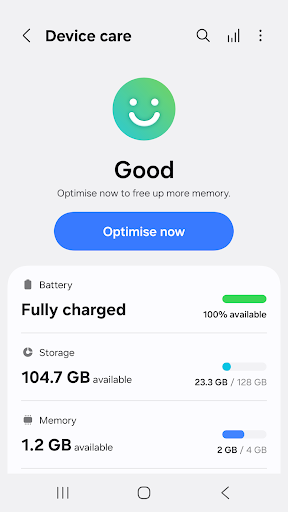
About this app
The Device Care app, developed by Samsung Electronics Co., Ltd., is designed to optimize the performance of Galaxy smartphones by providing features such as storage cleaning, battery management, and security checks. This app is particularly beneficial for Samsung device users who want to maintain their phone's health and performance without needing extensive technical knowledge. Compared to other tools in the category, Device Care stands out due to its seamless integration with Samsung devices and its user-friendly interface. However, its effectiveness and feature set may not surpass those of more specialized third-party apps.
Pros
- With over 1 billion downloads, Device Care has demonstrated its popularity and social proof, indicating a high level of user trust and satisfaction with its performance and features.
- The app's free model without ads or in-app purchases ensures a clean and uninterrupted user experience, focusing solely on its utility and functionality.
- Device Care's regular updates, such as version 13.8.70.5, show the developer's commitment to maintaining and improving the app, which is crucial for an app aimed at optimizing device performance and security.
- The absence of any permissions requests suggests that the app operates within a very limited scope, potentially enhancing user privacy and security by minimizing data collection and access.
- Its integration with Samsung devices makes it a convenient option for users looking for a native solution to manage their phone's health and performance.
Cons
- One of the primary concerns with Device Care is its limited compatibility, as it is specifically designed for Samsung Galaxy smartphones, which might limit its appeal and utility for users of other Android devices.
- Despite its user-friendly interface, some users might find the app's features somewhat basic compared to more advanced, third-party optimization tools available in the market.
- The lack of detailed information about what data the app collects, if any, and how it is used could raise privacy concerns among more cautious users, even though it doesn't request any permissions.
- There might be a learning curve for some users to fully utilize all the features and settings provided by the app, potentially leading to underutilization of its capabilities.
Best for: The ideal user for Device Care is a Samsung Galaxy smartphone owner, likely within the age range of 18 to 55, who values ease of use and is looking for a straightforward, integrated solution to maintain their device's performance and health without requiring advanced technical knowledge or preferring a native solution over third-party apps.
Developer Description
Device Care - optimize your Galaxy smartphone
Some Galaxy devices may not support some of the features outlined below.
App updates via the Google Play store are only available on some devices.
[Main features]
- Reports the current condition of a customer's smartphone on a 100-point scale;
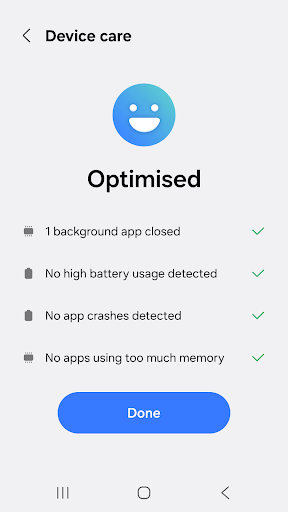
- Optimizes a smartphone in one simple click;
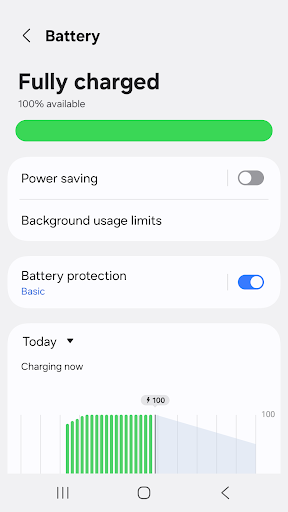
- Analyzes battery usage on a per-app basis and saves battery power by checking unused apps via App power monitor;
- Identifies battery-draining apps;
- Provides Power saving mode and Maximum power saving mode to ensure that the user can enjoy their smartphone for an extended period of time;
- Manages and frees up Memory efficiently;
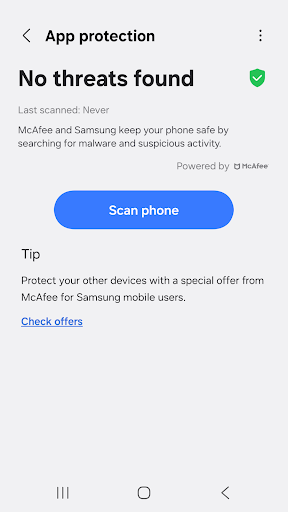
- Detects malware (viruses, spyware) and provides real-time protection for smartphones;
- Offers two widget types for customer convenience.
This app requires the following permissions:
You can still use the app's basic functions without allowing the optional permissions.
[Required permissions]
• Notifications: Used to notify you about updates and events
Privacy
Given that Device Care does not request any permissions, the risk of data misuse or unauthorized access is significantly minimized. However, users should still be cautious about relying solely on this app for security checks and consider complementing it with other security measures. Regularly reviewing the app's updates and terms of service can also help in maintaining privacy and security.
Tips
To get the most out of Device Care, users should regularly run the app's optimization features, such as storage cleaning and battery management, to maintain their device's performance. Additionally, exploring the app's settings can reveal more advanced features and customization options that can be tailored to individual needs. For first-time users, starting with the app's guided tour or tutorial can provide a comprehensive understanding of its capabilities and how to use them effectively.
Version Information
- Version
- 13.8.70.5
- Downloads
- 1.0B+
- Updated on
- Nov 6, 2025
- Released
- Jun 1, 2017
- Requires
- Android 11
Statistics
Google Play Rating History
Rating Distribution
Downloads Over Time
Device Care has been downloaded times. Over the past 30 days, it averaged downloads per day.
Shaded area shows 30-day prediction based on historical trends
Historical data collection started recently. More data points will be available over time.
Device Care users say on Google Play
 Pareem Pareem
Very good
 Cesar Espejon
nice
 042
042
honestly another unnecessary add on app
 Cindy Brownell
It uses too much app time ? What good is an app if runs all the time and uses Battery power.
 pravin ghantewad
there is lots off issues i facing in my phone .....issues like no battery stats recorded properly. and suddun battery down after 50% charge remaining. please fix the issue for better experience.
ApkTrusted Ratings & Reviews
More from Samsung Electronics Co., Ltd.
See more apps
Smart Tutor for SAMSUNG Mobile
Free

POWERbot-S
Free

Samsung WE VoIP
Free

Galaxy Buds Core Manager
Free
Samsung Accessory Service
Free

Galaxy Buds+ Manager
Free

Galaxy Buds2 Pro Manager
Free

Galaxy Buds FE Manager
Free

Galaxy Buds Pro Manager
Free

Galaxy Buds3 Manager
Free

Galaxy Buds2 Manager
Free

Galaxy Buds Manager
Free

Samsung Plus 2
Free

POWERbot-E
Free

Galaxy Buds3 Pro Manager
Free

Galaxy Buds3 FE Manager
Free
Similar Apps

File Manager
Free

Mi Browser
Free

AVG AntiVirus & Security
Free

CCleaner – Phone Cleaner
Free

Enpass Password Manager
Free

GlassWire Data Usage Monitor
Free

1Tap Cleaner (clear cache)
Free

Xiaomi Community
Free

Phone Cleaner – Junk Files
Free

OnePlus Community
Free

Cleaner Antivirus VPN Cleaner
Free

Internet Browser
Free

Speedtest by Ookla
Free

Bitwarden Password Manager
Free

MobiDrive Cloud Storage & Sync
Free

Swift Backup
Free
Scan this QR code to download

Forwarding you to the page at Google Play market in seconds...
Open Google Play market now