AirDroid Cast-screen mirroring v1.1.7.2
SAND STUDIO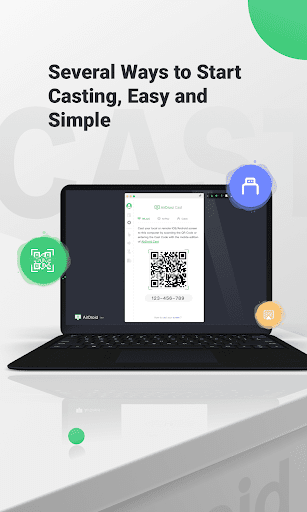




About this app
Developer Description
screen mirroring to pc, and control all mobile devices from any pc
Main Features:
Several Ways to Start Casting, Easy and Simple
Scan a QR code or input the Cast Code, or use a USB cable to cast the screen, eliminate the delays and enjoy the clear images. Suitable for game streaming and entertainment.
Control mobile device on computer
No matter you are in the office or at home, You can use AirDroid Cast to view and control your surroundings mobile device on a computer. As long as the AirDroid Cast is installed on a macOS/Windows computer, you can use it to control all mobile phones and tablets. You can click, scroll, and type on your mobile device through desktop, things that require you to take your phone in hand.
Mirror Android screen to pc with audio
AirDroid Cast streams not only the screen but the device microphone audio. Directly communicate with the meeting attendees using the two-way audio feature to enhance work efficiency
Works with a remote network
All features of AirDroid Cast are available under the local area network. Upgrade to Premium user, network type will not be limited; AirDroid Cast works even under the remote network to suit scenarios such as remote meetings.
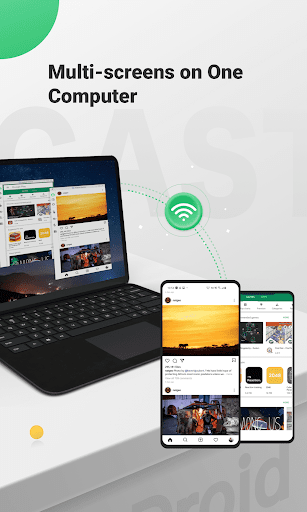
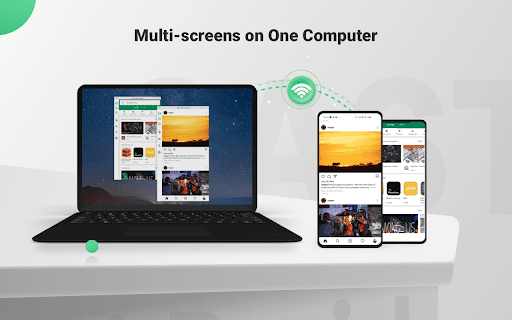
Multi-screens on one computer
AirDroid Cast supports casting a maximum of 5 devices onto a computer simultaneously. With this in mind, you can enjoy multiplayer gaming, or view all the attendees' PowerPoint slides during a meeting.
What can you do with AirDroid Cast?
Remote & Multi-attendees Meeting
When you are on a business trip or working from home, AirDroid Cast can help bridge the communication gap in a remote meeting. By scanning the QR code or entering the Cast Code, the meeting attendees can easily share their mobile device screens with the meeting host. Each attendee can directly draw and show his/her idea, using the two-way audio feature to make the communication more effective.
Online Presentation
You can nail in-house meetings, training, or product demonstration with AirDroid Cast. It enables you to share your mobile device screen to the meeting room computer whether the devices are under the same local area network. AirDroid Cast also supports AirPlay, allowing you to share macOS or iOS device screens to Windows or Mac computers.
Remote Online Teaching
As an instructor, you can turn your mobile device into a handy whiteboard by using AirDroid Cast. You can type down key points or draw the formula right onto your device and share the screen with the computer. In addition, you can get your students' feedback right away using the two-way audio feature.
Gaming & Live-streaming
With AirDroid Cast, you can easily share your Android/iOS device screen along with the audio to your computer by Wi-Fi. In this way, your fans can enjoy watching the live game streams. Furthermore, AirDroid Cast supports up to 5 devices casting at the same time, your friends can join you and show their skills with you.
What's New
In-app purchases
$2.49 - $29.99 per item
Version Information
- Version
- 1.1.7.2
- Downloads
- 1M+
- Updated on
- Jul 21, 2025
- Released
- Jan 26, 2021
- Requires
- Android 7.0
Statistics
Google Play Rating History
Rating Distribution
Downloads Over Time
AirDroid Cast-screen mirroring has been downloaded times. Over the past 30 days, it averaged downloads per day.
Shaded area shows 30-day prediction based on historical trends
Historical data collection started recently. More data points will be available over time.
AirDroid Cast-screen mirroring users say on Google Play
 0je14l3q8
Very helpful in casting your device onto anything! Especially since you don't have to download anything! Ads aren't disruptive, and even though there may be a bit of delay between screens and audio, it's a pretty solid app that you can get for free! I highly recommend it.
 Keith Kuchenbecker
Easy install, even on obsolete hardware. Had to tweek mic and speaker settings between laptop and mobile device to reduce, nearly eliminate audio feedback oscillations.
 B&Z Rosemond
This app is Good and all but sometimes it gliches
 Wentworth Hardware Division
I had to pay for the pro upgrade to get it to work right. I use this for business purposes when I perform software demos. I appreciate the option to connect my device via USB when I travel and struggle with getting both devices to connect on new networks. Unfortunately, they started displaying huge obnoxious black Friday discount ads that completely cover the cast screen and keep coming back. They make me look so unprofessional. I already have a paid account so why?? I will be switching.
 S
S
Absolute garbage you have to PAY to even use any of these features. I tried using screen mirroring and wanted to click on the screen and you can't do that because you have to PAY to even use this thing.
ApkTrusted Ratings & Reviews
More from SAND STUDIO
See more apps
AirMirror: Remote control
Free

AirDroid Parental Control
Free

AirDroid Business
Free

AirDroid Business Daemon
Free

AirDroid: File & Remote Access
Free

AirDroid Parental Connector
Free
AirDroid Remote Support
Free
AirDroid Control Add-on
Free

AirDroid Browser - Safe Search
Free

AirDroid Cast TV
Free

GoInsight.AI
Free
Similar Apps

RealVNC Viewer: Remote Desktop
Free

TeamViewer Remote Control
Free

Send Anywhere (File Transfer)
Free

ScreenStream
Free

Smart Connect
Free

VIDAA Smart TV
Free

Smart Switch - File Transfer
Paid

Quick Share: File Transfer
Paid

AnyDesk Remote Desktop
Free

Link to Windows
Free

Linksys
Free

Smart Transfer: File Sharing
Free

spacedesk - USB Display for PC
Free

eWeLink - Smart Home
Free

Universal Remote for Smart TV
Free

MERCUSYS
Free
Scan this QR code to download

Forwarding you to the page at Google Play market in seconds...
Open Google Play market now