
Smart switch - copy my data v110.0
Simple things for life










About this app
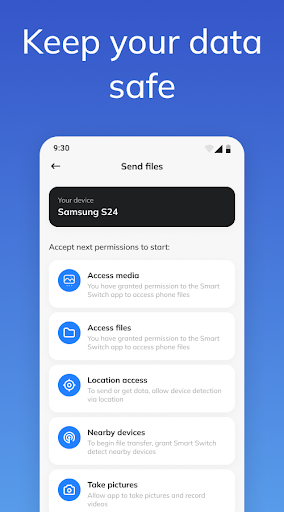
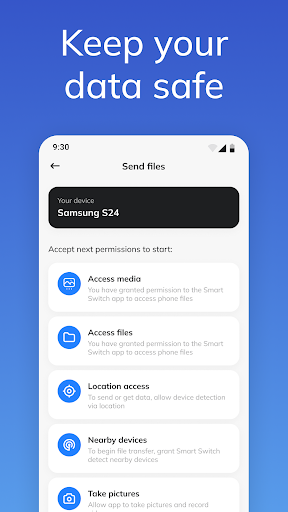
The Smart switch - copy my data app solves the problem of transferring important data between devices, benefiting those who frequently switch phones or need to migrate data to a new device. Compared to alternatives in the Tools category, SmartSwitch stands out for its simplicity and ease of use, but falls short in terms of advanced features. With over 1 million downloads and a mixed user rating, it's clear that the app has its strengths and weaknesses. The app's ability to transfer data without requiring any permissions is a notable advantage, but its aggressive monetization model may deter some users.
Pros
- The app has a large user base, with over 1 million downloads, which is a testament to its effectiveness and social proof.
- The app's simplicity and ease of use make it accessible to a wide range of users, including those who are not tech-savvy.
- The app's ability to transfer data without requiring any permissions is a significant advantage, as it reduces the risk of data breaches and privacy concerns.
- The app's frequent updates, with the latest version being 110.0, indicate that the developer is actively maintaining and improving the app.
- The app's offline capability allows users to transfer data even without an internet connection, making it a convenient option for those with limited data plans.
Cons
- The app's monetization model, which includes ads and in-app purchases, may be aggressive and intrusive, detracting from the user experience.
- The app's mixed user rating, with some users reporting issues with the app's performance and functionality, raises concerns about its reliability and effectiveness.
- The app's lack of advanced features, such as data encryption and password protection, may make it less secure than other data transfer apps.
- The developer's website and email address, which are not clearly linked to the app, may raise concerns about the app's legitimacy and support.
Best for: The ideal user for this app is someone who frequently switches phones or needs to migrate data to a new device, such as a student, professional, or individual with multiple devices, who values ease of use, simplicity, and convenience, and is willing to tolerate some ads and in-app purchases in exchange for a reliable and efficient data transfer experience.
Developer Description
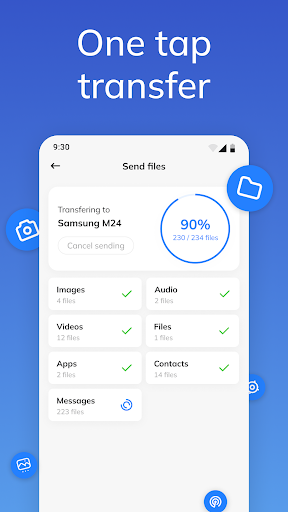
You can transfer all important data from one device to another with SmartSwitch!
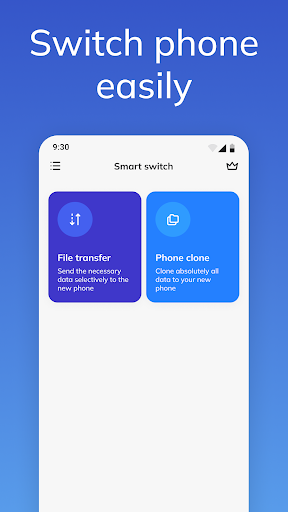
Check the Smart Switch app for quick transfer of personal data and settings between two gadgets! Our program is one of the best tools for transferring files between devices.
📱 File transfer may be necessary when exchanging data between an old and a new mobile device. If you bought a new phone and don’t want to lose all your files, you definitely need to try our SmartSwitch app!
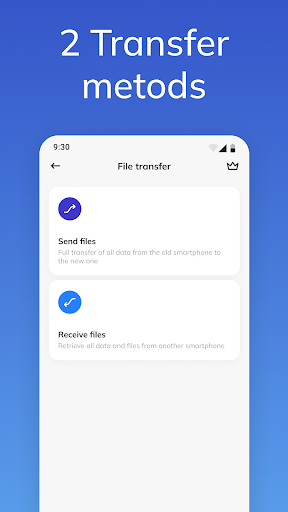
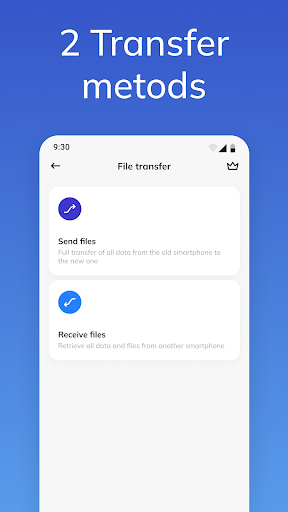
Two gadgets take part in the work process of the Smart Switch application at the same time:
the device that sends data
the device which receives data
Which of your data can be easily transferred? Most important:
📁Files
📱Applications
🎵 Music
📸 Foto
🎥 Video
Many little things in your device that make our lives comfortable will not be lost if you use the Smart Switch application.
We transmit data via WIFI or Direct Transfer.
The process of transferring data through the Smart Switch application will be explained in a short instruction:
Place the first (sender device) and new (receiver device - recipient) close to each other.
Turn on WIFI on both devices.
Devices must be connected to the same WIFI, or one device must share the internet with another. (With a direct transfer, this is not even necessary!)
Using the application, you pair two devices with each other
The sender sees the recipient in the list of found devices and asks for permission to pair.
The recipient confirms the pairing of devices.
You choose the data you want to transfer.
Send data from device to device!
❤ All chosen content will be available on the new device.
The time to transfer information depends on the device, the transfer mode, and the amount of data. Transferring light and small files will take you a few seconds. When a large amount of information is transferred, more time will be required.
❗ The advantages of our application are obvious:
1. The application supports direct data transfer from phone to phone.
2. It is very simple to select the type of data you want to move
3. The application is compatible with various phone models
4. Data quality remains unchanged
5. Our app is easy to use, has an intuitive interface, does not require any technical knowledge.
❗ The Smart Switch app works with almost all models of Android phones.
➡ We are constantly working to improve our app. Stay tuned!
Privacy
Given that the app requires no permissions, it's a relatively safe option for transferring data. However, users should still be cautious when transferring sensitive data and ensure that they are using a secure connection. To minimize risks, users should also review the app's terms and conditions and understand what data may be collected.
Tips
To get the most out of this app, users should first ensure that both devices are connected to the same Wi-Fi network, and then follow the in-app instructions to initiate the data transfer process. Additionally, users can optimize the app's performance by closing other resource-intensive apps and ensuring that both devices have sufficient battery life. Users can also explore the app's settings to customize the transfer process and prioritize specific types of data.
What's New
In-app purchases
$3.99 - $99.99 per item
Version Information
- Version
- 110.0
- Downloads
- 1M+
- Updated on
- Dec 30, 2025
- Released
- Jun 15, 2022
- Requires
- Android 8.0
Statistics
Google Play Rating History
Rating Distribution
Downloads Over Time
Smart switch - copy my data has been downloaded times. Over the past 30 days, it averaged downloads per day.
Shaded area shows 30-day prediction based on historical trends
Historical data collection started recently. More data points will be available over time.
Smart switch - copy my data - Google Play Rankings
Top Rankings
| Rank | Country | Category | List | Change |
|---|---|---|---|---|
| — |
Ranking History in
No ranking data available yet. Rankings are updated daily.
#45 in Top Grossing Tools in United Kingdom

#55 in Top Grossing Tools in Netherlands
 Photo Cleaner: Swipewipe
Smart switch - copy my data
Photo Cleaner: Swipewipe
Smart switch - copy my data
Smart switch - copy my data users say on Google Play
 Md Siam
I’ve been using this Switch 'app for a few weeks now, and overall it’s been a great addition to my cooking routine. It’s simple, intuitive, and very responsive — perfect for measuring ingredients when I don’t have a physical scale nearby. The interface is clean and easy to navigate, so I can quickly switch between different units like grams, ounces, milliliters, and pounds. I especially like how it remembers my last setting, which saves time when I’m baking frequently. Measurements feel accurate
 Kenneth Mobley
Works well.
 Robert Rucker
Quite frankly, your app wasn't worth your greediness. It's so infested with ads that it's not even really usable. Mellow out on the ads and you might just have something here.
 Pumpkineck Bort
50$ for an app I never installed. SCAM! 100% malware. Never downloaded, never interacted with this app at all yet still got charged. They somehow got my information from google play store. Thieves. Phishers. Look at all the names of the positive reviews. They're just straight picking people's names from the google playlist and charging them now.
ApkTrusted Ratings & Reviews
More from Simple things for life
See more apps


Similar Apps

Samsung Smart Switch Mobile
Free

Smart Transfer: File Sharing
Free

Transfer All Data - PhoneClone
Free

Phone Clone Tool: Switch data
Free

WeTransfer : File Transfer
Free

Send Anywhere (File Transfer)
Free

Data Transfer - MobileTrans
Free
OPPO Clone Phone
Free
EasyShare
Free

Galaxy Wearable
Free

File Sharing - InShare
Free

myPhonak
Free

Data Transfer
Free

RICOH Smart Device Connector
Free

Linksys
Free
AT&T Personal Cloud
Free
Scan this QR code to download

Forwarding you to the page at Google Play market in seconds...
Open Google Play market now