
Bangkero Dive-Master v1.2.0
SPRAKENTURN


About this app
Developer Description
Bangkero the waves explorer is now on WEAROS
A "bangkero" is a Filipino (Philippines) term for a skilled boatman, referring to someone who operates a "banga," or boat, to provide transportation, especially by guiding tourists on thrilling rides through rapids.
✰ Features:
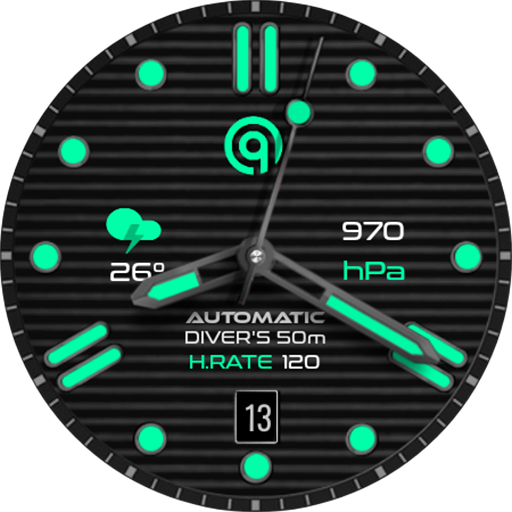
- Analog dial for time
- Date mirror/cyclops lens magnify effect on dial hands
- Heart rate, steps, distance (in km) and battery information
- Customization (dial background, index and dial hands colors)
- Month, day of the week and day display
- 4 preset app shortcut (heart rate, battery, steps and calendar)
- 7 custom shortcuts to access your favorite widget
- Always on display lumen color and brightness options
INSTALLATION:
1. Make sure your watch is connected to your smartphone (Bluetooth) with same GOOGLE account.
2. In Play Store App, select your watch as targeted device for installation. The watch face will be installed on your watch.
3. After installation, if your active watch face is not replaced. Follow these 3 SIMPLE STEPS before you comment not working.
3.1- Long press on your current watch face --> swipe to right until --> "Add watch face" (+/plus sign)
3.2- Scroll down and look for "Downloaded" section
3.3- Search and click on your new watch face to activate it - and that's it!
SETTING UP SHORTCUTS/BUTTONS:
1. Press and hold the watch display.
2. Tap customize button.
3. Swipe from right to left until you reach the "complications".
4. The 7 shortcuts are highlighted. Click on it to set what you want.
CUSTOMIZATION OF DIAL STYLE e.g. BACKGROUND, INDEX ETC:
1. Press and hold display then hit "Customize".
2. Swipe left and right to choose what to customize.
E.g. Background, Index frame etc.
3. Swipe up and down to choose options available.
For bugs, comments or suggestions, don't hesitate to contact me at (sprakenturn@gmail.com). If you like this watch face hope you wouldn't mind leaving a review. Thanks for your support!
What's New
- Updated target SDK Requirement (technical)
- Dial graphics/images and text enhancement
Version Information
- Version
- 1.2.0
- Downloads
- 1K+
- Updated on
- Sep 7, 2025
- Released
- Jul 12, 2023
- Requires
- Android Varies with device
Statistics
Google Play Rating History
Rating Distribution
Downloads Over Time
Bangkero Dive-Master has been downloaded times. Over the past 30 days, it averaged downloads per day.
Shaded area shows 30-day prediction based on historical trends
Historical data collection started recently. More data points will be available over time.
Bangkero Dive-Master - Google Play Rankings
Top Rankings
| Rank | Country | Category | List | Change |
|---|---|---|---|---|
| — |
Ranking History in
No ranking data available yet. Rankings are updated daily.
#44 in Top Paid Personalization in South Korea


Bangkero Dive-Master users say on Google Play
 Darhar M.
This is quite the interesting dive face. It looks great although the color pallet well not standard looks great thanks to the face design. Both of the watch faces you offer are worth having.
 Freddy Rozentzvaig
This is a good looking watch face. However, as someone who relies on AOD, it's too dark and the day of the month is essentially invisible in AOD. Also, it would be nice to be able to remove or change the information displayed above the 6:00 mark.
 Doctor Tarr
Great detail on watch. Controls freeze when adjusting watchface appearance - big problem.
 Joao Nieves
Bad!! Not work!!
ApkTrusted Ratings & Reviews
More from SPRAKENTURN
See more apps
Rogue Moon Phase Watch Face
Paid
The Misthios Watch Face
Paid

SPRAK Lagoon Watch Face
Paid

Bangkero Panda Watch Face
Paid

Misthios Panda Watch Face
Paid

SPRAK Phantom Watch Face
Paid

Icarus Watch Face
Paid

SPRAK 925 Ag Moon Watch Face
Paid

SPRAK Icarus Blaze Watch Face
Paid

The Misthios Watch Face BASIC
Free

SPRAK 143 Dark Moon Watch Face
Paid

Misthios Chronograph WatchFace
Paid

Rogue Watch Face
Paid
Similar Apps

AE SUBMARINER
Paid

Roolex Submarine
Paid

NW084: Analog watch face
Free
IWF D6 watchface
Paid
S4U Dive - Diver watch face
Paid

Luxury Watchface
Paid

IWF AllNew Diver SE
Free
Diver Classic 9 Wear OS 4+
Paid

IWF004 Diver Pro | ISACWATCH
Paid

Aquastellar: Diver Watch Face
Paid
Diver Classic 10 Wear OS 4+
Paid

Sevian : Diver Watch Face
Paid

IWF D1 SE watchface
Free

Diver Classic 17 Wear OS 4+
Free

ULTRA Diver watch face
Paid

JW074 jwstudio
Paid
Scan this QR code to download

Forwarding you to the page at Google Play market in seconds...
Open Google Play market now