AirPin PRO - AirPlay & DLNA v5.6.1
WaxRain Tech.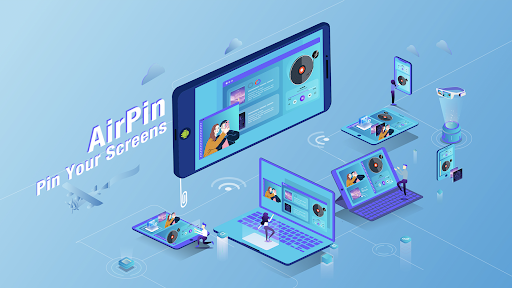









About this app
Developer Description
1)AirPlay/DLNA Mirroring/Streaming, up to 4 connections; 2)Samba/NAS/DMS Player.
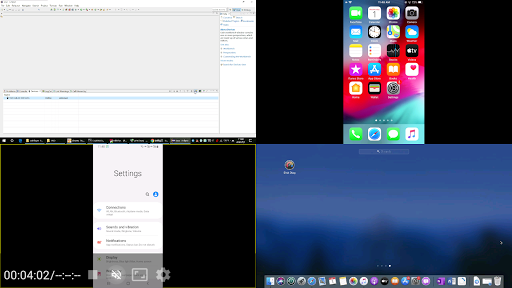
●With this PRO version, you can display multiple device screens(up to 4) simultaneously.
●With STD version, you can display one device screen at one time.
The FIRST Android app supporting both AirPlay and DLNA(The first version was released in Jul. 2012).
You can share the media and screen from your Apple, Windows and Android devices with the big screen.
●Share screen/video/music from iPhone/iPad/MacBook to AirPin via AirPlay
●Install AirPinPcSender.exe on your PC to share screen/media from Windows to AirPin
●Install AirPinCast(Search 'AirPinCast' in Google Play) to share screen/media from Android devices
NOTE: If the app doesn't work perfectly with your device, please contact us to improve. Your encouragement will help us move further.
Features:
●Display multiple device screens(up to 4) simultaneously
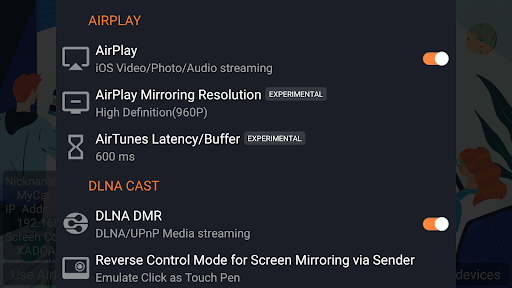
●Support AirPlay video/music streaming and screen mirroring on all iOS/MacOS versions
●[*]The FIRST app supporting the latest Youtube AirPlay streaming
●[*]The FIRST app supporting slideshow for AirPlay photo streaming
●[*]The FIRST app supporting AirPlay password protect
●Support DLNA and UPnP
●[*]The ONLY app supporting both Renderer and Player for Android based TV
●[*]Directly pull media from DLNA/NAS/Samba Server to play
●Support Windows streaming and mirroring(Working with AirPinPcSender.exe)
●Support AndroidSender(Android mirroring/streaming via AirPinCast)
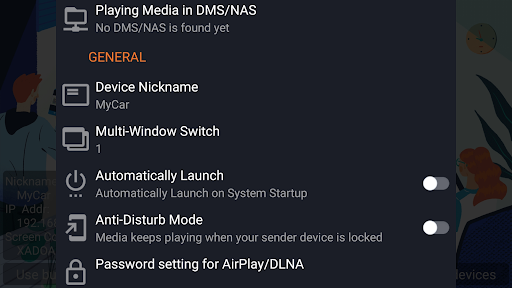
●Support Password protection
●Automatic startup and Service shutdown configurable
●Audio streaming background played without delay
●Anti-disturb mode(video is kept playing when the controlling side exits)
●Continue playing from its previous pause point
●Support external Player
●Constant bug fixing and updating within our capability
What's New
1)Improve compatibility for AirPlay and DLNA;
2)Improve compatibility for live broadcast streaming;
3)Fixed other known bugs.
v5.4.5:
1)Improve compatibility for DLNA 1.5;
2)Add doodle menu;
3)Fixed other known bugs.
Version Information
- Version
- 5.6.1
- Downloads
- 10K+
- Updated on
- Dec 24, 2024
- Released
- Apr 18, 2020
- Requires
- Android 2.3
Statistics
Google Play Rating History
Rating Distribution
Downloads Over Time
AirPin PRO - AirPlay & DLNA has been downloaded times. Over the past 30 days, it averaged downloads per day.
Shaded area shows 30-day prediction based on historical trends
Historical data collection started recently. More data points will be available over time.
AirPin PRO - AirPlay & DLNA - Google Play Rankings
Top Rankings
| Rank | Country | Category | List | Change |
|---|---|---|---|---|
| — |
Ranking History in
No ranking data available yet. Rankings are updated daily.
#22 in Top Paid Video Players in United States


#9 in Top Paid Video Players in Brazil

#13 in Top Paid Video Players in Canada
 TV Cast Pro for Samsung TV
AirPin PRO - AirPlay & DLNA
TV Cast Pro for Samsung TV
AirPin PRO - AirPlay & DLNA
#27 in Top Paid Video Players in Poland


AirPin PRO - AirPlay & DLNA users say on Google Play
 Adam Sjodin
Great app, does everything you would expect and exceeds expectations. Works perfectly on my Nvidia shield mirroring from my iPad pro. I assumed an app like this wouldn’t exist until I went looking. All one star reviews that I have seen appear to be user error rather than any issue with the app, so this app probably deserves an even higher rating than it has
 Medhat Elsayed
Hi. The app is great but I have an issue when trying to airplay live YouTube videos. The video plays for few seconds only then stops (or doesn’t play at all). Tried switching player settings but no success. Everything else works well with the right settings.
 Sebastian Werner
Apple TV content not working
 Neil Risidore
Like Ranjith .K.Soman, I have been unable to stream from the Apple TV app. Airpin Pro first displays Loading (20 secs approx) and then Buffering 0% (indefinitely). Looks like this is a definite bug. App works OK for other streaming services like Youtube. I am streaming from iPad and iPhone to a Sony Android TV (A8F)..
 Ranjith .K.Soman
I purchased this app to stream my appletv+ on my iPad to my Mibox. While screen mirroring works perfectly, streaming doesn't work. It is stuck at a screen which states loading , and then goes to the place holder page.
ApkTrusted Ratings & Reviews
More from WaxRain Tech.
See more apps

Similar Apps

HQ Video Player & Casting
Paid

Focus Video - Video Compressor
Free

PUBBLY Player
Free

IDAGIO Stream Classical Music
Free

IPTV Player: Watch 8K Live Tv
Paid

Dr. Dish Player
Free

All Languages Translator App
Paid

Video Recorder
Paid

Quick Share: File Transfer
Paid

IZZY - Stream Israel
Free
Podcast Republic - Podcast app
Free

Newsmax
Free

Canon+
Free

KSL+
Free

Lib of Dev (Open Source)
Free

Earz Solo - Game to the Music
Free
Scan this QR code to download

Forwarding you to the page at Google Play market in seconds...
Open Google Play market now