
Zoho Sheet: Spreadsheet App v2025.12.17
Zoho Corporation





About this app
Developer Description
Work on spreadsheets—Excel-compatible and with offline support.
As a standalone spreadsheet application, we don't ask you to link your credit or debit cards and introduce hidden costs later—it's a fully free experience.
You only need to sign up if you want to work online. Prefer working offline? Get started right away—no signup needed.
With Zoho Sheet, you can:
1. Create spreadsheets from scratch and manage them completely within the app.
2. Access files in the cloud or work offline on your device as needed.
3. Open and edit MS Excel files (XLSX, XLS, XLSM, and XLTM), as well as CSV, TSV, ODS, and more stored on your device and cloud apps like Box and DropBox.
4. Create spreadsheets for bills, invoices, and receipts using Data from Picture. Just scan your paper records and turn them into spreadsheets in seconds.
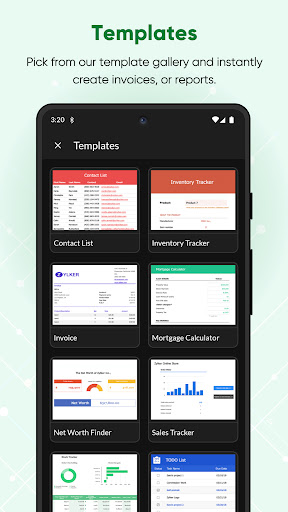
5. Set up your timesheets, budget spreadsheets and more in no time using our ready-made spreadsheet templates.
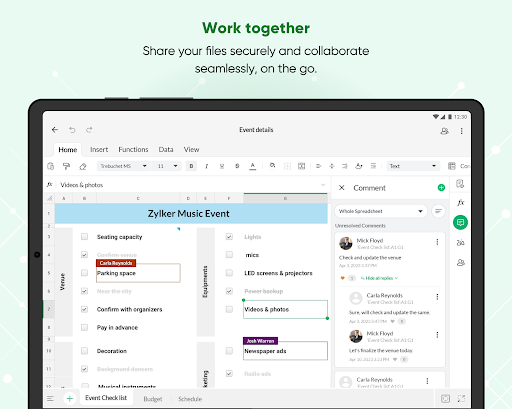
6. Share your spreadsheets with collaborators, set different permission levels, and work together in real time.
7. Add comments—at a cell or range level—and use @mentions to tag collaborators for improved teamwork.
8. Ensure accurate data entry with various data validation tools.
Format your cells with all the fundamental tools, sort and filter, and apply conditional formatting.
9. Crunch numbers with more than 350 functions and formulas—from VLOOKUP and XLOOKUP to IF and more.
10. Visualize your findings with more than 35 types of charts.
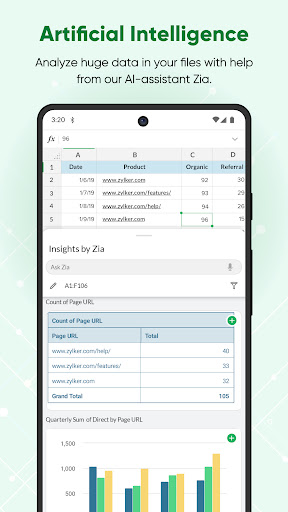
11. Let Zia, our in-house artificial intelligence, do the heavy lifting—get smart data analysis suggestions, automatically generate charts and pivot tables, and even ask questions using voice commands.
12. Rest assured that every bit of work you do is saved automatically and securely.
Keep your data in sync across platforms
Zoho Sheet is also available on the web and iOS. The best part? The data syncs instantaneously and automatically, so you can switch between platforms anytime.
Zoho's privacy promise
Respecting your privacy has always been central to our philosophy as a company. In our history of 25+ years, we have never sold our users' information to anyone for advertising or earned revenue by showing third-party ads. Your spreadsheet data stays yours.
The Zoho advantage for businesses
Zoho Sheet is the spreadsheet software in the Zoho office suite, which also includes Zoho Writer for word processing and Zoho Show for presentations. When you sign up for Zoho Sheet, you get a variety of tools to create and manage your sheets, presentations, and word documents in one place. It's also part of Zoho WorkDrive, an online file storage and collaboration tool and, Zoho Workplace, an email and collaboration suite.
Zoho's single sign-on account makes it easier to access all the Zoho apps you need. Our ecosystem currently offers 55+ apps across business categories—sales, marketing, email and collaboration, finance, HR, and more.
For more details visit: https://www.zoho.com/sheet/mobile.html
If you have questions before you try the app or while using it, please write to us at android-support@zohosheet.com.
What's New
We've smashed a few bugs and improved the app performance.
Version Information
- Version
- 2025.12.17
- Downloads
- 500K+
- Updated on
- Dec 17, 2025
- Released
- Nov 21, 2017
- Requires
- Android 6.0
Statistics
Google Play Rating History
Rating Distribution
Downloads Over Time
Zoho Sheet: Spreadsheet App has been downloaded times. Over the past 30 days, it averaged downloads per day.
Shaded area shows 30-day prediction based on historical trends
Historical data collection started recently. More data points will be available over time.
Zoho Sheet: Spreadsheet App users say on Google Play
 D Roy
D Roy
working fantasticly
 Arabinda Paul
Filter not working in android app
 Karan Suchak
Directly importing data from a web URL within the Zoho Sheet mobile app is not a currently available. so please add all possible features in mobile app as well.
 Dinesh kumar Kumawat
its a really good beginning by your side . currently i am using the app in my tab samsung A9+ since one month but somewhere i am facing so many glitches like auto fill ralated or so many things . i hope you will understand this problem and fix it in next update.
 Dhanraj Ghag
Launch a single unified app like Microsoft 365 merging capabilities of zoho sheet, writer, scanner and show.
ApkTrusted Ratings & Reviews
More from Zoho Corporation
See more apps
Barcode & QR Code Generator
Free

Arattai Messenger
Free

Customer App - Zoho Assist
Free

Site24x7
Free
Card Scanner - business cards
Free

Zoho Scanner–Document PDF OCR
Free

Zoho Assist - Remote Desktop
Free

Zoho Backstage for Organizers
Free

Zoho One Admin
Free

Authenticator App - OneAuth
Free
Zoho Calendar
Free

Search across Zoho- Zia Search
Free

Zoho Backstage for Attendees
Free

Zoho POS (Formerly Zakya)
Free

Business Manager by Zoho POS
Free

Pannai - Farm Management App
Free
Similar Apps
Table Notes - Mobile Excel
Free

Microsoft Planner
Free

Asana: Work Management
Free

Smartsheet: Projects & Teams
Free

monday.com - Work Management
Free

CSV File Viewer - Smart CSV
Free

Jira Cloud by Atlassian
Free
Microsoft SharePoint
Free

Invoice Maker & Estimate App
Free

Basecamp - Project Management
Free

Pocket CRM - Customers & Leads
Free

Microsoft Excel: Spreadsheets
Free

Microsoft Power BI
Free

Rocketbook
Free

Microsoft 365 Admin
Free

Microsoft To Do: Lists & Tasks
Free
Scan this QR code to download

Forwarding you to the page at Google Play market in seconds...
Open Google Play market now