
Zoho Scanner–Document PDF OCR v3.2.2
Zoho Corporation


About this app
Developer Description
Scan documents to PDF. OCR, image to text, translate, sign & share easily.
SCAN ANYTHING
Open Zoho Scanner, the best document scanner app in the store, hold it straight against the document you would like to scan. The scanner app will automatically detect the document's edges. You can then crop, edit, rotate and apply filters and export the document as either PNG or PDF with a single tap.
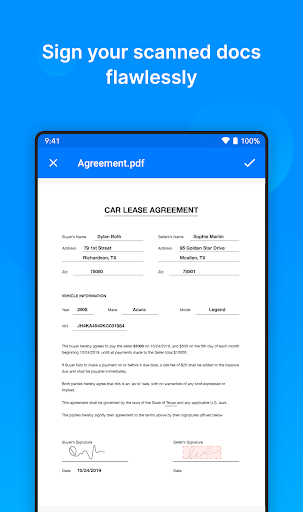
E-SIGN
Verify your identity by dropping in your signature from Zoho Sign. Add initials, names, signing date, email address, and more to your scanned document.
IMAGE TO TEXT
Extract the text from your scanned documents to share the content as a .txt file. OCR also helps you search for files using keywords from the content in the scanned document.
TRANSLATE
Translate extracted content from scanned documents into 15 different languages: French, Spanish, German, Russian, Chinese, Japanese, Portuguese, and Italian and more.
SHARE & AUTOMATE
Upload scanned documents to your favorite cloud storage like Notebook, Google Drive, Dropbox, OneDrive, Zoho Expense, and Zoho WorkDrive. Share scanned docs via email and messaging apps such as WhatsApp or save them to cloud services with the Auto Upload feature. Create workflows to simplify your tasks and save time.
ORGANIZE
Stay organized by creating folders, setting reminders, and adding tags to categorize and find documents easily. Auto Tags will recommend tags based on the content inside the doc.
ANNOTATE & FILTER
Crop out unwanted areas scanned images and resize them as needed. Annotate scanned copies with three different marker tools and re-order pages in a set of scanned docs. Choose from a set of filters to apply on the scanned documents.
Zoho Scanner has two paid plans, Basic and Premium. Basic is a one time purchase plan priced at USD 1.99 and Premium is a monthly/yearly subscription plan priced at USD 4.99/49.99 respectively.
BASIC
- Choose from five different app themes.
- Set reminders for documents.
- Secure your documents using finger print.
- Use document content to search for documents.
- Choose from a set of filters of your choice.
- Remove watermark from documents while you share.
- Set upto 2 workflows to cater for your sharing needs.
PREMIUM
Including all the Basic Plan features mentioned above,
- Digitally sign up to 10 documents yourself.
- Automatically back up your scanned docs in Google Drive.
- Extract the text from scanned docs and share the content as .txt file.
- Translate extracted content from your scanned documents into 15 different languages including French, Spanish, German, Russian, Chinese, Japanese, Portuguese, Italian and more.
- Create unlimited workflows based on your sharing needs.
- Auto upload scanned docs to your favorite cloud storage including Notebook, Google Drive, Dropbox, OneDrive, Zoho Expense, and Zoho WorkDrive.
- Get intelligent tag suggestions with Zia for your scanned docs.
- Let Zoho Scanner read the document for you.
GET IN TOUCH
We always would love to hear from you. If you have any feedback to share, please contact us directly from the app (Settings > scroll down > Support). You can also write to us @ isupport@zohocorp.com.
In-app purchases
$1.99 - $49.99 per item
Version Information
- Version
- 3.2.2
- Downloads
- 100K+
- Updated on
- Jan 14, 2026
- Released
- Jun 30, 2014
- Requires
- Android 10
Statistics
Google Play Rating History
Rating Distribution
Downloads Over Time
Zoho Scanner–Document PDF OCR has been downloaded times. Over the past 30 days, it averaged downloads per day.
Shaded area shows 30-day prediction based on historical trends
Historical data collection started recently. More data points will be available over time.
Zoho Scanner–Document PDF OCR users say on Google Play
 Sreyas
I am using the Zoho Scanner app and it is working very well. The Results are Clear and Short. Best wishes for the Zoho Team for many more Success in the endeavor.
 Swastik Mishra
It's taking too much time to convert photo to pdf. Also, the photo clicked in this app, is not being saved into the gallery.
 Kuldip Gaur
sir You need to improve it more like oken scanner, it's good but some issues actually have. Just like after make pdf we have no option in edit section to apply same filter on all pages in one click , we have to edit single single pages one by one manually. and why crop option automatically on during the applying firters on pages?🤔 sir pls fix these issues
 Ronak Singhavi
When I tried to scan from scanner it instantly captured the photo it didn't even give me chance to position myself and camera so I deleted it and tried again and this happened again it it does not captures the doc perfectly and capture background also after the taking scan the Ai or the after effects it uses it completely ruins the image and it so bad that printing is second thing I can't even read it SO, pls fix this
 Tarun Jaiswar
Poor
ApkTrusted Ratings & Reviews
More from Zoho Corporation
See more apps
Bigin by Zoho CRM
Free

Barcode & QR Code Generator
Free

Arattai Messenger
Free
Customer App - Zoho Assist
Free

Site24x7
Free
Card Scanner - business cards
Free
Zoho Backstage for Organizers
Free

Zoho Assist - Remote Desktop
Free

Zoho One Admin
Free

Authenticator App - OneAuth
Free
Zoho Calendar
Free
Search across Zoho- Zia Search
Free

Zoho Backstage for Attendees
Free

Zoho POS (Formerly Zakya)
Free

Business Manager by Zoho POS
Free

Pannai - Farm Management App
Free
Similar Apps
Rocketbook
Free

CSV File Viewer - Smart CSV
Free

iLovePDF: PDF Editor & Scanner
Free

Falcon PDF Viewer Lite Editor
Free

Smartsheet: Projects & Teams
Free

Foxit PDF Editor
Free
Regula Document Reader
Free
ODK Collect
Free
vFlat Scan - PDF Scanner, OCR
Free

Genius Scan - PDF Scanner
Free

PDF Merge: Scan, Sign & Edit
Free
Okta Verify
Free

Workflowy |Note, List, Outline
Free

Tiny Scanner - PDF Scanner App
Free

PDF Reader Zone
Free
All Document Reader: PDF, Word
Free
Scan this QR code to download

Forwarding you to the page at Google Play market in seconds...
Open Google Play market now