Brain Waves - Binaural Beats v9.3.0
MynioTech Apps




About this app
Developer Description
Binaural Beats for Deep Sleep, Focus, Meditation & More! - Pure Sound - No loops
---
**⚠️ Very Important**
• Use headphones for the best sound experience.
• Do not use this app while driving or operating heavy machinery.
• Protect your hearing — high volume is not necessary.
---
**🎛️ Create and Customize Your Own Frequencies**
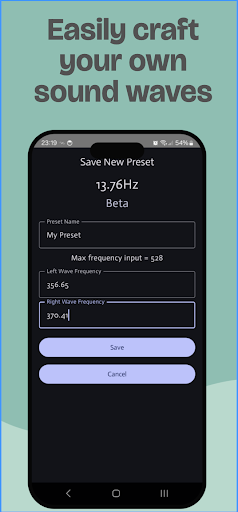
Easily generate and save your own frequencies using two independent oscillators.
Control them with horizontal sliders, fine-tune with adjustment buttons, or tap the frequency values to input precise numbers (supports two decimal places, e.g., 125.65 Hz).
All sounds are generated **in real-time** — not pre-recorded — allowing uninterrupted playback for as long as you wish.
---
**🧠 How It Works**
Binaural beats are a perceptual audio illusion that occurs when two slightly different frequencies are played separately in each ear. Your brain interprets the frequency difference as a rhythmic beat, which can influence your mental state.
For example, playing 300 Hz in one ear and 310 Hz in the other creates a perceived beat of 10 Hz — a frequency associated with relaxation or meditation.
For best results, always use headphones at a low to moderate volume. The binaural effect is only noticeable when both ears are engaged.
🔗 Learn more: [Binaural Beats – Wikipedia](https://en.wikipedia.org/wiki/Binaural_beats)
---
**🎧 Audio Tips**
• Use headphones for a proper binaural experience.
• The app’s volume slider is separate from your device’s system volume — adjust both if needed.
• High volume is not required for effective results.
---
**⚙️ Android Compatibility Note**
Newer Android versions may limit background processes to save battery and optimize performance.
Because this app uses real-time audio synthesis, this can affect audio playback.
To prevent interruptions, follow the instructions on:
🔗 [https://dontkillmyapp.com](https://dontkillmyapp.com)
---
**💾 Manage Your Presets**
• Tap **"Tap to Save"** on the main screen to save your current settings.
• Enter a name and hit Save.
• To load a preset, tap **Presets** and select one from the list.
• To delete a preset, tap the trash icon.
---
**🔊 Background Playback**
To keep the sound playing in the background, simply press your device’s **Home** button.
Note: Pressing the **Back** button will close the app.
---
**⏱️ Timer Function**
Enter a time (in minutes), and the app will automatically stop when the timer ends.
---
**🌊 Brainwave Types**
**Delta** – Deep sleep, healing, detached awareness
**Theta** – Meditation, intuition, memory
**Alpha** – Relaxation, visualization, creativity
**Beta** – Focus, alertness, cognition
**Gamma** – Inspiration, higher learning, deep concentration
---
**✨ Key Features:**
* Helps with meditation and mindfulness
* Boosts focus for studying or work
* Promotes deep relaxation and sleep
* Blocks external noise
* Reduces stress and anxiety
* Real-time sound synthesis — no loops, no interruptions
* Works in the background (via Home button or Quick Tile shortcut)
---
What's New
We've redesigned the app to make it even easier and more enjoyable to use!
New features like:
- Dark and Light Mode
- Filter by wave type
- Make a favorite list
- Real time wave length graphic
- Add alternative audio engine option
- Add confirmation dialog before delete a preset
- Linear gain slider
In-app purchases
$1.99 per item
Version Information
- Version
- 9.3.0
- Downloads
- 1M+
- Updated on
- Jun 11, 2025
- Released
- Dec 28, 2014
- Requires
- Android 6.0
Statistics
Google Play Rating History
Rating Distribution
Downloads Over Time
Brain Waves - Binaural Beats has been downloaded times. Over the past 30 days, it averaged downloads per day.
Shaded area shows 30-day prediction based on historical trends
Historical data collection started recently. More data points will be available over time.
Brain Waves - Binaural Beats users say on Google Play
 Ben R
Ben R
Best Binaural app by far. Simple and does exactly what it needs to do. Ads are well placed and unobtrusive. Two small tweaks that would make it even better: I wish the android "back" button from the "now playing" screen would go to the list of tones instead of closing the app. Second, sorting the list of tones by frequency instead of alphabetically by name would be nice.
 Stephen Gassett
Would give 4 1/2 stars. Not enough presets compared with similar aps. I like that the sound is being generated though as opposed to a loop. That can really take you out of it if it's done poorly. Round out the presets and it'd be 5 stars easily. Love the simple interface that allows for detailed control despite it's simplicity. When it comes to this woo woo stuff I tend to trust a slick streamlined simple app far more than one that tries to look pretty and shiny with unnecessary graphics.
 S B
S B
Good basic features. But, difficult to slide where you want. Timer doesnt work, fades out after 10 minutes no matter the number you enter.
 Pete Baldwin
The hertz of the frequency are no where close to what they say. I tested them with frequency testers and they are off by quite a bit every single time. That defeats the point of the desired purpose
 Brad Molyneaux
They say they don't collect data for third parties. My phone has blocked over 150 attempts from Google through this app. It is fraudulent to say they don't when they do.
ApkTrusted Ratings & Reviews
More from MynioTech Apps
See more apps


Similar Apps
Binaural Beats Brainwaves
Free
Breethe - Sleep & Meditation
Free

Elite HRV: Wellness & Fitness
Free

HapiBrain
Free
Breathwrk: Breathing Exercises
Free

Relax & Sleep Well Hypnosis
Free

One Deep Breath: Breathwork
Free

Trident Mindset
Free
Music for Focus by Brain.fm
Free

Harmony - Self Hypnosis
Free

Innertune Affirmations
Free

Sens.ai Brain Training
Free
ReSound Tinnitus Relief
Free

Slo: Sleep Sounds, Brown Noise
Free

Slowdive | Meditation & Mantra
Free

Brainwaves: Binaural Beats ™
Free
Scan this QR code to download

Forwarding you to the page at Google Play market in seconds...
Open Google Play market now