Scan Shot - PDF Scanner App v1.26.2.5051
KAERMORHEN, S.L




About this app
Scan Shot - PDF Scanner App effectively solves the problem of digitizing physical documents on the go, benefiting professionals and individuals who frequently need to scan and share documents. With its high user rating and significant download numbers, it stands out in the Productivity category for its ease of use and efficiency. Compared to alternatives, Scan Shot's ad-free experience and straightforward in-app purchase model are notable advantages. However, its lack of permissions raises questions about its ability to integrate with other apps or services.
Pros
- With over 1 million downloads and a 4.6-star rating, Scan Shot demonstrates strong social proof and user satisfaction, indicating a well-designed and functional app.
- The app's ad-free experience enhances user engagement and productivity, making it a preferable choice for those seeking uninterrupted document scanning.
- Scan Shot's developer, KAERMORHEN, S.L, provides a professional website and contact email, suggesting a commitment to customer support and feedback incorporation.
- The app's offline capability, implied by the lack of permissions, allows users to scan and save documents without internet connectivity, enhancing its utility in various environments.
- Regular updates, as indicated by the version number, suggest that the developer is actively maintaining and improving the app, which is crucial for security and feature enhancements.
Cons
- The app's in-app purchase model, with prices ranging from $6.99 to $49.99, might be perceived as expensive for some users, potentially limiting its accessibility to a broader audience.
- Despite its high rating, some users might find the lack of integration with other productivity apps or services due to its zero-permission policy as a limitation, especially in workflows that require seamless document sharing or editing.
- The absence of detailed information about what each in-app purchase offers could lead to confusion or hesitation among potential buyers, potentially affecting the app's revenue and user satisfaction.
- With no permissions requested, users might wonder about the app's ability to automatically save scans to external storage or cloud services, which could be a desirable feature for some.
Best for: The ideal user for Scan Shot is a busy professional or individual who frequently handles physical documents and needs a reliable, easy-to-use, and efficient mobile scanning solution, such as freelancers, students, or office workers, who value simplicity, quality, and the ability to work offline or online seamlessly.
Developer Description
Scan, sign, and save documents as PDFs quickly and easily on your mobile
Save time and become more productive with the best document scanner app. Download for free and scan everything from documents, receipts, IDs, and passports to handwritten notes, photos, business cards, and more.
USEFUL FEATURES:
DOCUMENT SCANNER
Scan as many documents as you want with no page limit and easily convert them to PDF. Use this mobile PDF scanner to scan documents, receipts, papers, IDs, passports, and business cards. Instant scanning speed with the best and highest quality results.
SCAN ID / PASSPORT
Scan everything you need for your travels: IDs, passports, travel itineraries, photos, and receipts, and easily convert them to PDF. Scan Shot is your on-the-go scanner app.
SIGN DOCUMENTS
Create and save more than one e-signature. Quickly and professionally sign important documentation. Create an electronic signature in just a few taps!
OCR / TEXT RECOGNITION
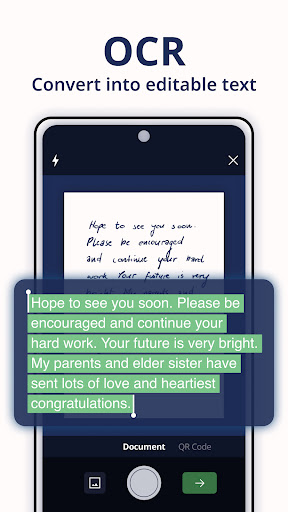
Save time extracting text from PDF documents or photos and edit according to your needs. Scan Shot’s OCR (Optical Character Recognition) AI technology can quickly and accurately convert any document to text in seconds.
SCAN BOOKS
Use the mobile camera scanner to capture high-quality images of book pages and convert them to PDF or JPG for easy saving and sharing.
ON-THE-GO SCANNER
Scan anything, anywhere – keep your scanner handy in your pocket. Need to sign a document? Quickly create a signature and sign anything securely and professionally.
AI AUTO-BORDER DETECTION
Easily finds the edges of your documents, so you get accurate scans without the need to spend time on manual adjustments.
IMPROVE SCANS
Rotate, crop, and utilize filters to enhance brightness, saturation, and overall quality of your scans, ensuring your documents appear impeccable.
MERGE DOCUMENTS
Merge different scans into only one document to manage your files more efficiently. Scan and merge files together, and add unlimited pages to previous documents.
EXPORT IN ANY FORMAT
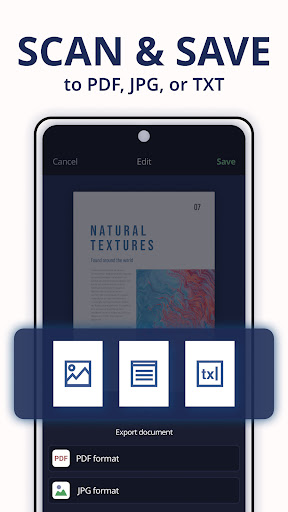
Scan documents to PDF or JPG/JPEG format. Save your documents in the format that suits you best, and convert any file to text with the OCR function. Store unlimited files in the app and return to make edits whenever you want!
SHARE YOUR SCANNED DOCUMENTS
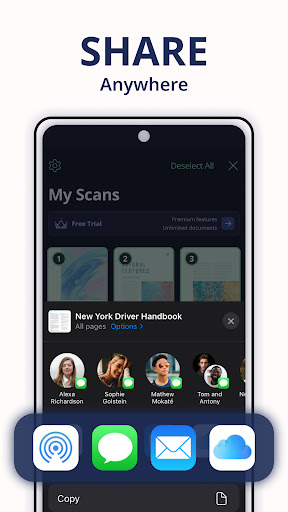
Quickly email your scans as PDF or JPEG. Save your documents to your photo library or cloud storage. Easily send your scanned files through any messaging app.
MULTI-PURPOSE DOCUMENT SCANNER & SIGNER :
FOR WORK
- Boost your productivity with Scan Shot! Whether you need a business card scanner or a regular PDF scanner, revolutionize your professional efficiency by simplifying the scanning of crucial documents.
- Easily scan and manage contracts, reports, and invoices, ensuring clear and transparent records.
- Sign documents quickly and securely with our document signer, facilitating smooth collaboration and eliminating the need for manual document handling.
FOR PERSONAL USE
- Use the document scanner app to convert and save personal documents, including medical records, photos, receipts, and homework as PDFs.
- Scan and organize your study materials, such as books, handwritten notes, and more, into PDF documents.
- Take advantage of our passport and ID scanner to create a digital record of your travel document before heading to your next destination.
- E-sign any document with ease. Create your signature, save it, and use it to sign your personal documents.
CONTACT:
Email:
info@scanshot.app
Terms of use:
https://www.scanshot.app/terms-of-use
Privacy policy:
https://www.scanshot.app/privacy-policy
Privacy
Given that Scan Shot requests no permissions, the risk of data collection for targeted advertising or unauthorized access is significantly minimized. However, users should still be cautious when purchasing in-app features, ensuring they understand what they are buying. It's also advisable to review the app's terms of service and privacy policy, available on the developer's website, to understand how user data is handled.
Tips
For optimal performance, ensure your device has sufficient storage space before scanning large documents. Utilizing good lighting conditions and placing documents on a flat surface can significantly improve scan quality. Additionally, exploring the app's settings can reveal options for adjusting scan quality, file format, and organization, which can enhance the overall user experience and productivity.
What's New
- Performance and stability improvements
Your feedback helps us make the app even better. Please let us know what improvements or new features you’d like to see. Scan, sign, and share your documents in seconds!
In-app purchases
$6.99 - $49.99 per item
Version Information
- Version
- 1.26.2.5051
- Downloads
- 1M+
- Updated on
- Aug 18, 2025
- Released
- Jun 3, 2022
- Requires
- Android 8.0
Statistics
Google Play Rating History
Rating Distribution
Downloads Over Time
Scan Shot - PDF Scanner App has been downloaded times. Over the past 30 days, it averaged downloads per day.
Shaded area shows 30-day prediction based on historical trends
Historical data collection started recently. More data points will be available over time.
Scan Shot - PDF Scanner App users say on Google Play
 Monica Rodriguez
Really helpful and considered for the right Job.
 Lina Mantshadi
the documents are clear and the app is easy to use.i recommend it to anyone who would like to apply for job opportunity.even converting to pdf is simple,it make ur documents professional.
 Justice Foster
not free, yes you can use every last one of them but the minute you want to save it to your phone, download it, take a screenshot, you get hit with the 3 day free trial then a 1 year contract directly after. no shade just saying what it is, you can edit documents but when its time to save them it doesn't let you without starting that free trial, am I right? or wrong?
 Crazy Chicken
had to sign a subscription. which i didn't need. withdrew money 2 or 3 times from my account. Definitely a waste. Disappointed
 Briana
I'm tired of all these scanner apps thinking you too good to be completely free. I ain't paying for your dumbass subscription, I just need one of these apps for my English professor and I can't do anything past converting without needing to agree to a free trial that's gonna conveniently charge me in 2 days when I've forgotten about it and run me in a circle when I try to cancel.
ApkTrusted Ratings & Reviews
More from KAERMORHEN, S.L
See more apps
Similar Apps

Mobile Scanner App - Scan PDF
Free

PDF Scanner Plus - Doc Scanner
Free

QR & Barcode Scanner
Paid

Tiny Scanner - PDF Scanner App
Free

Genius Scan - PDF Scanner
Free

PDFEsign.com PDF E-Sign
Free

CamCard-AI Scanner, Transcribe
Paid

PDF Scanner app - TapScanner
Free

CamCard AI Scanner, Transcribe
Free

vFlat Scan - PDF Scanner, OCR
Free

SignNow: Sign & Fill PDF Docs
Free

Mobi PDF・Editor・Scanner・Reader
Free

Personio
Free
MRZ Scanner - PRO
Paid

Smallpdf: Scanner & PDF Editor
Free

PDF Scanner - Document Scanner
Free
Scan this QR code to download

Forwarding you to the page at Google Play market in seconds...
Open Google Play market now