
Timestamp Camera, Auto GPS Cam v1.0.37
Hitchhike Tech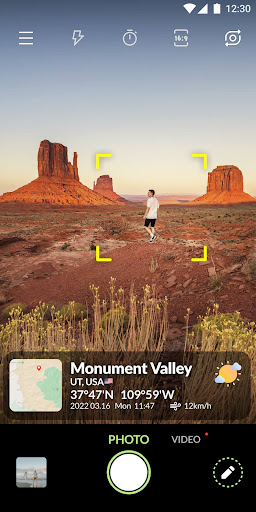



About this app
The Timestamp Camera, Auto GPS Cam app solves the problem of manually adding location, time, and date information to photos and videos, making it a valuable tool for professionals and enthusiasts alike. It benefits users who need to geotag their media, such as real estate agents, travel bloggers, or outdoor enthusiasts. Compared to alternatives in the Photography category, this app stands out with its automatic addition of location and map data, but falls short in terms of customization options. With over 10 million downloads and a 3.9-star rating, it has established itself as a reliable choice, although some users may find the ads and in-app purchases detract from the experience.
Pros
- The app's ability to automatically add location, time, date, and map data to photos and videos is a significant time-saver, making it an attractive option for users who need to geotag their media frequently.
- With over 10 million downloads and a generally positive user rating, the app has demonstrated its reliability and effectiveness, giving users confidence in its performance.
- The developer, Hitchhike Tech, has a reputation for creating useful apps, and the lack of permissions required by this app suggests a commitment to user privacy and security.
- The app's offline capability and accessibility features make it a practical choice for users who need to geotag their media in areas with limited internet connectivity.
- The app's update frequency and developer support suggest a commitment to ongoing improvement and bug fixes, which is essential for a photography app.
Cons
- The app's monetization model, which includes ads and in-app purchases, may be seen as aggressive by some users, potentially detracting from the overall experience.
- Some users may find the lack of customization options for the added metadata to be a limitation, as it may not fit their specific needs or branding requirements.
- The app's compatibility with certain devices or Android versions may be limited, which could lead to performance issues or crashes for some users.
- The developer's website and email support may not be as comprehensive as some users would like, potentially making it difficult to resolve issues or get questions answered.
Best for: The ideal user for this app is a professional or enthusiast photographer who needs to geotag their media frequently, such as a real estate agent, travel blogger, or outdoor enthusiast, and is looking for a reliable and easy-to-use solution that can automate this process, with a moderate level of technical skill and a need for efficient and accurate metadata addition.
Developer Description
Auto-add location, time, date, map and geodata to photos or videos.
From now, it’s easy to add location and time & date to your photos or videos. You can display auto location or manually select location details (country, state, city, district, county, street, building), and present time & date in your preferred setup from nearly 100 formats.
For example:
Mar 3, 2022 18:41:01
1600 Amphitheatre Parkway, Mountain View, California, United States
37.422°N 122.084°W
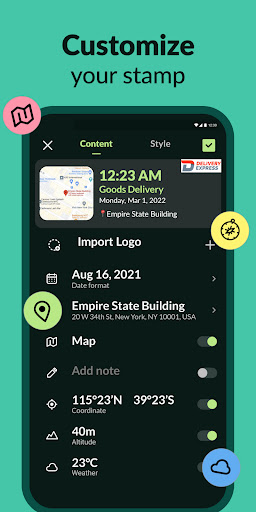
🌟 Custom elements in timestamp template (Real-time preview of adjustments):
◆ Show location: present real-time location address when shooting;
◆ Show time & date: you can add time & date when you take this picture or video;
◆ Show map: put map location on photos or videos;
◆ Show latitude & longitude: have GPS coordinates shown on camera;
◆ Show altitude: add the surface elevation of your real-time location;
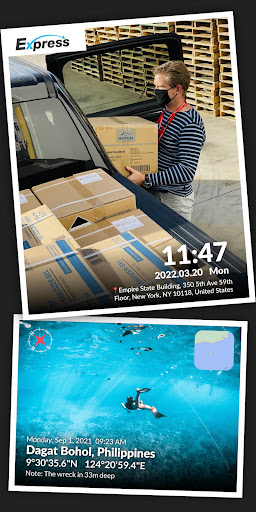
◆ Add custom text & emoji on photos or videos: e.g. you can leave a note like "The package is at your front door."
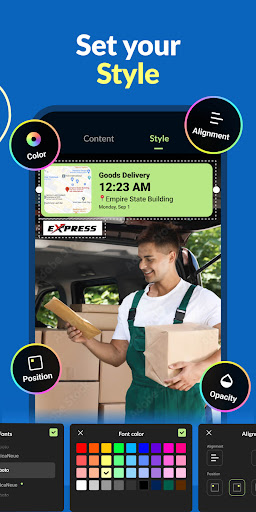
◆ DIY your own timestamp style:
- All kinds of font colors
- All kinds of colors and 0%-100% opacity of timestamp background
- Align contents: left align, center align, right align
- Change positions of timestamp: top left, top right, center, bottom left, bottom right
🌟 Advanced settings in camera:
◆ Autofocus
◆ Zoom in & Zoom out
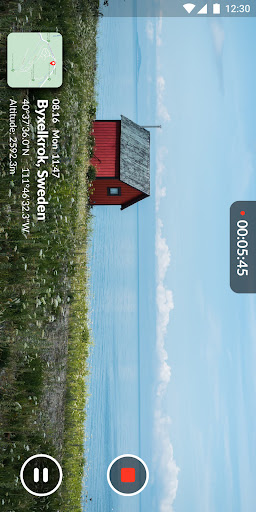
◆ Capture the picture while recording the video
◆ Auto-rotate the camera in portrait or landscape mode
◆ Shooting quality: low, standard, high
◆ Assistive grid to compose your pictures/videos
◆ Mirror camera
◆ Aspect ratio: 1:1 or 4:3 or 16:9
◆ Remote control timer(2s/5s/10s) with countdown numbers display on the screen
◆ Flash
◆ Photo library
🌟 Available in all scenes
◆ After package/food delivery, take a picture with the time and location for confirmation.
◆ In outdoor exploration, record the important GPS data.
◆ During traveling, capture funny moments with the date on them.
◆ For foodie adventure, document the location of good restaurants.
◆ For real estate people, show your clients a house tour video with its address on it.
Privacy
Given that the app requires no permissions, it appears to be a relatively safe and private option for users. However, users should still be cautious when using any app that adds metadata to their media, as this information can potentially be used to track their location or activities. To stay safe, users should only use the app for its intended purpose and avoid sharing sensitive information.
Tips
To get the most out of this app, users should first ensure that their device's location services are enabled, as this is necessary for the app to function correctly. Additionally, users can optimize the app's performance by closing other resource-intensive apps and ensuring that their device has sufficient storage space. Finally, users can explore the app's settings to customize the metadata that is added to their media, such as the format of the timestamp or the level of geolocation detail.
In-app purchases
$1.99 - $12.99 per item
Version Information
- Version
- 1.0.37
- Downloads
- 10M+
- Updated on
- Oct 10, 2025
- Released
- Mar 25, 2022
- Requires
- Android 5.0
Statistics
Google Play Rating History
Rating Distribution
Downloads Over Time
Timestamp Camera, Auto GPS Cam has been downloaded times. Over the past 30 days, it averaged downloads per day.
Shaded area shows 30-day prediction based on historical trends
Historical data collection started recently. More data points will be available over time.
Timestamp Camera, Auto GPS Cam - Google Play Rankings
Top Rankings
| Rank | Country | Category | List | Change |
|---|---|---|---|---|
| — |
Ranking History in
No ranking data available yet. Rankings are updated daily.
#20 in Top Free Photography in Thailand


#27 in Top Free Photography in South Korea


#43 in Top Free Photography in Vietnam


#63 in Top Free Photography in Indonesia


Timestamp Camera, Auto GPS Cam users say on Google Play
 Ramesh Krishnamoorthy
very good app. works well providing all required information on the photos
 Maritim Moses
easy to be used time sett is essentially preferred to most
 406 Charlie Siquijor MPS Pat Dave Palacio
too many ads
 check it
uninstalled within the first 30 sec, why on earth should I sign up, useless.
ApkTrusted Ratings & Reviews
More from Hitchhike Tech
See more apps







Similar Apps

Timemark: Photo Proof
Free

Camera - HD Camera for Android
Free

Framelapse 2 Time Lapse Camera
Free

Professional HD Camera
Free
HD Camera 2025 for Android
Free
Cameringo Lite. Filters Camera
Free

HD Camera for Android
Free
Camera - Fast Snap with Filter
Free

Timestamp Camera Pro
Paid

Camera FV-5 Lite
Free
HD Camera
Free
HD Camera
Free
HD Camera: Professional Camera
Free

Manual Camera DSLR (Lite)
Free
InFrame - Photo Editor & Frame
Free

NoteCam Lite - GPS memo camera
Free
Scan this QR code to download

Forwarding you to the page at Google Play market in seconds...
Open Google Play market now