CalenGoo - Calendar and Tasks vVARY
Gunia UG (haftungsbeschränkt)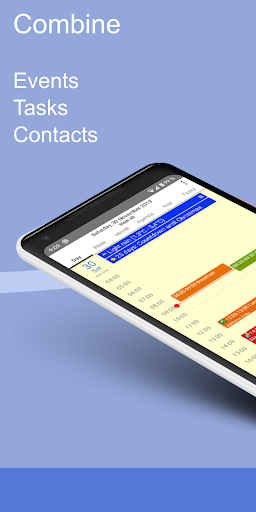


About this app
Developer Description
CalenGoo is a very flexible and feature-rich calendar app
✔️ Sync all your past and future events with Google Calendar (just add your Google account under "Settings > Accounts" instead of syncing via the Android calendar).
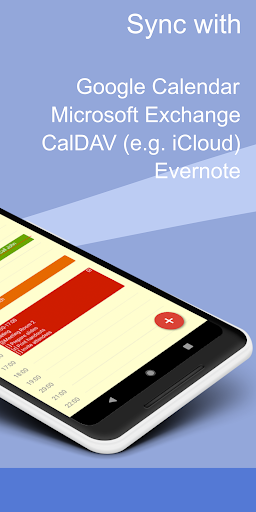
✔️ Sync calendars with Google Calendar, Exchange, CalDAV and iCloud (via the Android calendar or directly).
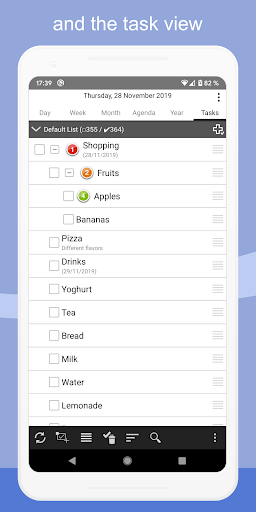
✔️ Sync tasks with Google Calendar, Exchange, CalDAV and iCloud.
✔️ Attach photos and files to your events (when syncing directly with Google Calendar).
✔️ Attach Evernote® notes to events.
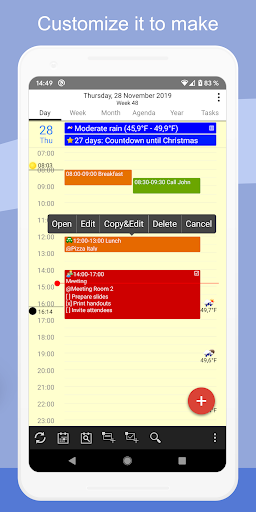
✔️ Weather forecast ("Settings > Weather").
✔️ Add icons to Google events (you have to add your Google account under "Settings > Accounts", then you can configure the icons under "Settings > Icons").
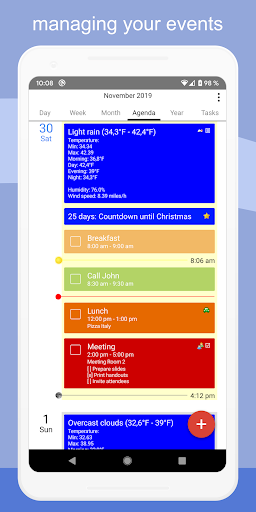
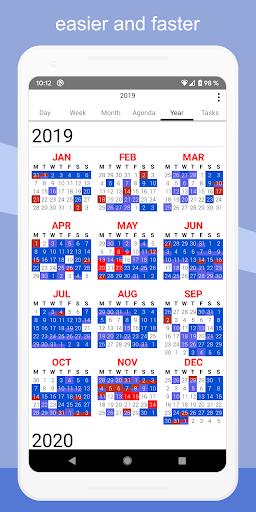
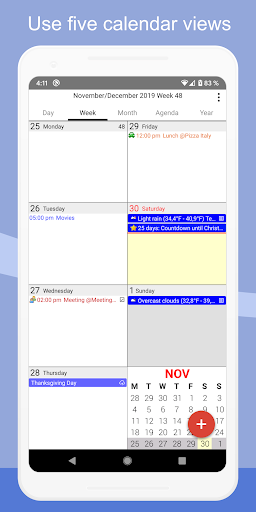
✔️ Five types of calendar views (day, week, month, agenda and year).
✔️ Four styles of agenda views ("Settings > Display and Use > Agenda view")
✔️ Use drag&drop to move and copy your events.
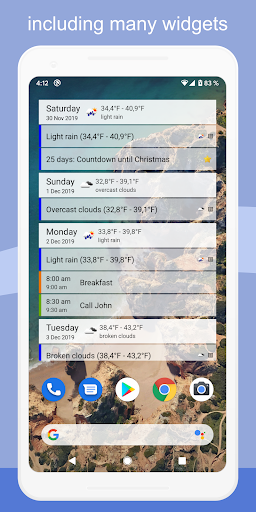
✔️ Widgets to see your events on your home screen (day, week, month, agenda, year and task widget).
✔️ Support for Exchange categories (when syncing CalenGoo directly with Exchange using EWS).
✔️ Share calendars with other people (using Google Calendar).
✔️ Search function
✔️ Various reminder functions (e.g. notifications, pop-up window, spoken reminders, different sounds, ...)
✔️ Birthdays and anniversaries of your contacts
✔️ Floating events and completable events
✔️ Templates for events
✔️ Print to PDF function
✔️ Tasks in events (add a short list of tasks into an event)
✔️ Contacts can be linked to events
✔️ Use keywords to change the color or icons of your events ("Settings > Display and Use > General > Keywords").
✔️ Dark theme and light theme ("Settings > Design")
✔️ Many configuration options can be found under "Settings > Display and Use".
✔️ Supports WearOS by Google (Agenda view, New event, New task)
For more details please see here:
http://android.calengoo.com
Additionally you can add ideas or vote for ideas on https://calengoo.de/features/calengooandroid
And you can find a free 3-day trial version here: http://android.calengoo.com/trial
If you have problems just contact the support: http://android.calengoo.com/support
What's New
- Improved support for Google's birthday entries.
- Added several new options (e.g. separate color for private events, GPS for sunrise/sunset, "free" event color only for selected calendars, ...).
- Added a new function to the multiselect bar to apply a template to all selected events
- Workaround for syncing via Graph API.
- Bug fixes
Version Information
- Version
- -
- Downloads
- 100K+
- Updated on
- Jan 6, 2026
- Released
- Jan 7, 2011
- Requires
- Android Varies with device
Statistics
Google Play Rating History
Rating Distribution
Downloads Over Time
CalenGoo - Calendar and Tasks has been downloaded times. Over the past 30 days, it averaged downloads per day.
Shaded area shows 30-day prediction based on historical trends
Historical data collection started recently. More data points will be available over time.
CalenGoo - Calendar and Tasks - Google Play Rankings
Top Rankings
| Rank | Country | Category | List | Change |
|---|---|---|---|---|
| — |
Ranking History in
No ranking data available yet. Rankings are updated daily.
#45 in Top Paid Productivity in United States


#11 in Top Paid Productivity in Germany
#13 in Top Paid Productivity in Italy

#15 in Top Paid Productivity in Japan

CalenGoo - Calendar and Tasks users say on Google Play
 Pixel Guy J
I am not quite sure why this calendar app has such few recent reviews! The customization options can be VERY daunting but they give you infinite choices. The integration of both Google and Microsoft Exchange calendars as well as customizable notification sounds, even per calendar, is almost unheard of from other apps. It gets continual support and I would gladly pay a one time fee to help insure that. This is one of the best calendar apps I have ever found in the Play Store!
 Kathy
Kathy
I've been using this app for years. I love the versatility of it and mostly the UI which is helpful in different views such as agenda vs monthly/weekly, etc. Recently, I'm getting a popup stating "Could not initialize Quick sync" every time I open the app. I have sent an email to support and waiting for a response. Has anyone else had this issue?
 Zenithas (Zen)
Loaded calendar fine, worked well until I chose "dark mode". Black writing on black background. Honestly disappointed.
 R O L
R O L
There are a lot of settings to make it really how I like. I really love this calendar app, especially the transparent events and the vertical all day event in week view. From the font size to background colors for different days, I spent almost an hour to set everything. Then I found an issue. The location map isn't accurate. It's showing a different state. Okay, I can ignore it, whatever. But!!! I'm using dark mode all the time, and when I open the app, it shows bright white screen.
 Nigel Johnstone
My app has been updated to the latest version, but it frequently stops working. Why is this? I was wondering if I should uninstall and then reinstall but could I lose all historical data if I do?
ApkTrusted Ratings & Reviews
More from Gunia UG (haftungsbeschränkt)
See more apps




Similar Apps

Nothing Pomodoro Timer
Paid
DigiCal Calendar Agenda
Free
Calendar Widget: Month/Agenda
Free

Progressive Pomo: Focus Timer
Paid
Simple Calendar - easy planner
Free
SupaTask - Daily Planner, Todo
Free

Gratitude Journal
Paid

CalendarTask
Free

Setmore Appointment Scheduling
Free

Chore Tracker - Flatastic
Free

TimeTune - Schedule Planner
Free

UpNote - notes, diary, journal
Free

Timeshifter Jet Lag
Free

Workflowy |Note, List, Outline
Free
Twos: Remember & Share Things
Free

TimeTree - Shared Calendar
Free
Scan this QR code to download

Forwarding you to the page at Google Play market in seconds...
Open Google Play market now