
Google Arts & Culture v11.9.34-841657606.1-release
Google LLC






About this app
The Google Arts & Culture app solves the problem of limited access to cultural and historical content by providing a vast collection of stories and exhibits from around the world, making it an excellent resource for students, educators, and anyone interested in the arts. This app benefits most those who value educational and cultural enrichment, and it stands out in the Education category due to its high-quality content and user-friendly interface. Compared to alternatives, Google Arts & Culture offers a unique blend of interactive exhibits, high-resolution images, and in-depth stories. However, its lack of interactive features and limited offline capability might fall short for some users.
Pros
- With over 10 million downloads and a 4.2-star rating, Google Arts & Culture has demonstrated its value to a large and satisfied user base, indicating a high level of social proof and quality assurance.
- The app's developer, Google LLC, is a well-established and reputable company, which contributes to the app's trustworthiness and stability.
- The absence of ads and in-app purchases ensures a distraction-free and equitable user experience, allowing users to focus on exploring the app's content without interruptions or financial burdens.
- The app's offline capability, although limited, still enables users to access some content without an internet connection, making it a useful resource in areas with poor connectivity.
- Google Arts & Culture is regularly updated, which suggests that the developer is committed to maintaining and improving the app, ensuring that users have access to the latest content and features.
Cons
- One concern is the app's limited offline capability, which may hinder users who want to access content in areas with poor or no internet connectivity, making it less suitable for field trips or rural areas.
- Some users may find the app's content to be too focused on visual arts, with limited coverage of other cultural aspects, such as music, literature, or performance arts.
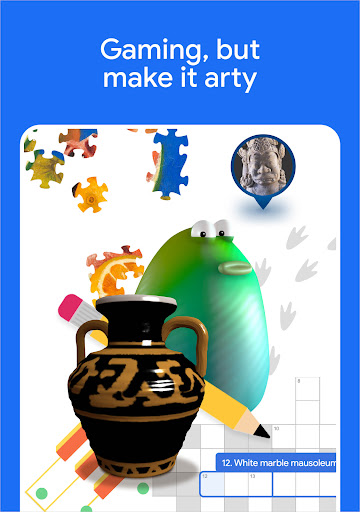
- The app's lack of interactive features, such as quizzes, games, or discussions, might make it less engaging for some users, particularly younger audiences who are accustomed to more interactive educational experiences.
- The app's large size may be a concern for users with limited storage space on their devices, which could lead to issues with installation or performance.
Best for: The ideal user for Google Arts & Culture is likely an individual with a strong interest in the arts, history, and culture, such as students, educators, or professionals in the museum and cultural sectors, who value high-quality educational content and are looking for a reliable and engaging resource to explore and learn about the world's cultural heritage.
Developer Description
For the culturally curious – stories from around the world
Google Arts & Culture puts the treasures, stories and knowledge of over 2,000 cultural institutions from 80 countries at your fingertips. From the suffragettes who fought for women’s rights, to performing arts at the Paris Opera, to NASA’s archive of stunning images, discover stories about our cultural heritage. It’s your doorway to explore the art, history, people and wonders of our world.
Highlights:
• Art Transfer – Take a photo and transform it with classic artworks
• Art Selfie – Discover portraits that look like you
• Color Palette – Find art by using the colors of your photo
• Art Projector – See how artworks look in real size
• Pocket Gallery – Wander through immersive galleries and get up close to art
• Art Camera – Explore high-definition artworks
• 360° videos – Experience culture in 360 degrees
• Virtual reality tours – Step inside world-class museums
• Street View – Tour famous sites and landmarks
• Explore by time and color – Travel through time and see the rainbow through art
• Art Recogniser – Point your device camera at artworks to learn more about them, even when offline (at select museums only)
More features:
• Exhibits – Take guided tours curated by experts
• Favorites – Save and group your favorite artworks into galleries to share with friends or students
• Nearby – Find museums and exhibitions near you
• Notifications – Subscribe to receive weekly highlights or favorite content updates
• Translate – Use the translate button to read about exhibits from around the world in your language
Permissions notice:
• Location: used to recommend cultural sites and events based on your current location
• Camera: used to recognise artworks and provide related information about them
• Contacts (Get Accounts): used to allow sign in with a Google Account, in order to store users' favourites and preferences
• Storage: used to allow artworks to be recognised and related information to be accessed while offline
Privacy
Since Google Arts & Culture does not request any permissions, users do not need to worry about their data being collected or shared, making it a very private and secure app. However, as with any app, users should be cautious when clicking on external links or downloading content, and ensure they have a secure internet connection. Additionally, users should review Google's privacy policy to understand how their data is handled.
Tips
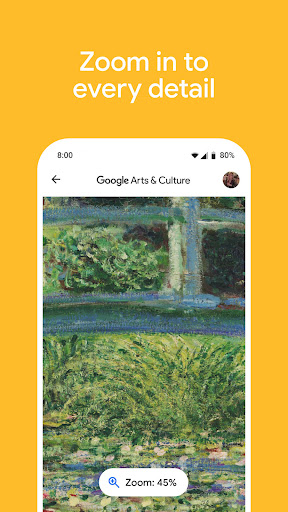
To get the most out of Google Arts & Culture, users should start by exploring the app's curated exhibits and stories, which provide a wealth of information on various cultural topics. Users can also search for specific artists, artifacts, or historical events to discover related content, and utilize the app's zoom feature to examine high-resolution images in detail. Furthermore, users can save their favorite exhibits and stories for offline access, allowing them to revisit and reflect on the content at their convenience.
What's New
• Design improvements to the 'Inspire' feed make it easier to like, share and find related content.
• Find our Camera features and other cultural playables in the 'Play' tab.
• Use the new 'Explore' tab to browse our partners' wide corpus of cultural content through topics such as Fashion, Food and Visual arts.
Version Information
- Version
- 11.9.34-841657606.1-release
- Downloads
- 10M+
- Updated on
- Dec 10, 2025
- Released
- Nov 30, 2015
- Requires
- Android 8.0
Statistics
Google Play Rating History
Rating Distribution
Downloads Over Time
Google Arts & Culture has been downloaded times. Over the past 30 days, it averaged downloads per day.
Shaded area shows 30-day prediction based on historical trends
Historical data collection started recently. More data points will be available over time.
Google Arts & Culture - Google Play Rankings
Top Rankings
| Rank | Country | Category | List | Change |
|---|---|---|---|---|
| — |
Ranking History in
No ranking data available yet. Rankings are updated daily.
#70 in Top Free Education in Spain
#73 in Top Free Education in Argentina


#96 in Top Free Education in Mexico


Google Arts & Culture users say on Google Play
 Arash Zamani
After recent updates the app always shows a message that the contents can't be loaded and it is offline. Before these damn updates, I used to spend a lot of time by checking this great app and dive through the world of art. Please fix it!
 Md. Asaduzzaman Shafin
Creative app, I must say. But the paintings shown should be switched to horizontal mode angel when I rotate my phone to have a better view.
 Brian Z. Porter
Needs work. I love that you can browse museum collections from the museum itself in street view. Unfortunately, if you try to move, it takes you to a random location outside the museum. Another gripe is when you're viewing an item, you can't swipe to the next item. You have to back out to the full list, which is strange and annoying. With some updates, it will be awesome.
 Ralfs Grauss
I love the idea of this service but I cannot ses myself using it if the visual content is so weirdly presented. Why are the great works of art pressed into an annoying frames that dont let me se the full artwork? atleast add a button that allows to see the full artwork without those annoying powerpoint presentation borders. For me it should be Function > design.
 Min Mary
the app lacks information, for an app made about arts and artists and their work, it seems to have as much topics as the mind of a hipster, the app has no information about the most famous pf artists who are not white and I'll say it, its borderline offensive, the search engine in it is horrible and misleading and the database is just quiet literally empty; you are better off searching on good search and wasting your time and effort here.
ApkTrusted Ratings & Reviews
More from Google LLC
See more apps
Chrome Beta
Free

Magnifier
Free

Chrome Dev
Free

Chrome Canary (Unstable)
Free

Lookout - Assisted vision
Free

Fitbit
Free

Test DPC
Free

Google Chrome
Free

Accessibility Scanner
Free

Compose Material Catalog
Free

Action Blocks
Free

Sound Amplifier
Free

Switch Access
Free

Reading mode
Free

Pixel Camera
Free

Android AICore
Free
Similar Apps

DailyArt - Daily Dose of Art
Free

Miro: your visual workspace
Free

StarNote: Handwriting & PDF
Free

Nano Banana AI Image - GoArt
Free

Obsidian
Free

Manus AI
Free

Wikipedia
Free

Xmind: Mind Map & Brainstorm
Free

Academia.edu
Free

Deepstash: Smarter Every Day!
Free

PENUP – Drawing-sharing SNS
Free

Feedly - Smarter News Reader
Free

Smartify: Arts and Culture
Free

Claude by Anthropic
Free

Notewise - AI Notes, PDF, Docs
Free

mymind
Free
Scan this QR code to download

Forwarding you to the page at Google Play market in seconds...
Open Google Play market now