
Multitrack Player v7.6
GyokovSolutions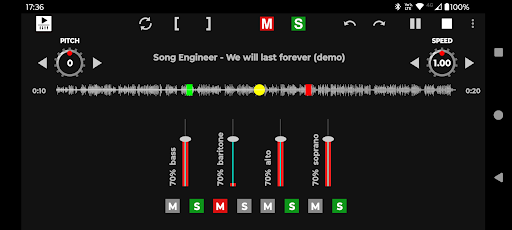


About this app
Developer Description
Play multitrack songs on your device
App features:
- play multitrack song (several audio files for different instruments)
- adjust track loudness
- solo/mute track
- loop feature
- change speed
- change pitch
How to use:
1. Download multitrack songs on your device. Search internet for "free multitracks". Multitrack song contains several audio files for instrument tracks.
2. Open app. Select Menu - Open multitrack and point to folder that contains multitrack song.
3. The app loads multitrack song.
4. Press buttons PLAY and STOP to play song.
5. Using track fader you can control instrument track loudness.
6. Use track button [S] to solo track and button [M] to mute track.
7. Use header button [S] to activate all tracks and button [M] to mute all tracks.
How to activate loop feature:
1. Press loop button. It will change color to white and will activate (start loop ) and (end loop) buttons ( [ ) and ( ] ).
2. Play song or move progress slider to start loop position.
3. Press ( [ ) button to set start loop position.
4. Move progress slider to loop end position.
5. Press ( ] ) button to set end loop position.
6. Press play button to play the song.
How to change speed and pitch:
1. Use speed spinner to set song speed
2. Use pitch spinner to change pitch. The step is one semitone.
For better performance use wav files. If mp3 files are used then it is better to use CBR (constant bitrate) mp3.
App manual - https://gyokovsolutions.com/multitrack-player-manual
Get Pro version for extra features:
- no ads
- balance control
- pitch and speed knob controls with continuous values
- save/open multitrack
- load/play next/previous multitrack in folder.
- autoplay next multitrack
- audio preview (loop/scrub)
- zoom
What's New
v7.6
- pitch and speed knob controls
v7.3
- Settings - track length adjustment
v7.0
- improved track synchronization
v5.1
- added link to pro version - Menu - Get full version.
Full version has following advantages:
- no ads
- track balance control
- save/open multitrack project
Version Information
- Version
- 7.6
- Downloads
- 10K+
- Updated on
- Nov 12, 2025
- Released
- Apr 1, 2023
- Requires
- Android 6.0
Statistics
Google Play Rating History
Rating Distribution
Downloads Over Time
Multitrack Player has been downloaded times. Over the past 30 days, it averaged downloads per day.
Shaded area shows 30-day prediction based on historical trends
Historical data collection started recently. More data points will be available over time.
Multitrack Player users say on Google Play
 Carlisle Steele
Great app, does what it says. Great for a solo artist.
 Ben Lawry
This app is "good" in that it does what it advertises; it plays multiple audio tracks at the same time and has a decent mixer feature. What I'm really looking for is something that can do this with a "set-list" feature. This app can mix multiple tracks at a time, but it would get five stars if there was a "set-list" feature that allowed me to quickly queue and play several different songs in order. It would also be useful if it could read multitracks from a single zip file on a per-song basis.
 Wagner Mello
As said before, the tracks are not played in sync. I only used 9 tracks. Unfortunately, this problem renders the app unusable. Please fix it. Tks!
ApkTrusted Ratings & Reviews
More from GyokovSolutions
See more apps
Morse Code Engineer
Free

G-NetTrack Lite
Free

G-NetTrack Pro
Paid

Melody Engineer
Paid

GIF Engineer
Free

GIF Engineer Pro
Paid

G-NetLook Pro
Free

G-NetReport Pro
Paid
Bass Engineer
Free

Drums Engineer
Free

G-NetView Pro
Paid

G-NetWiFi
Free

G-NetWiFi Pro
Free

BLE MIDI Engineer Lite
Free

BLE MIDI Engineer
Free

Morse Code Engineer Lite
Free
Scan this QR code to download

Forwarding you to the page at Google Play market in seconds...
Open Google Play market now