AutoCast v1.5.1.bf
joaomgcd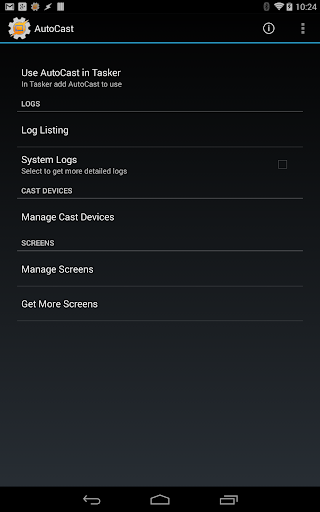


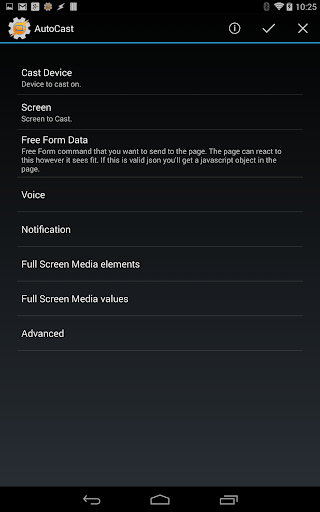


About this app
Developer Description
Cast any video,image or audio along with any custom web page to your Chromecast!
******IMPORTANT NOTE*****
Please don't rate the app 1 star because it's not a standalone app. Contact me for a refund if you've bought it thinking otherwise.
AutoCast is a Tasker plugin. You need to have Tasker (https://play.google.com/store/apps/details?id=net.dinglisch.android.taskerm) installed to use most of its features, so please be aware of that before using it.
You can get a free trial of Tasker here: http://tasker.dinglisch.net/download.html
Also, to create everything you see in the demo video you need other Tasker plugins. Please read the video description. Please don't rate the app 1 star because of this. This is not supposed to be a standalone app at all. Thank you for understanding.
********************************
Learn all about AutoCast here: http://joaoapps.com/autocast/
This is a demo version of the app with these restrictions:you'll always cast pre-determined images, audio and video. Text you cast with the lite version will be prepended with "AutoCast Demo".
Get the full app by buying the unlocker (https://play.google.com/store/apps/details?id=com.joaomgcd.autocast.unlock) or an in-app purchase.
AutoCast is a Tasker plugin that gives you full control over your Chromecast. It not only enables you to cast images, audio and video from Tasker, but you can also cast and control many other local or web contents, like YouTube videos and playlists, notifications, voice, and web pages! You can also take over other apps that are being cast and control their playback!
CUSTOM SCREENS (Learn how to create one here: http://joaoapps.com/autocast/custom-screens/)
In AutoCast anything you cast is a custom screen.
Built-in screens:
- "Full Screen Media". Here you can cast video, photos and audio in full screen, so they look their best. For example you can cast a slideshow and at the same time listen to the system Audio from your phone. Or you can be watching a movie in AutoCast while you receive all your Android notifications on your TV. You can even watch a slideshow of photos and videos, all in a row.
- "Alternate Home Screen". Here you have a screen that is really similar to the built-in Chromecast homescreen, but it shows whatever photos you want and you can add any info you like on to it, like the current weather, or if the heater in your house is currently on. Like in all screens you also get all the goodies of an AutoCast screen, so you can get notifications on it for example, or you can play some music in the background.
You can also cast any existing web page you like, assuming that the page allows for this.
My goal with AutoCast is that people from around the world start creating their own awesome custom screens which you can then easily import into AutoCast and use.
YOUTUBE INTEGRATION
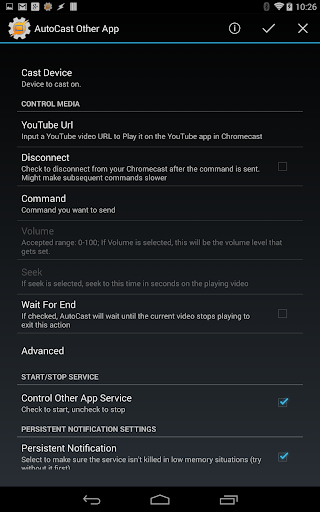
In AutoCast you can cast a YouTube video or playlist on to any screen. With the help of AutoShare you can cast a YouTube video from your Android Web Browser for example. Or with the help of AutoRemote you can cast a playlist from the YouTube Website.
MULTIPLE SOURCES
With AutoCast you can cast media from an ever growing list of websites and sources like Dropbox, Vimeo, Flickr, Gametrailers and more! For example, you can cast all the photos on the Flickr explore page as a slideshow. Or you can cast a Gametrailers video from your favourite RSS reader on Android.
MULTIPLE USERS
Because AutoCast can also send messages from your Chromecast to your Android device, you can also create collaborative casting apps, like a photo editor where multiple people are editing the same image.
CONTROL AND INFO
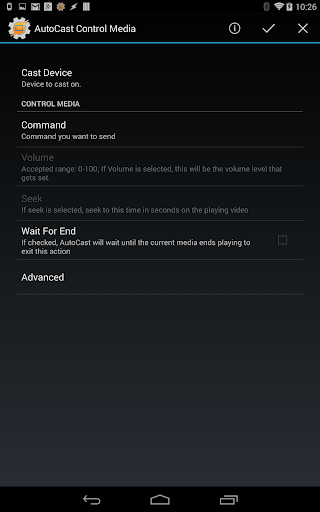
You can control the playback of media in AutoCast as well as some other apps like YouTube, Google Play Music or Plex. You can also get info on what is currently playing, so you could build a remote Chromecast controller on your PC for example.The possibilities are endless!
What's New
In-app purchases
$1.49 per item
Version Information
- Version
- 1.5.1.bf
- Downloads
- 100K+
- Updated on
- May 28, 2018
- Released
- Apr 4, 2014
- Requires
- Android 4.0.3
Statistics
Google Play Rating History
Rating Distribution
Downloads Over Time
AutoCast has been downloaded times. Over the past 30 days, it averaged downloads per day.
Shaded area shows 30-day prediction based on historical trends
Historical data collection started recently. More data points will be available over time.
AutoCast users say on Google Play
 Nathan Orris
Honestly if anybody sees this I'm hoping they understand that this app has a lower rating than it deserves. This app is 5 stars all the way people just don't read the instructions and know what it's supposed to do instead they just assume it does something it doesn't. There are in ap purchases it's not a standalone app you need other plugins but You would know that if you ever used Tasker or were interested in it because you may have read the description like you should 5 stars all the way!
 A Google user
What a nice tasker plug-in. I've set it up so that when I receive a phone call or a new sms, push a speak to my google home for each contact I have pre-entered. Really nice. One "bug" (might be a configuration issue). After I receive a SMS it plays "You have a new sms from XYZ", no problem. If I then start a spotify song, autocast seems to re-connect and take over the device every 30 or 60 seconds (I didn't time it), and stop the spotify cast. If I restart my spotify, same thing, autocast re-connect. The only solution I can find is to disable tasker so it stop taking over the Google home. Is there a way to prevent AutoCast from maintaining connection with the device? One question Is there a way to pass the caller name to the autocast plugin? I've try placing %CNAME or %CNUM in the speach text but it does not get replaced by it's value. I ended up creating a different task for each contact. 4 stars because most help screen don't work in the app "Ooops, page not found" and some advanced exemple would be nice (like.. How to pass variable to AutoCast? :))
A Google user
I struggle a bit with this. On one Chromecast I had no luck with the Full Screen Media screen and the Home Screen Replacement only displayed local images if there was more than one. It doesn't work at all on another. No persistent notifications ever appear when casting and the App command to stop casting doesn't work. A redundant speak command has to be used to stop it instead. Tasker seems to wait for Speak actions to finish before continuing and it would be nice if it were possible for it to continue processing while the speaker is doing its bit and be able to queue up further casts. Tasker can be quite sluggish at the best of times and those extra seconds would be very useful. As with many of the Auto apps, there is often a lack of basic documentation at the point of configuration, and what you can find elsewhere is sometimes out of date and a bit hit and miss. It's the simple stuff like what options actually do and why you might want to use them, the correct format for filling in text fields, and so on. It can be hard to get started.
A Google user
You say that this can cast YouTube playlists but I don't see how. There is nothing in the settings anywhere for YouTube. The website has no instructions for AutoCast and there is nothing in the forums. The most helpful thing has been the video tutorial (v=iRlCsEWKxnc) but what it shows doesn't match what I am seeing in the app. In the video, they click on "AutoCast Other App". But in Tasker, when I click on plugins, I see just "AutoCast" which I click on and there there is "App" which I assume is supposed to be the same thing. But on the configuration screen the video shows a "YouTube Url" field, but I don't have that option at all. I only have "Cast Device" (which makes sense), "AutoCast Service" and "Keep Current Screen" (which are check boxes); and a bunch of persistent notification settings. I have no idea what this Action is supposed to be used for. I went through the other possible actions and nothing looked like it would work. The only hint I have is that it seems there could be some javascript I could enter into a Free Form Data field that might work but I have no idea what to put in there... I was able to use this to cast a 1 local audio file, which was nice.
A Google user
I was hoping to auto-cast audio to a speaker, but the app tells me they're all invalid except for the Chromecast. While I understand this app is designed for video, the casting icon and the mention of casting audio implies more. I can't imagine why I'd want to cast audio to my TV instead of my always-on speakers, or my Onkyo receiver. Developer: add this oversight, make it work well, and I'll change this review.
ApkTrusted Ratings & Reviews
More from joaomgcd
See more apps
AutoShare Unlock Key
Paid

AutoRemoteLite
Free
AutoRemote
Paid
AutoLaunch Unlock Key
Paid
AutoShare
Free
AutoInput
Free
AutoNotification
Free
AutoApp for Arduino
Free

AutoContacts
Free

AutoAlarm
Free
AutoApps
Free
AutoLaunch
Free
AutoLocation
Free
AutoNotification Unlock Key
Free
AutoLocation Unlock Key
Free

AutoBluetooth
Free
Similar Apps

BISSELL Connect
Free
NOAA Weather Unofficial (Pro)
Paid

Yatse: Kodi remote and cast
Free

Ruuvi Station
Free

Yubii Home
Free

Cardata Mobile
Free
MoeGo: Pet Business Suite
Free

HQ Video Player & Casting
Paid
Rivercast - River Levels App
Free

PPJG
Free
Autio - Travel Companion
Free
Podcast Republic - Podcast app
Free

Dierbergs
Free

TAP Kiln Control Mobile
Free

FLYFUEL
Free

ABAX Admin
Free
Scan this QR code to download

Forwarding you to the page at Google Play market in seconds...
Open Google Play market now